> ## Documentation Index
> Fetch the complete documentation index at: https://gcore.com/docs/llms.txt
> Use this file to discover all available pages before exploring further.
# Integrate CDN resource with vBulletin
Before you take any steps please back up your files and database. The plugin works only with the default CMS pattern. If you manually changed CMS patterns, the plugin might not help you.
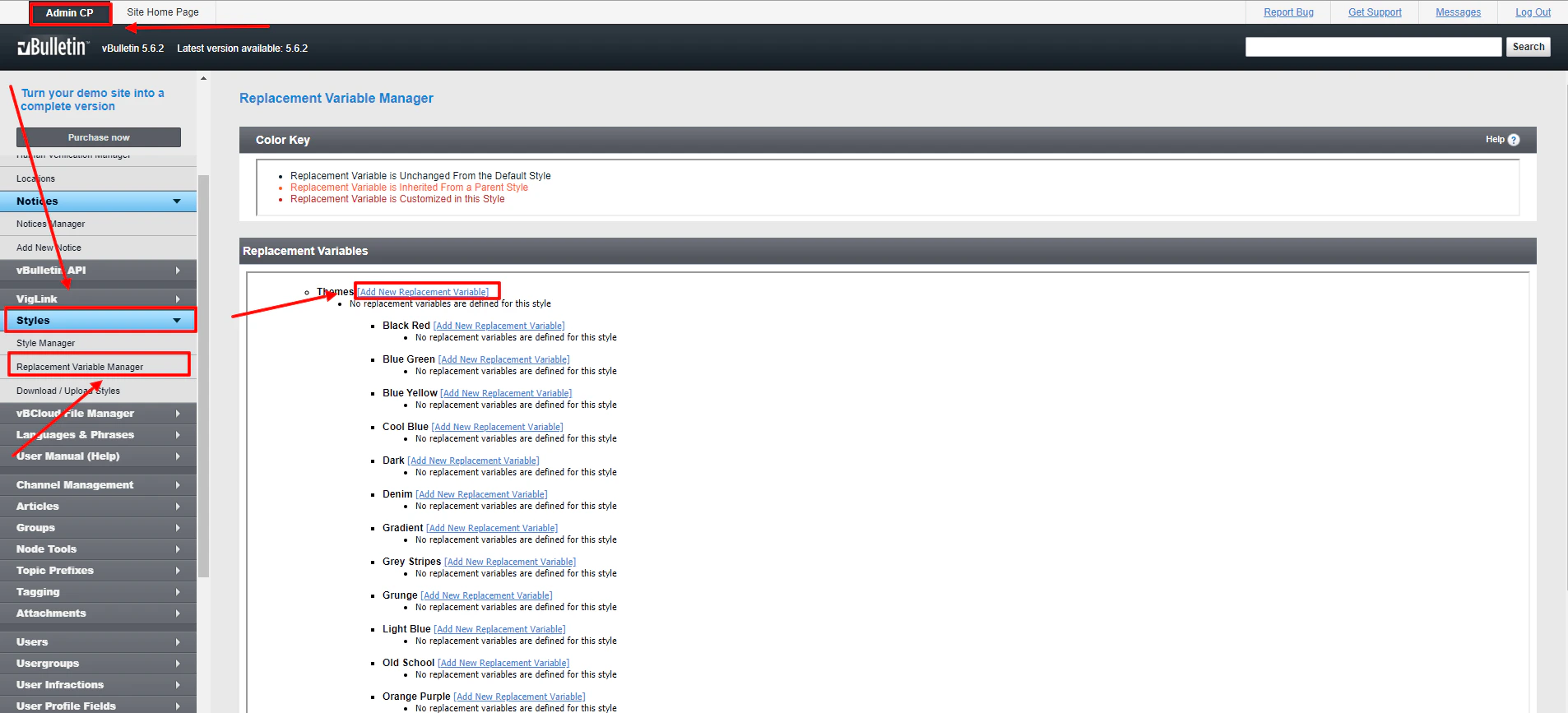
1\. Login to your vBulletin control panel.
2\. Go to Styles, then to Replacement Variable Manager.
3\. Choose Add New Replacement Variable.
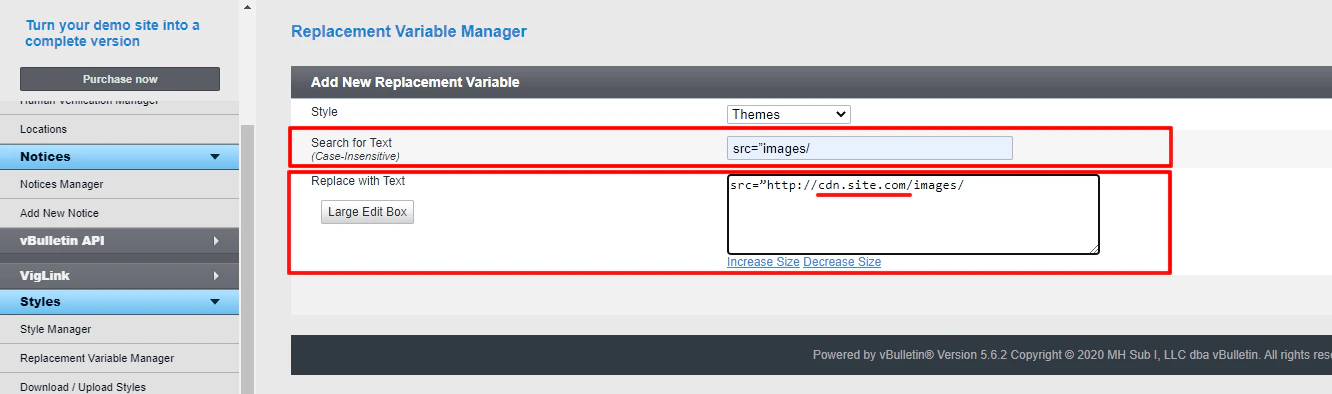
 Using your CNAME from the [Gcore Customer Portal](https://portal.gcore.com/cdn/resources/list) (`cdn.site.com`). Create a new replacement variable for each item in the following table. Ensure that your [CNAME record has been configured](/cdn/cdn-resource-options/general/create-and-set-a-custom-domain-for-the-content-delivery-via-cdn) in a proper way before using it for integration.
 | Find in the text | Replace with |
| --------------------------------------------------------------------------- | -------------------------------------------------------------------------------------------------------------------------------------------------------------- |
| `src="customavatars/` | `src="` |
| `src="customprofilepics/` | `src="` |
| `src="images/` | `src="` |
| `url("clientscript` | `url("cdn.site.com` |
| `src="clientscript/` | `src="` |
| `src="{vb:raw vboptions.bburl}/clientscript/` | `src="` |
| `href="clientscript/` | `href="` |
| `url(./images/` | `url(` |
| `url(images/` | `url(` |
| `var IMGDIR_MISC="images/misc";`
| Find in the text | Replace with |
| --------------------------------------------------------------------------- | -------------------------------------------------------------------------------------------------------------------------------------------------------------- |
| `src="customavatars/` | `src="` |
| `src="customprofilepics/` | `src="` |
| `src="images/` | `src="` |
| `url("clientscript` | `url("cdn.site.com` |
| `src="clientscript/` | `src="` |
| `src="{vb:raw vboptions.bburl}/clientscript/` | `src="` |
| `href="clientscript/` | `href="` |
| `url(./images/` | `url(` |
| `url(images/` | `url(` |
| `var IMGDIR_MISC="images/misc";`
`var IMGDIR_BUTTON="images/buttons";` | `var IMGDIR_MISC="[http://cdn.site.com/images/misc";var](http://cdn.site.com/images/misc%22;var)`
`IMGDIR_BUTTON="";` |
4\. If you have more directories for your images repeat the process for each of them.
5\. Integration has been completed! We highly recommend you to check the HTML code of your web page to ensure that URLs have been rewritten properly from your original ones to CNAME from the Gcore Customer Portal.
To do that press **F12** or open Developers Tools in your browser, choose the Network tab and refresh the page. All static files should have your CNAME in URLs.