> ## Documentation Index
> Fetch the complete documentation index at: https://gcore.com/docs/llms.txt
> Use this file to discover all available pages before exploring further.

# Add TLS certificates to a load balancer

export const MethodSection = ({children}) => children ?? null;

export const MethodSwitch = ({children}) => {
  const tabs = React.Children.toArray(children).map(c => {
    if (!c || !c.props) return null;
    if (c.props.id) return c;
    const inner = c.props.children;
    if (inner && inner.props && inner.props.id) return inner;
    return null;
  }).filter(Boolean);
  const firstId = tabs.length > 0 ? tabs[0].props.id : "";
  const [active, setActive] = React.useState(firstId);
  React.useEffect(() => {
    try {
      const saved = localStorage.getItem("gcore_docs_method");
      if (saved && tabs.find(t => t.props.id === saved)) {
        setActive(saved);
      }
    } catch (_) {}
  }, []);
  React.useEffect(() => {
    try {
      document.querySelectorAll("h2[id], h3[id]").forEach(heading => {
        const visible = heading.offsetParent !== null;
        document.querySelectorAll(`a[href="#${heading.id}"]`).forEach(link => {
          if (link.closest("h1,h2,h3,h4,h5,h6")) return;
          const li = link.closest("li");
          if (li) li.style.display = visible ? "" : "none";
        });
      });
    } catch (_) {}
    window.dispatchEvent(new Event("scroll"));
  }, [active]);
  const handleClick = id => {
    setActive(id);
    try {
      localStorage.setItem("gcore_docs_method", id);
    } catch (_) {}
  };
  return <div>
      <div className="not-prose flex gap-0 border-b border-zinc-200 dark:border-zinc-800 mb-8 mt-2" role="tablist">
        {tabs.map(tab => {
    const isActive = active === tab.props.id;
    return <button key={tab.props.id} role="tab" aria-selected={isActive} onClick={() => handleClick(tab.props.id)} className={["px-4 py-2 text-sm font-medium border-b-2 -mb-px transition-colors cursor-pointer", isActive ? "border-primary text-primary" : "border-transparent text-zinc-500 hover:text-zinc-800 dark:hover:text-zinc-200"].join(" ")}>
              {tab.props.label}
            </button>;
  })}
      </div>

      {tabs.map(tab => <div key={tab.props.id} style={{
    display: active === tab.props.id ? "" : "none"
  }}>
          {tab.props.children}
        </div>)}
    </div>;
};

<MethodSwitch>
  <MethodSection id="portal" label="Customer Portal">
    You can configure multiple TLS (Transport Layer Security) certificates for a single Load Balancer, which allows you to host several secure websites on a single IP address.

    Instead of configuring separate Load Balancers for each website, you can configure just one Load Balancer and add multiple TLS certificates to it. The Load Balancer will serve the correct certificate based on the requested domain name, and everything will be managed in one place.

    ## How it works

    Our listeners support Server Name Indication (SNI) extension to handle multiple TLS certificates. Based on the SNI information provided by the client, the listener selects the appropriate TLS certificate for encrypting the connection. Once the TLS connection is terminated at the listener, the Load Balancer inspects the decrypted traffic and routes it to the proper server.

    Each listener can also be configured with its own TLS certificate, corresponding to a specific hostname or domain.

    ## Add multiple certificates

    You can add multiple certificates to listeners that use the Terminated HTTPS and Prometheus protocols.

    ### 1. Add certificates to the Secrets Manager

    To get started, you need to add the required certificates to Gcore Secrets Manager. If you don't have any certificates created, follow the instructions from our [guide on configuring secrets for HTTPS Load Balancers](/cloud/secrets-manager/upload-a-pkcs12-file).

    ### 2. Add certificates to a listener

    After you configure the certificates, you need to add them to the relevant listener. This can be done during Load Balancer creation or in the settings of an existing Load Balancer.

    <Info>
      **Info**

      You can't delete a secret that's being used by a Load Balancer's listener. This restriction is necessary to ensure that a Load Balancer can failover successfully when needed. In such cases, you first need to delete a listener that uses the secret and then remove the secret, recreating a listener if needed.
    </Info>

    <Tabs>
      <Tab title="During Load Balancer creation">
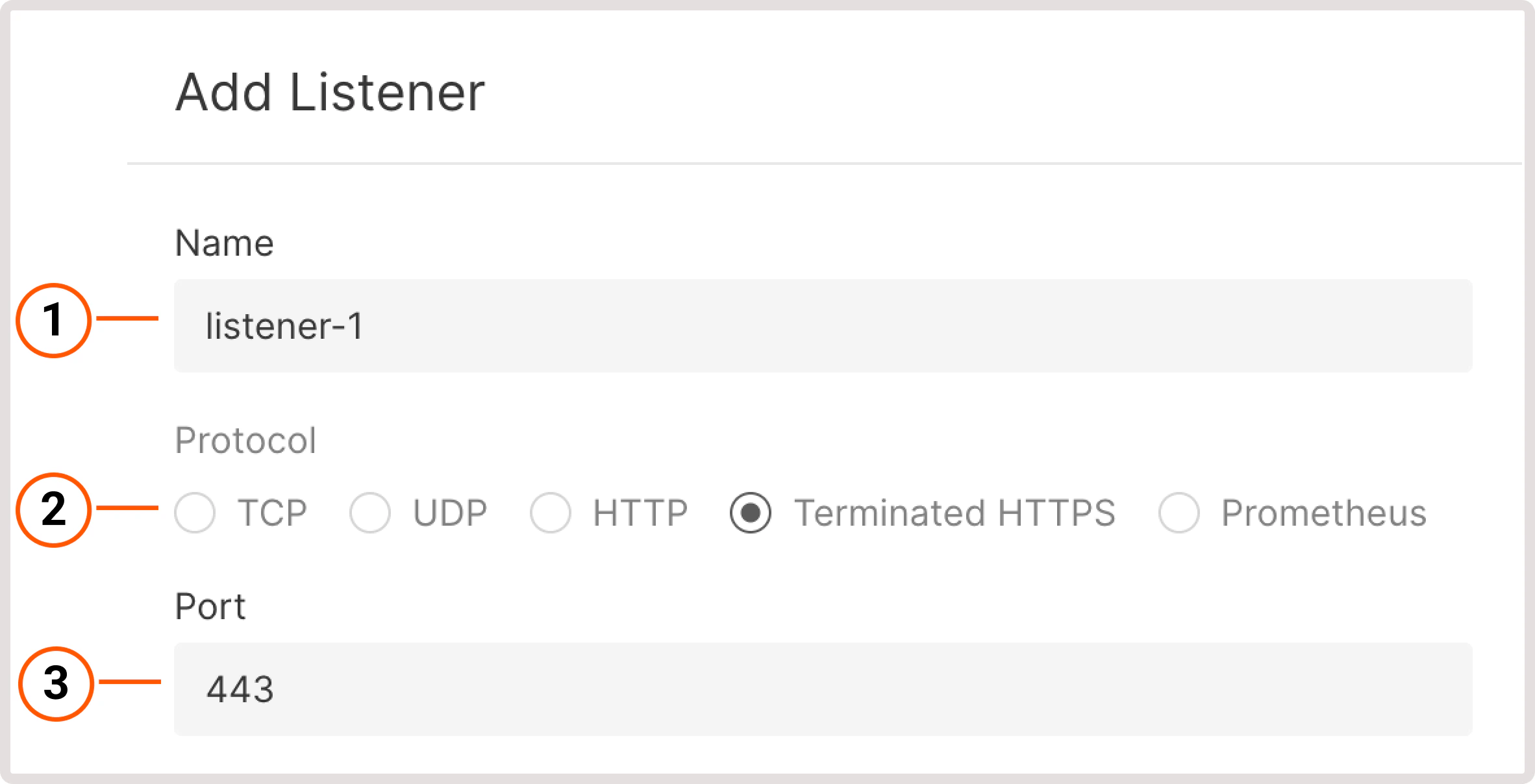
        Create a new Load Balancer [according to the instructions](/cloud/networking/create-and-configure-a-load-balancer). In step 5, configure a new listener as follows:

        1\. Give your listener a name.

        2\. Select a protocol with the supported TLS encryption: **Terminated HTTPS** or **Prometheus**.

        3\. Use a default port or specify a custom port from 1 to 65535.

        <Frame>
          <img src="https://mintcdn.com/gcore/c-GSw73gRYekqiTo/images/docs/cloud/networking/load-balancers/add-certificates-to-load-balancer/add-listener-name-port.png?fit=max&auto=format&n=c-GSw73gRYekqiTo&q=85&s=cd5b35340fcde53295cd0feceada9e60" alt="Create a listener dialog" width="2364" height="1208" data-path="images/docs/cloud/networking/load-balancers/add-certificates-to-load-balancer/add-listener-name-port.png" />
        </Frame>

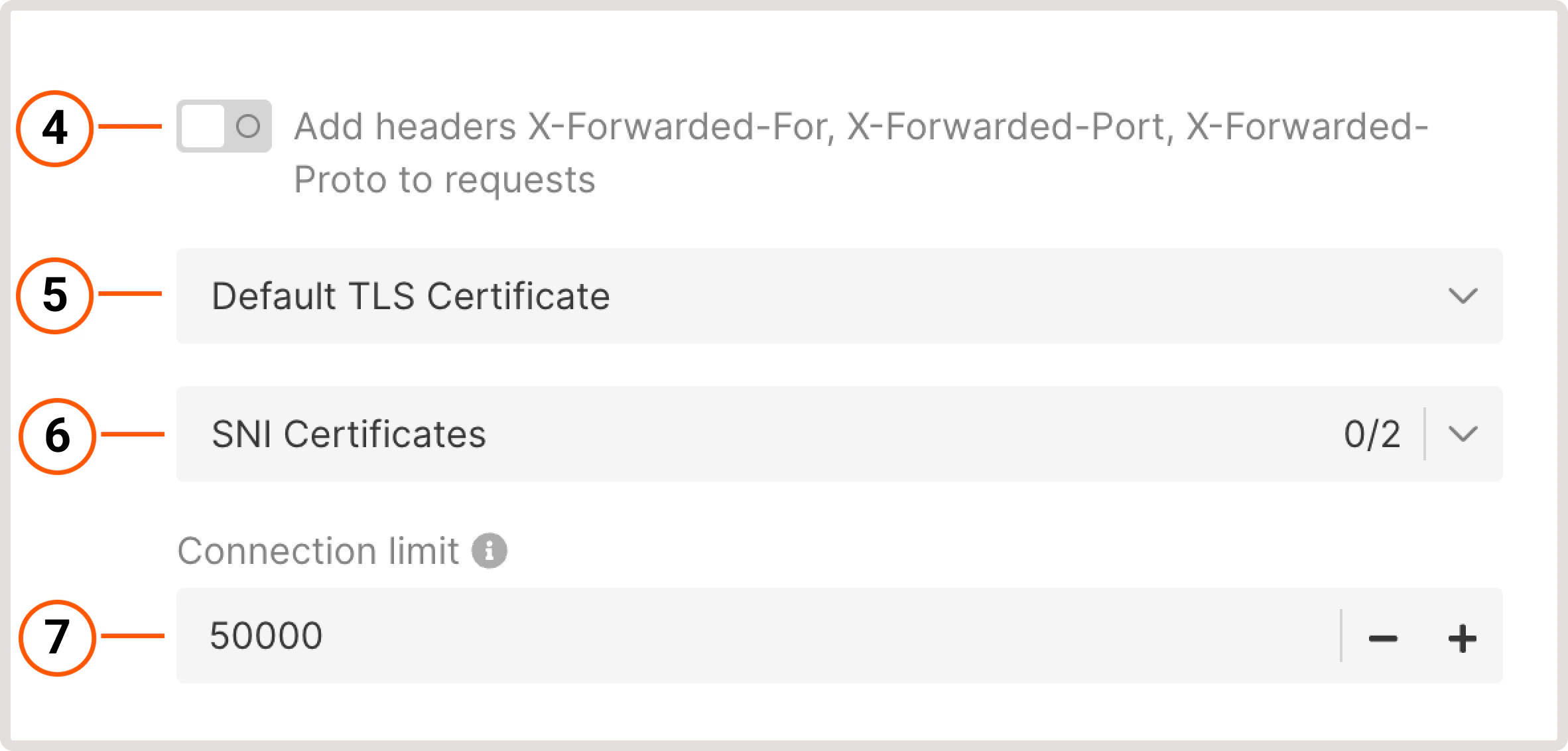
        4\. (Optional) To identify the origin of the user's IP address connecting to a web server via a Load balancer, enable the **Add headers X-Forwarded-For, X-Forwarded-Port, X-Forwarded-Proto to requests** toggle.

        5\. Choose the default TLS Certificate. It's the main certificate that will be used when there's no configured certificate for a domain.

        6\. Select the SNI Certificates stored in the Secret Manager.

        7\. Set the connection limit - a maximum number of simultaneous connections that can be handled by the listener.
        <Frame>
          <img src="https://mintcdn.com/gcore/c-GSw73gRYekqiTo/images/docs/cloud/networking/load-balancers/add-certificates-to-load-balancer/add-listener-headers-cni.png?fit=max&auto=format&n=c-GSw73gRYekqiTo&q=85&s=cb0a486321627efad61ee87a352bcde6" alt="Create a listener dialog" width="2364" height="1132" data-path="images/docs/cloud/networking/load-balancers/add-certificates-to-load-balancer/add-listener-headers-cni.png" />
        </Frame>

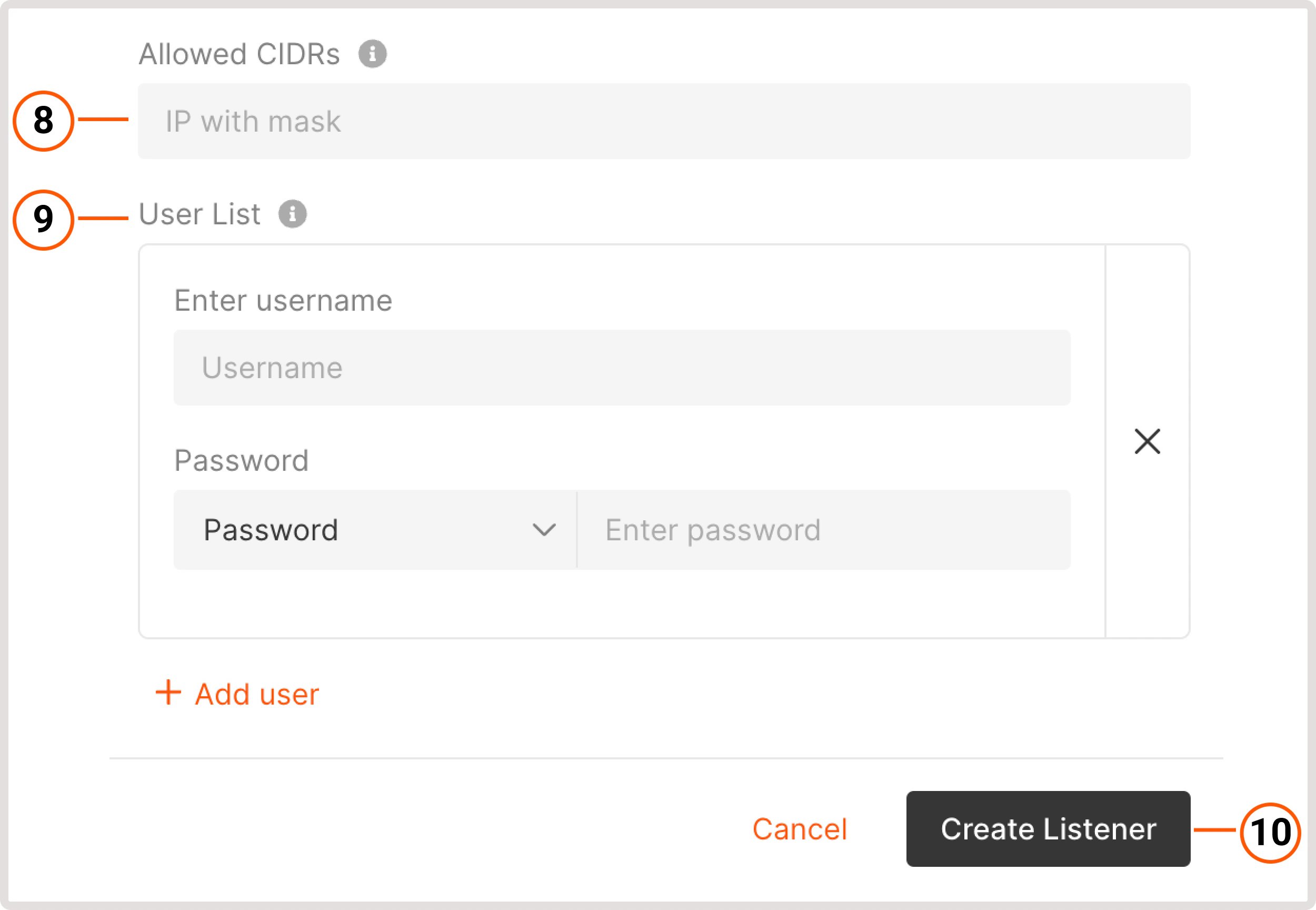
        8\. (Optional) Add allowed CIDR ranges to define which IP addresses can access your content. All IP addresses that don't belong to the specified range will be denied access.

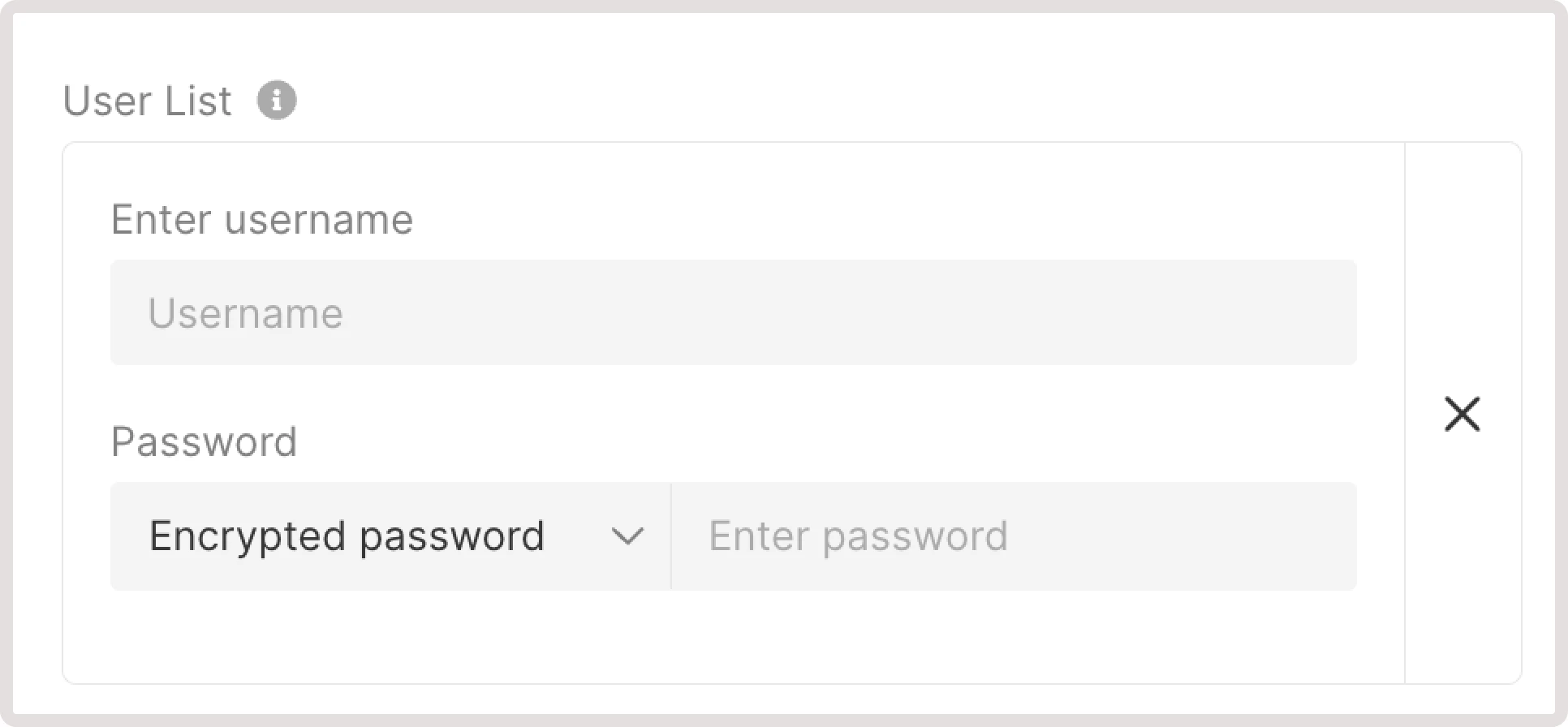
        9\. (Optional) Configure Basic Authentication for HTTP traffic to protect your resource from unauthorized access. Click **Add user** to specify who can access your resource only by logging in with the following credentials:

        * **Enter username** : specify a username that needs to be entered on the login screen.

        * **Password** : specify a password or provide an encrypted password.

        10\. Click **Create Listener**.

        After you configure the listener, proceed with the rest of the steps described in the [Create a Load Balancer](/cloud/networking/create-and-configure-a-load-balancer) guide to finish the balancer's creation.
        <Frame>
          <img src="https://mintcdn.com/gcore/YEsPf7l6EvNuxMEL/images/docs/cloud/networking/load-balancers/add-certificates-to-load-balancer/create-listener.png?fit=max&auto=format&n=YEsPf7l6EvNuxMEL&q=85&s=aad86584977ec6ef005be07b42e2783f" alt="Create a listener dialog" width="2500" height="1728" data-path="images/docs/cloud/networking/load-balancers/add-certificates-to-load-balancer/create-listener.png" />
        </Frame>
      </Tab>

      <Tab title="From the Load Balancer settings">
        If you already have a Load Balancer and don't want to create a new one to terminate SSL connections, update the existing Load Balancer as follows:

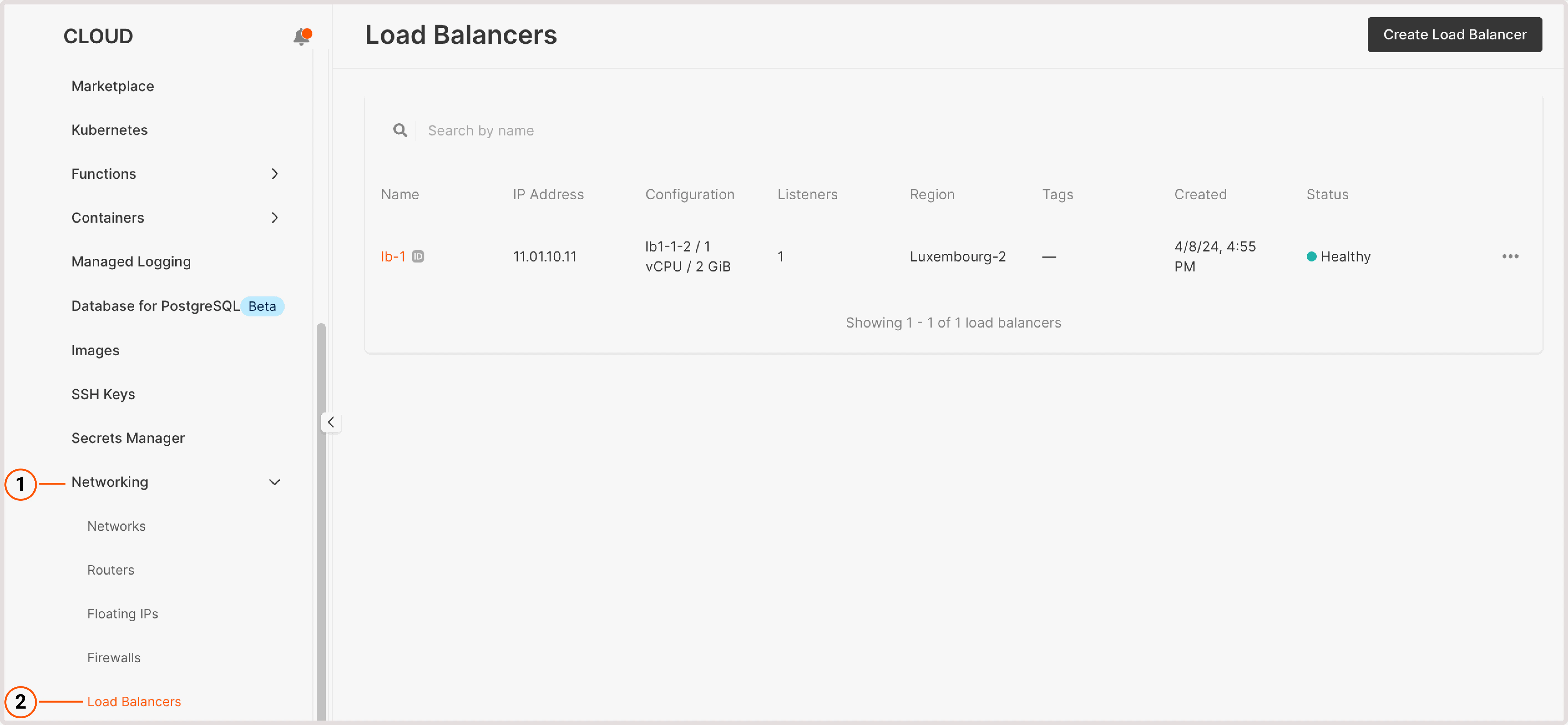
        1\. In the Gcore Customer Portal, navigate to the **Cloud** page and click **Networking**.

        2\. Open the **Load Balancers** page.

        <Frame>
          <img src="https://mintcdn.com/gcore/YEsPf7l6EvNuxMEL/images/docs/cloud/networking/load-balancers/add-certificates-to-load-balancer/load-balancers-page.png?fit=max&auto=format&n=YEsPf7l6EvNuxMEL&q=85&s=03e6d064d41c023fc603fcb711a74650" alt="Load Balancers page in Customer Portal" width="5652" height="2612" data-path="images/docs/cloud/networking/load-balancers/add-certificates-to-load-balancer/load-balancers-page.png" />
        </Frame>

        3\. Find the Load Balancer you want to configure and click its name to open it.

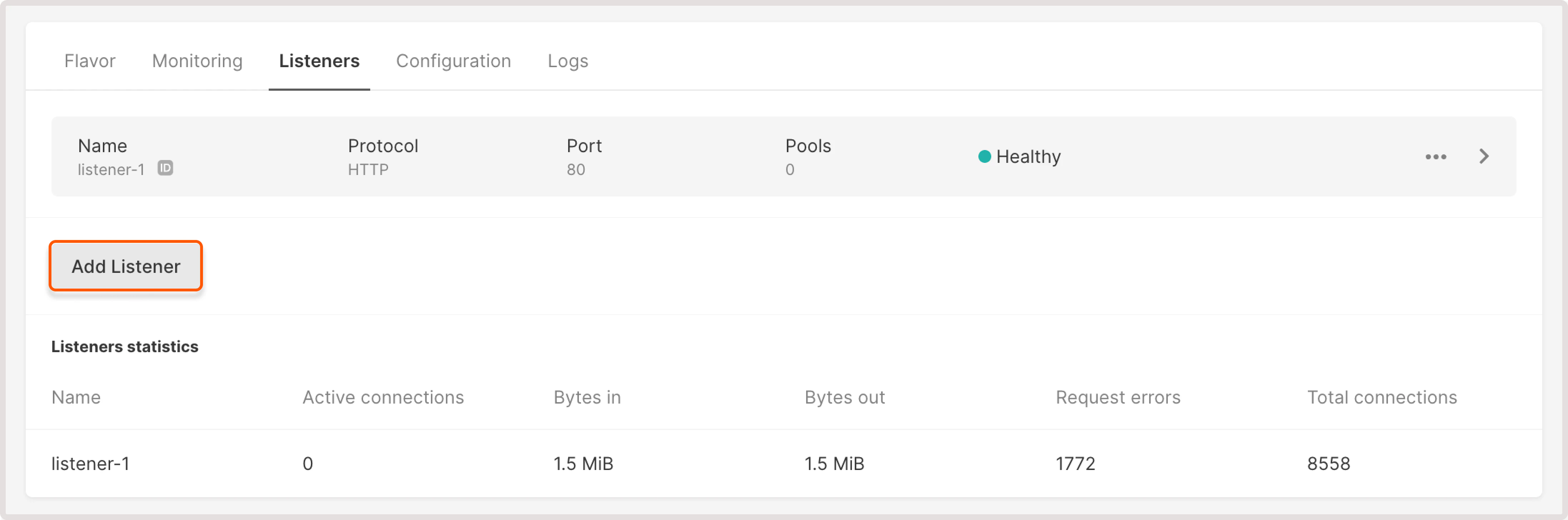
        4\. Navigate to the **Listeners** tab and click **Add listener**.
        <Frame>
          <img src="https://mintcdn.com/gcore/YEsPf7l6EvNuxMEL/images/docs/cloud/networking/load-balancers/add-certificates-to-load-balancer/listeners-tab.png?fit=max&auto=format&n=YEsPf7l6EvNuxMEL&q=85&s=616e7466bf24607808e64702fcaa71b4" alt="Listener tab in the Load Balancer settings" width="4388" height="1456" data-path="images/docs/cloud/networking/load-balancers/add-certificates-to-load-balancer/listeners-tab.png" />
        </Frame>

        5\. To configure a new listener, follow the same instructions as in the "Add certificates during Load Balancer creation" step.
      </Tab>
    </Tabs>

    ## Create an encrypted password

    When configuring basic authentication for HTTP traffic, you have the option to specify an encrypted password for a user.

    You can use any preferred encryption method or generate a hashed password using the [MKPasswd](https://www.unix.com/man-page/linux/1/mkpasswd/) utility.

    To generate a password hash using a dockerized version of MKPasswd:

    1\. Check the available encryption types:

    ```sh theme={null}
    docker run --rm yardalgedal/mkpasswd -m help
    ```

    2\. Choose your preferred encryption method and generate the password hash. For example, to create a password hash using the bcrypt method, run:

    ```sh theme={null}
    docker run --rm yardalgedal/mkpasswd -m bcrypt mypassword
    ```

    3\. Insert the hash into the **Encrypted password** field:

    <Frame>
      <img src="https://mintcdn.com/gcore/YEsPf7l6EvNuxMEL/images/docs/cloud/networking/load-balancers/add-certificates-to-load-balancer/encrypted-password-field.png?fit=max&auto=format&n=YEsPf7l6EvNuxMEL&q=85&s=35e8c4ca8ed8656177b91a244dc27690" alt="Encrypted password in listener settings" width="1932" height="896" data-path="images/docs/cloud/networking/load-balancers/add-certificates-to-load-balancer/encrypted-password-field.png" />
    </Frame>
  </MethodSection>

  <MethodSection id="api" label="REST API">
    TLS termination on a load balancer requires two resources: a certificate stored in Secrets Manager and a `TERMINATED_HTTPS` listener that references it. A listener accepts one default certificate and multiple SNI certificates — the load balancer selects the correct certificate for each connection based on the domain name in the TLS handshake.

    <Info>
      An [API token](/account-settings/api-tokens) is required, along with a [project ID](/api-reference/cloud/projects/list-projects) and [region ID](/api-reference/cloud/regions/list-regions).
    </Info>

    Open a bash terminal and set these as environment variables before running the examples:

    ```bash theme={null}
    export GCORE_API_KEY="{YOUR_API_KEY}"
    export GCORE_CLOUD_PROJECT_ID="{YOUR_PROJECT_ID}"
    export GCORE_CLOUD_REGION_ID="{YOUR_REGION_ID}"
    export LB_ID="{YOUR_LOAD_BALANCER_ID}"
    ```

    <Info>
      **LB\_ID** is the UUID of an existing load balancer. To create one or find its ID, see [Create and configure a load balancer](/cloud/networking/create-and-configure-a-load-balancer).
    </Info>

    ## Quickstart

    The scripts below upload a TLS certificate to Secrets Manager and create a `TERMINATED_HTTPS` listener on an existing load balancer.

    <Tabs>
      <Tab title="Python SDK">
        ```python theme={null}
        import os
        from gcore import Gcore
        from gcore.types.cloud import secret_upload_tls_certificate_params

        client = Gcore()
        lb_id = os.environ["LB_ID"]

        # Step 1. Upload the default TLS certificate to Secrets Manager
        cert_pem = open("/path/to/certificate.pem").read()
        key_pem = open("/path/to/private-key.pem").read()
        chain_pem = open("/path/to/chain.pem").read()

        secret = client.cloud.secrets.upload_tls_certificate_and_poll(
            name="my-lb-cert",
            payload=secret_upload_tls_certificate_params.Payload(
                certificate=cert_pem,
                private_key=key_pem,
                certificate_chain=chain_pem,
            ),
        )
        print(f"Secret: {secret.id}  status: {secret.status}")

        # Step 2. Create a TERMINATED_HTTPS listener with the certificate
        listener = client.cloud.load_balancers.listeners.create_and_poll(
            load_balancer_id=lb_id,
            name="my-https-listener",
            protocol="TERMINATED_HTTPS",
            protocol_port=443,
            secret_id=secret.id,
        )
        print(f"Listener: {listener.id}  protocol: {listener.protocol}  port: {listener.protocol_port}")
        ```
      </Tab>

      <Tab title="Go SDK">
        ```go theme={null}
        package main

        import (
        	"context"
        	"fmt"
        	"log"
        	"os"
        	gcore "github.com/G-Core/gcore-go"
        	"github.com/G-Core/gcore-go/cloud"
        )

        func readFile(path string) string {
        	data, err := os.ReadFile(path)
        	if err != nil {
        		log.Fatal(err)
        	}
        	return string(data)
        }

        func main() {
        	lbID := os.Getenv("LB_ID")

        	client := gcore.NewClient()
        	ctx := context.Background()

        	// Step 1. Upload the default TLS certificate to Secrets Manager
        	secret, err := client.Cloud.Secrets.UploadTlsCertificateAndPoll(ctx, cloud.SecretUploadTlsCertificateParams{
        		Name: "my-lb-cert",
        		Payload: cloud.SecretUploadTlsCertificateParamsPayload{
        			Certificate:      readFile("/path/to/certificate.pem"),
        			PrivateKey:       readFile("/path/to/private-key.pem"),
        			CertificateChain: readFile("/path/to/chain.pem"),
        		},
        	})
        	if err != nil {
        		log.Fatal(err)
        	}
        	fmt.Printf("Secret: %s  status: %s\n", secret.ID, secret.Status)

        	// Step 2. Create a TERMINATED_HTTPS listener with the certificate
        	listener, err := client.Cloud.LoadBalancers.Listeners.NewAndPoll(ctx, cloud.LoadBalancerListenerNewParams{
        		LoadBalancerID: lbID,
        		Name:           "my-https-listener",
        		Protocol:       cloud.LbListenerProtocolTerminatedHTTPS,
        		ProtocolPort:   443,
        		SecretID:       cloud.LoadBalancerListenerNewParamsSecretID(secret.ID),
        	})
        	if err != nil {
        		log.Fatal(err)
        	}
        	fmt.Printf("Listener: %s  protocol: %s  port: %d\n",
        		listener.ID, listener.Protocol, listener.ProtocolPort)
        }
        ```
      </Tab>
    </Tabs>

    ## Step-by-step

    <p>Each step below explains what the call does, which parameters matter, and what the response looks like.</p>

    <Accordion title="Show all steps">
      ### Step 1. Upload a TLS certificate to Secrets Manager

      Certificates are stored in Gcore Secrets Manager before being referenced by a load balancer listener. Each certificate requires three PEM-encoded fields: the certificate itself, the private key, and the certificate chain.

      | Parameter                   | Required | Description                                                                                           |
      | --------------------------- | -------- | ----------------------------------------------------------------------------------------------------- |
      | `name`                      | Yes      | Display name for the certificate in Secrets Manager                                                   |
      | `payload.certificate`       | Yes      | SSL certificate in PEM format                                                                         |
      | `payload.private_key`       | Yes      | Private key in PEM format                                                                             |
      | `payload.certificate_chain` | Yes      | Intermediate and root CA certificates in PEM format; use the certificate itself for self-signed certs |
      | `expiration`                | No       | ISO 8601 datetime after which the secret expires; omit for no expiration                              |

      <Tabs>
        <Tab title="Python SDK">
          ```python theme={null}
          import os
          from gcore import Gcore
          from gcore.types.cloud import secret_upload_tls_certificate_params

          client = Gcore()

          cert_pem = open("/path/to/certificate.pem").read()
          key_pem = open("/path/to/private-key.pem").read()
          chain_pem = open("/path/to/chain.pem").read()

          secret = client.cloud.secrets.upload_tls_certificate_and_poll(
              name="my-lb-cert",
              expiration="2030-12-31T23:59:59",
              payload=secret_upload_tls_certificate_params.Payload(
                  certificate=cert_pem,
                  private_key=key_pem,
                  certificate_chain=chain_pem,
              ),
          )
          print(f"Secret ID: {secret.id}  status: {secret.status}  type: {secret.secret_type}")
          ```
        </Tab>

        <Tab title="Go SDK">
          ```go theme={null}
          secret, err := client.Cloud.Secrets.UploadTlsCertificateAndPoll(ctx, cloud.SecretUploadTlsCertificateParams{
          	Name: "my-lb-cert",
          	Payload: cloud.SecretUploadTlsCertificateParamsPayload{
          		Certificate:      readFile("/path/to/certificate.pem"),
          		PrivateKey:       readFile("/path/to/private-key.pem"),
          		CertificateChain: readFile("/path/to/chain.pem"),
          	},
          })
          if err != nil {
          	log.Fatal(err)
          }
          fmt.Printf("Secret ID: %s  status: %s\n", secret.ID, secret.Status)
          ```
        </Tab>

        <Tab title="curl">
          ```bash theme={null}
          # Read PEM files and escape newlines for JSON
          CERT_PEM=$(awk '{printf "%s\\n", $0}' /path/to/certificate.pem)
          KEY_PEM=$(awk '{printf "%s\\n", $0}' /path/to/private-key.pem)
          CHAIN_PEM=$(awk '{printf "%s\\n", $0}' /path/to/chain.pem)

          curl -X POST "https://api.gcore.com/cloud/v2/secrets/$GCORE_CLOUD_PROJECT_ID/$GCORE_CLOUD_REGION_ID" \
            -H "Authorization: APIKey $GCORE_API_KEY" \
            -H "Content-Type: application/json" \
            -d "{
              \"name\": \"my-lb-cert\",
              \"expiration\": \"2030-12-31T23:59:59\",
              \"payload\": {
                \"certificate\": \"$CERT_PEM\",
                \"private_key\": \"$KEY_PEM\",
                \"certificate_chain\": \"$CHAIN_PEM\"
              }
            }"
          ```

          The API returns a task ID:

          ```json theme={null}
          {
            "tasks": ["9d5289af-7a66-4419-ae20-8c0521b7f145"]   // save as TASK_ID
          }
          ```

          Poll <code>GET /cloud/v1/tasks/{task_id}</code> every 5 seconds until `state` is `FINISHED`:

          ```bash theme={null}
          curl "https://api.gcore.com/cloud/v1/tasks/$TASK_ID" \
            -H "Authorization: APIKey $GCORE_API_KEY"
          ```

          When complete:

          ```json theme={null}
          {
            "state": "FINISHED",
            "created_resources": {
              "secrets": ["04c518a0-738e-4fc6-b045-32a779ef83b3"]   // save as SECRET_ID
            }
          }
          ```
        </Tab>
      </Tabs>

      The [secrets API](/api-reference/cloud#tag/Secrets/operation/SecretsViewSetV2.post) confirms creation with `status: ACTIVE` and `secret_type: certificate`.

      ### Step 2. List certificates in Secrets Manager

      Listing secrets returns all certificates stored in the current project and region.

      <Tabs>
        <Tab title="Python SDK">
          ```python theme={null}
          page = client.cloud.secrets.list()
          for s in page.results:
              print(f"  {s.id}  {s.name}  {s.status}")
          ```
        </Tab>

        <Tab title="Go SDK">
          ```go theme={null}
          secrets, err := client.Cloud.Secrets.List(ctx, cloud.SecretListParams{})
          if err != nil {
          	log.Fatal(err)
          }
          for _, s := range secrets.Results {
          	fmt.Printf("  %s  %s  %s\n", s.ID, s.Name, s.Status)
          }
          ```
        </Tab>

        <Tab title="curl">
          ```bash theme={null}
          curl "https://api.gcore.com/cloud/v1/secrets/$GCORE_CLOUD_PROJECT_ID/$GCORE_CLOUD_REGION_ID" \
            -H "Authorization: APIKey $GCORE_API_KEY"
          ```

          The API returns:

          ```json theme={null}
          {
            "count": 1,
            "results": [
              {
                "id": "04c518a0-738e-4fc6-b045-32a779ef83b3",
                "name": "my-lb-cert",
                "status": "ACTIVE",
                "secret_type": "certificate",
                "created": "2026-05-30T19:06:26",
                "expiration": "2030-12-31T23:59:59"
              }
            ]
          }
          ```
        </Tab>
      </Tabs>

      The [secrets API](/api-reference/cloud#tag/Secrets/operation/SecretListViewSet.get) returns all secrets regardless of type; filter by `secret_type: certificate` for TLS certificates.

      ### Step 3. Create a listener with the TLS certificate

      A `TERMINATED_HTTPS` listener decrypts TLS traffic at the load balancer and forwards plain HTTP to backend pool members. The `secret_id` sets the default certificate - the one used when no SNI match is found.

      | Parameter          | Required | Description                                                |
      | ------------------ | -------- | ---------------------------------------------------------- |
      | `load_balancer_id` | Yes      | ID of the existing load balancer                           |
      | `name`             | Yes      | Listener name                                              |
      | `protocol`         | Yes      | Must be `TERMINATED_HTTPS` for TLS termination             |
      | `protocol_port`    | Yes      | Port number (1-65535); use `443` for standard HTTPS        |
      | `secret_id`        | Yes      | ID of the default TLS certificate from Secrets Manager     |
      | `sni_secret_id`    | No       | List of additional certificate IDs for SNI-based selection |

      <Tabs>
        <Tab title="Python SDK">
          ```python theme={null}
          listener = client.cloud.load_balancers.listeners.create_and_poll(
              load_balancer_id=lb_id,
              name="my-https-listener",
              protocol="TERMINATED_HTTPS",
              protocol_port=443,
              secret_id=secret.id,
          )
          print(f"Listener: {listener.id}  status: {listener.provisioning_status}")
          print(f"Default certificate: {listener.secret_id}")
          ```
        </Tab>

        <Tab title="Go SDK">
          ```go theme={null}
          listener, err := client.Cloud.LoadBalancers.Listeners.NewAndPoll(ctx, cloud.LoadBalancerListenerNewParams{
          	LoadBalancerID: lbID,
          	Name:           "my-https-listener",
          	Protocol:       cloud.LbListenerProtocolTerminatedHTTPS,
          	ProtocolPort:   443,
          	SecretID:       cloud.LoadBalancerListenerNewParamsSecretID(secret.ID),
          })
          if err != nil {
          	log.Fatal(err)
          }
          fmt.Printf("Listener: %s  status: %s\n", listener.ID, listener.ProvisioningStatus)
          fmt.Printf("Default certificate: %s\n", listener.SecretID)
          ```
        </Tab>

        <Tab title="curl">
          ```bash theme={null}
          curl -X POST "https://api.gcore.com/cloud/v1/lblisteners/$GCORE_CLOUD_PROJECT_ID/$GCORE_CLOUD_REGION_ID" \
            -H "Authorization: APIKey $GCORE_API_KEY" \
            -H "Content-Type: application/json" \
            -d "{
              \"load_balancer_id\": \"$LB_ID\",
              \"name\": \"my-https-listener\",
              \"protocol\": \"TERMINATED_HTTPS\",
              \"protocol_port\": 443,
              \"secret_id\": \"$SECRET_ID\"
            }"
          ```

          The API returns a task ID:

          ```json theme={null}
          {
            "tasks": ["4cd68984-9e6b-4633-bc69-c862cca8abf7"]   // save as TASK_ID
          }
          ```

          Poll every 5 seconds until `state` is `FINISHED`. The completed task contains the new listener ID:

          ```json theme={null}
          {
            "state": "FINISHED",
            "created_resources": {
              "listeners": ["38db0600-8173-4386-8cf6-3ab143bbf1c8"]   // save as LISTENER_ID
            }
          }
          ```

          Verify the result:

          ```bash theme={null}
          curl "https://api.gcore.com/cloud/v1/lblisteners/$GCORE_CLOUD_PROJECT_ID/$GCORE_CLOUD_REGION_ID/$LISTENER_ID" \
            -H "Authorization: APIKey $GCORE_API_KEY"
          ```

          ```json theme={null}
          {
            "id": "38db0600-8173-4386-8cf6-3ab143bbf1c8",
            "name": "my-https-listener",
            "protocol": "TERMINATED_HTTPS",
            "protocol_port": 443,
            "secret_id": "04c518a0-738e-4fc6-b045-32a779ef83b3",
            "sni_secret_id": [],
            "provisioning_status": "ACTIVE",
            "operating_status": "ONLINE"
          }
          ```
        </Tab>
      </Tabs>

      The [create listener](/api-reference/cloud#tag/Load-Balancer-Listeners/operation/LoadBalancerListenerViewSet.post) endpoint also supports the `PROMETHEUS` protocol for TLS-secured metrics endpoints.

      ### Step 4. Add SNI certificates to an existing listener

      SNI certificates let a single listener serve different TLS certificates for different domain names. The load balancer matches the domain in the client's TLS handshake against the Subject Alternative Names (SANs) of each SNI certificate and serves the matching one; the default certificate from `secret_id` is used as fallback.

      | Parameter       | Required | Description                                                                    |
      | --------------- | -------- | ------------------------------------------------------------------------------ |
      | `sni_secret_id` | Yes      | List of certificate IDs to use for SNI matching; replaces the current SNI list |

      <Tabs>
        <Tab title="Python SDK">
          ```python theme={null}
          # Upload the SNI certificate first (same as Step 1)
          sni_secret = client.cloud.secrets.upload_tls_certificate_and_poll(
              name="my-sni-cert",
              payload=secret_upload_tls_certificate_params.Payload(
                  certificate=open("/path/to/sni-certificate.pem").read(),
                  private_key=open("/path/to/sni-private-key.pem").read(),
                  certificate_chain=open("/path/to/sni-chain.pem").read(),
              ),
          )

          tasks = client.cloud.load_balancers.listeners.update(
              listener_id=listener.id,
              sni_secret_id=[sni_secret.id],
          )
          task = client.cloud.tasks.poll(tasks.tasks[0])
          print(f"Update status: {task.state}")

          updated = client.cloud.load_balancers.listeners.get(listener_id=listener.id)
          print(f"SNI certificates: {updated.sni_secret_id}")
          ```
        </Tab>

        <Tab title="Go SDK">
          ```go theme={null}
          // Upload the SNI certificate first (same as Step 1)
          sniSecret, err := client.Cloud.Secrets.UploadTlsCertificateAndPoll(ctx, cloud.SecretUploadTlsCertificateParams{
          	Name: "my-sni-cert",
          	Payload: cloud.SecretUploadTlsCertificateParamsPayload{
          		Certificate:      readFile("/path/to/sni-certificate.pem"),
          		PrivateKey:       readFile("/path/to/sni-private-key.pem"),
          		CertificateChain: readFile("/path/to/sni-chain.pem"),
          	},
          })
          if err != nil {
          	log.Fatal(err)
          }

          updated, err := client.Cloud.LoadBalancers.Listeners.UpdateAndPoll(ctx, listenerID, cloud.LoadBalancerListenerUpdateParams{
          	SniSecretID: []string{sniSecret.ID},
          })
          if err != nil {
          	log.Fatal(err)
          }
          fmt.Printf("SNI certificates: %v\n", updated.SniSecretID)
          ```
        </Tab>

        <Tab title="curl">
          ```bash theme={null}
          curl -X PATCH "https://api.gcore.com/cloud/v2/lblisteners/$GCORE_CLOUD_PROJECT_ID/$GCORE_CLOUD_REGION_ID/$LISTENER_ID" \
            -H "Authorization: APIKey $GCORE_API_KEY" \
            -H "Content-Type: application/json" \
            -d "{\"sni_secret_id\": [\"$SNI_SECRET_ID\"]}"
          ```

          The API returns a task ID:

          ```json theme={null}
          {
            "tasks": ["f910e568-4f04-4a9c-9924-d1ddb438b897"]
          }
          ```

          Poll every 5 seconds until `state` is `FINISHED`. Verify the result:

          ```bash theme={null}
          curl "https://api.gcore.com/cloud/v1/lblisteners/$GCORE_CLOUD_PROJECT_ID/$GCORE_CLOUD_REGION_ID/$LISTENER_ID" \
            -H "Authorization: APIKey $GCORE_API_KEY"
          ```

          ```json theme={null}
          {
            "id": "38db0600-8173-4386-8cf6-3ab143bbf1c8",
            "protocol": "TERMINATED_HTTPS",
            "secret_id": "04c518a0-738e-4fc6-b045-32a779ef83b3",
            "sni_secret_id": ["a2395dad-02a6-4313-bbc4-38f0f0954011"]
          }
          ```
        </Tab>
      </Tabs>

      To add more SNI certificates later, include all existing IDs plus the new ones in `sni_secret_id` - the field replaces the full list, not appends to it. The [update listener](/api-reference/cloud#tag/Load-Balancer-Listeners/operation/LoadBalancerListenerUpdateViewSet.patch) endpoint also accepts `secret_id` to replace the default certificate.
    </Accordion>

    ## Clean up

    Delete the listener before the secret. A secret that is in use by a listener cannot be deleted - the API returns a `ValidationError`.

    <Tabs>
      <Tab title="Python SDK">
        ```python theme={null}
        # Delete the listener first
        client.cloud.load_balancers.listeners.delete_and_poll(listener_id=listener.id)
        print("Listener deleted.")

        # Then delete the secrets
        task_list = client.cloud.secrets.delete(secret_id=secret.id)
        client.cloud.tasks.poll(task_list.tasks[0])
        print("Default certificate deleted.")

        task_list = client.cloud.secrets.delete(secret_id=sni_secret.id)
        client.cloud.tasks.poll(task_list.tasks[0])
        print("SNI certificate deleted.")
        ```
      </Tab>

      <Tab title="Go SDK">
        ```go theme={null}
        // Delete the listener first
        if err := client.Cloud.LoadBalancers.Listeners.DeleteAndPoll(ctx, listenerID,
            cloud.LoadBalancerListenerDeleteParams{}); err != nil {
            log.Fatal(err)
        }
        fmt.Println("Listener deleted.")

        // Then delete the secrets
        if err := client.Cloud.Secrets.DeleteAndPoll(ctx, secret.ID,
            cloud.SecretDeleteParams{}); err != nil {
            log.Fatal(err)
        }
        fmt.Println("Default certificate deleted.")

        if err := client.Cloud.Secrets.DeleteAndPoll(ctx, sniSecret.ID,
            cloud.SecretDeleteParams{}); err != nil {
            log.Fatal(err)
        }
        fmt.Println("SNI certificate deleted.")
        ```
      </Tab>

      <Tab title="curl">
        ```bash theme={null}
        # Delete the listener first
        curl -X DELETE "https://api.gcore.com/cloud/v1/lblisteners/$GCORE_CLOUD_PROJECT_ID/$GCORE_CLOUD_REGION_ID/$LISTENER_ID" \
          -H "Authorization: APIKey $GCORE_API_KEY"
        ```

        Poll until the delete task finishes. Then delete the secrets:

        ```bash theme={null}
        curl -X DELETE "https://api.gcore.com/cloud/v1/secrets/$GCORE_CLOUD_PROJECT_ID/$GCORE_CLOUD_REGION_ID/$SECRET_ID" \
          -H "Authorization: APIKey $GCORE_API_KEY"

        curl -X DELETE "https://api.gcore.com/cloud/v1/secrets/$GCORE_CLOUD_PROJECT_ID/$GCORE_CLOUD_REGION_ID/$SNI_SECRET_ID" \
          -H "Authorization: APIKey $GCORE_API_KEY"
        ```
      </Tab>
    </Tabs>
  </MethodSection>

  <MethodSection id="terraform" label="Terraform">
    <p>Configure TLS termination on a listener by attaching certificates via `sni_secret_id` on [`gcore_cloud_load_balancer_listener`](https://registry.terraform.io/providers/G-Core/gcore/latest/docs/resources/cloud_load_balancer_listener).</p>

    <Info>
      An [API token](/account-settings/api-tokens) is required, along with a [project ID](/api-reference/cloud/projects/list-projects) and [region ID](/api-reference/cloud/regions/list-regions).
    </Info>

    ## Create a TERMINATED\_HTTPS listener

    <p>The listener requires a default certificate in `secret_id` (set to `""` to omit) and one or more SNI certificates in `sni_secret_id`. The load balancer matches the client's requested hostname against the Subject Alternative Names of each SNI certificate; the default falls back to `secret_id` when no match is found.</p>

    ```hcl theme={null}
    resource "gcore_cloud_secret" "tls" {
      project_id = var.project_id
      region_id  = var.region_id
      name       = "example-com-cert"

      payload_wo_version = 1
      payload = {
        certificate_wo       = file("${path.module}/certificate.pem")
        private_key_wo       = file("${path.module}/private_key.pem")
        certificate_chain_wo = file("${path.module}/certificate_chain.pem")
      }
    }

    resource "gcore_cloud_load_balancer_listener" "https" {
      project_id       = var.project_id
      region_id        = var.region_id
      load_balancer_id = var.load_balancer_id
      name             = "https-listener"
      protocol         = "TERMINATED_HTTPS"
      protocol_port    = 443
      secret_id        = ""
      sni_secret_id    = [gcore_cloud_secret.tls.id]
    }

    output "listener_id" {
      value = gcore_cloud_load_balancer_listener.https.id
    }
    ```

    <p>Set `var.load_balancer_id` to the ID of an existing load balancer. To create a load balancer with Terraform, see [Create and configure a load balancer](/cloud/networking/create-and-configure-a-load-balancer).</p>

    ## Add more SNI certificates

    <p>Pass all certificate IDs together — `sni_secret_id` replaces the full list on each apply:</p>

    ```hcl theme={null}
    resource "gcore_cloud_secret" "sni_extra" {
      project_id = var.project_id
      region_id  = var.region_id
      name       = "extra-domain-cert"

      payload_wo_version = 1
      payload = {
        certificate_wo       = file("${path.module}/extra-certificate.pem")
        private_key_wo       = file("${path.module}/extra-private_key.pem")
        certificate_chain_wo = file("${path.module}/extra-certificate_chain.pem")
      }
    }

    resource "gcore_cloud_load_balancer_listener" "https" {
      ...
      sni_secret_id = [
        gcore_cloud_secret.tls.id,
        gcore_cloud_secret.sni_extra.id,
      ]
    }
    ```

    ## Rotate a certificate

    <p>To replace a certificate, increment `payload_wo_version` on the corresponding `gcore_cloud_secret` resource — Terraform destroys the old secret and creates a new one. The listener re-reads the new ID via the reference.</p>

    <Warning>
      Rotating a certificate destroys the existing secret and creates a replacement. The listener is updated automatically because `sni_secret_id` references `gcore_cloud_secret.tls.id` — Terraform updates the listener in the correct order.
    </Warning>

    ## Delete

    <p>Remove the listener block first, then the secret blocks, and run `terraform apply` — Terraform deletes the listener before the secrets to satisfy the API constraint that a secret in use cannot be deleted.</p>

    ```hcl theme={null}
    # Step 1: comment out or remove the listener block and apply
    # resource "gcore_cloud_load_balancer_listener" "https" { ... }

    # Step 2: after the listener is gone, comment out or remove the secret blocks and apply
    # resource "gcore_cloud_secret" "tls" { ... }
    # resource "gcore_cloud_secret" "sni_extra" { ... }
    ```

    ## Import

    <p>To bring an existing listener under Terraform management:</p>

    ```bash theme={null}
    terraform import gcore_cloud_load_balancer_listener.https '{PROJECT_ID}/{REGION_ID}/{LISTENER_ID}'
    ```
  </MethodSection>
</MethodSwitch>
