> ## Documentation Index
> Fetch the complete documentation index at: https://gcore.com/docs/llms.txt
> Use this file to discover all available pages before exploring further.
# Logging for load balancers
export const Caution = ({children}) => {
return ;
};
Gcore Logging collects and stores logs from various Cloud resources, including Load Balancers. This guide outlines configuring Logging for an existing Load Balancer and highlights the guaranteed throughput between different Load Balancer regions and Logging regions.
To create a new Load Balancer, refer to [our product documentation](/cloud/networking/create-and-configure-a-load-balancer).
## Step 1. Open load balancers settings
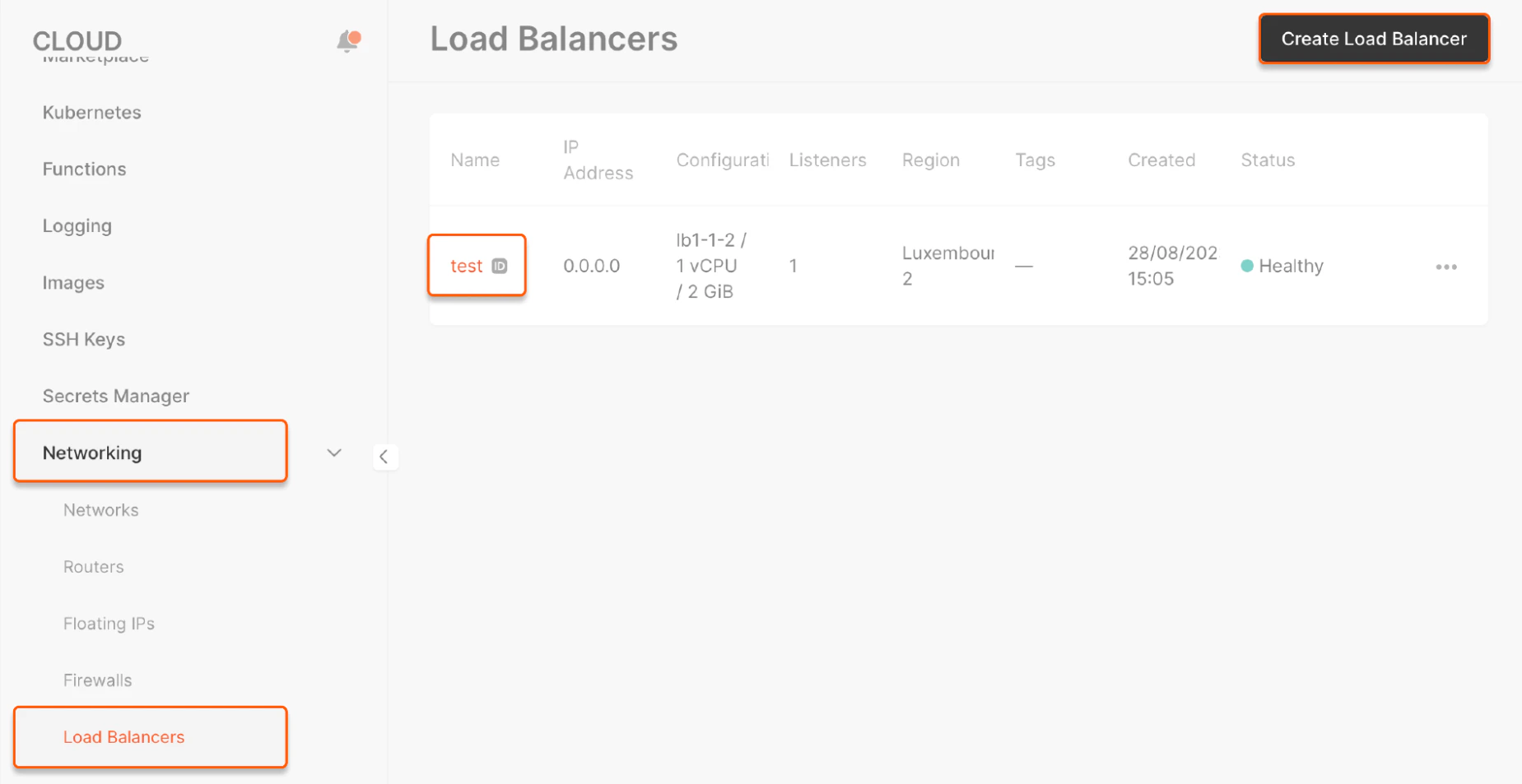
In the **Cloud** menu, select **Networking** and then **Load Balancers**. Click the Load Balancer name for which you want to configure Logging.
 ## Step 2. Enable logging
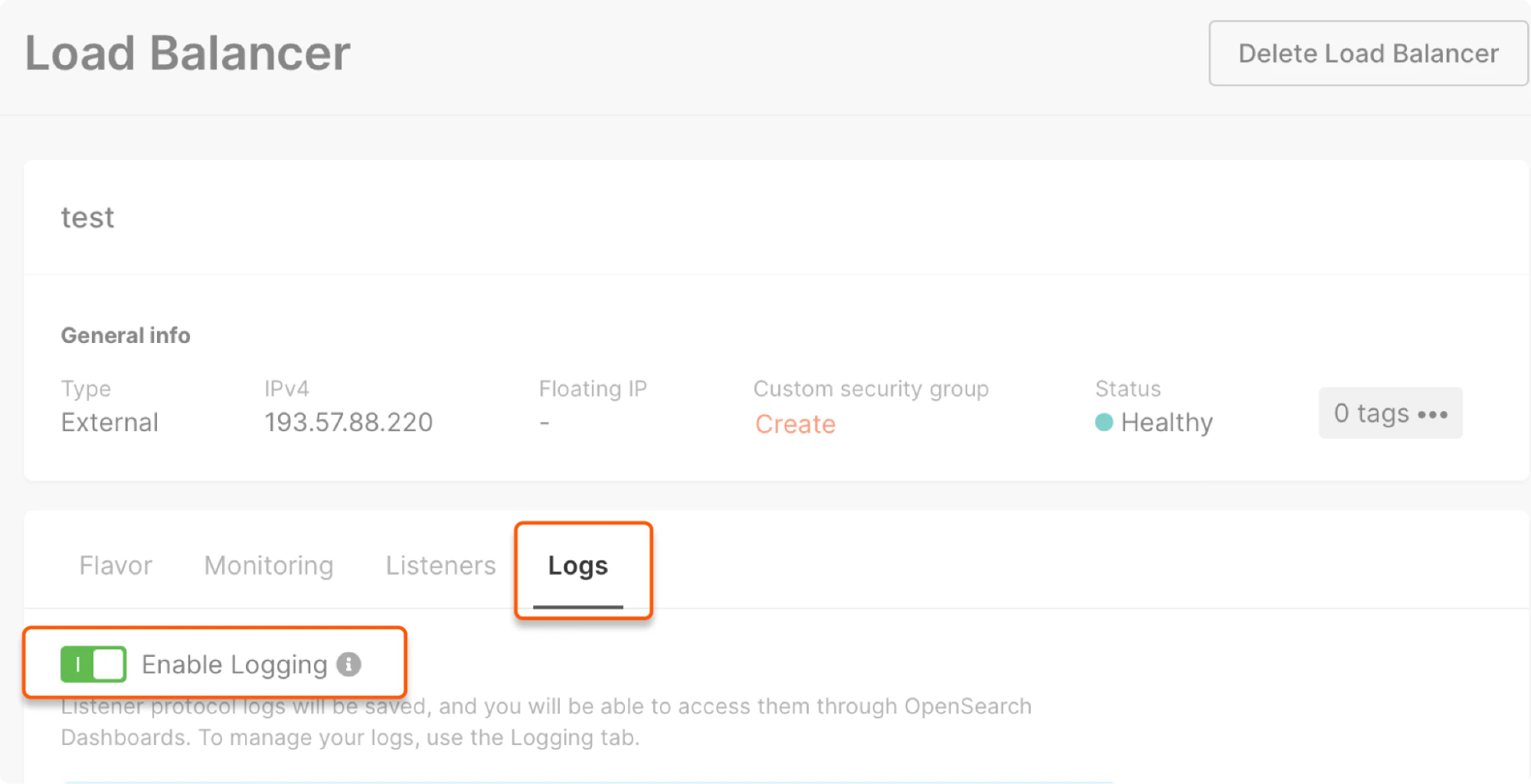
Go to the **Logs** tab and turn on the **Enable Logging** toggle.
## Step 2. Enable logging
Go to the **Logs** tab and turn on the **Enable Logging** toggle.
 ## Step 3. Configure logging settings
1\. Create a namespace for your topics.
**Warning**
This setting is available **if you have not activated** [Logging](/cloud/logging-as-a-service/about-logging-as-a-service) for your project in the selected destination region.
Previously, when activating Logging, you could see a non-human-readable string, e.g., `cbc25c71af8d4f7ca6cbbcdc5a4d68fe.your-topic` as a *namespace* that is used as prefixed for topics. To make this process more user-friendly, we created the possibility of making human-readable namespaces, e.g., `namespace123.your-topic`.
**Caution**
You can only create a namespace for a new project where the default value is not set up.
To create a namespace, input the namespace name according to the following restrictions:
* Lowercase Latin letters and digits can be used
* Underscore and spaces are prohibited
* Length is between 2–32
* The name should be unique for the destination region. If it's already used, the system will suggest inputting another name.
Click **Create**.
## Step 3. Configure logging settings
1\. Create a namespace for your topics.
**Warning**
This setting is available **if you have not activated** [Logging](/cloud/logging-as-a-service/about-logging-as-a-service) for your project in the selected destination region.
Previously, when activating Logging, you could see a non-human-readable string, e.g., `cbc25c71af8d4f7ca6cbbcdc5a4d68fe.your-topic` as a *namespace* that is used as prefixed for topics. To make this process more user-friendly, we created the possibility of making human-readable namespaces, e.g., `namespace123.your-topic`.
**Caution**
You can only create a namespace for a new project where the default value is not set up.
To create a namespace, input the namespace name according to the following restrictions:
* Lowercase Latin letters and digits can be used
* Underscore and spaces are prohibited
* Length is between 2–32
* The name should be unique for the destination region. If it's already used, the system will suggest inputting another name.
Click **Create**.
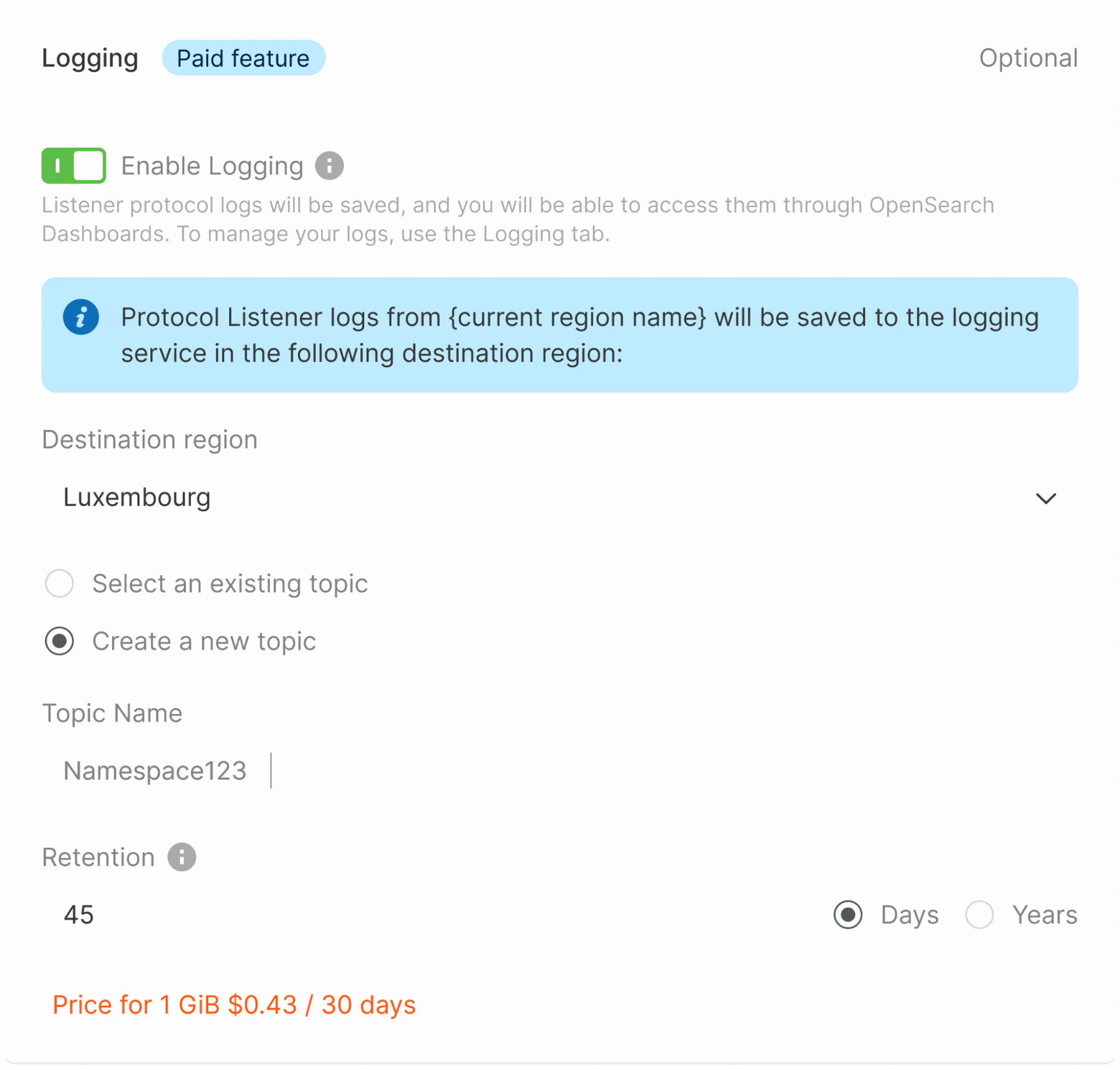 2\. Add a topic. Select an existing one from the list or create a new one. For a new topic, specify the name and the retention period.
3\. Click **Save changes**.
Your Load Balancer will start sending logs to the topic.
## Throughput test results
Below are the test results that demonstrate the throughput for various region pairs (measured in K RPS,) where "source" is the region of a Load Balancer and "destination" is the location of the Managed Logging servers.
| **Source** | **Destination** | **Measured log delivery throughput, K RPS** |
| ------------ | --------------- | ------------------------------------------- |
| Amsterdam | Luxembourg | 9.6 |
| Amsterdam-2 | Luxembourg | 14.4 |
| Darmstadt | Luxembourg | 16.8 |
| Frankfurt | Luxembourg | 8 |
| Tokyo | Luxembourg | 1.6 |
| Istanbul | Luxembourg | 8.8 |
| London | Luxembourg | 17.6 |
| Luxembourg-2 | Luxembourg | 12 |
| Warsaw | Luxembourg | 11.2 |
| Paris-2 | Luxembourg | 14.4 |
| Dubai | Luxembourg | 17.6 |
| Almaty | Luxembourg | 16 |
| Johannesburg | Luxembourg | 11.2 |
| Newport | Luxembourg | 16.8 |
| Dubai | Singapore | 16.8 |
| Almaty | Singapore | 12.8 |
| Tokyo | Singapore | 9.6 |
| Singapore | Singapore | 14.4 |
| Johannesburg | Singapore | 11.2 |
| Sydney | Singapore | 10.4 |
| Mumbai | Singapore | 17.6 |
| Hong Kong | Singapore | 10.4 |
| Chicago | Manassas | 8 |
| Manassas | Manassas | 15.2 |
| Santa Clara | Manassas | 7.2 |
| Sao Paulo | Manassas | 14.4 |
| Sao Paulo-2 | Manassas | 16.8 |
2\. Add a topic. Select an existing one from the list or create a new one. For a new topic, specify the name and the retention period.
3\. Click **Save changes**.
Your Load Balancer will start sending logs to the topic.
## Throughput test results
Below are the test results that demonstrate the throughput for various region pairs (measured in K RPS,) where "source" is the region of a Load Balancer and "destination" is the location of the Managed Logging servers.
| **Source** | **Destination** | **Measured log delivery throughput, K RPS** |
| ------------ | --------------- | ------------------------------------------- |
| Amsterdam | Luxembourg | 9.6 |
| Amsterdam-2 | Luxembourg | 14.4 |
| Darmstadt | Luxembourg | 16.8 |
| Frankfurt | Luxembourg | 8 |
| Tokyo | Luxembourg | 1.6 |
| Istanbul | Luxembourg | 8.8 |
| London | Luxembourg | 17.6 |
| Luxembourg-2 | Luxembourg | 12 |
| Warsaw | Luxembourg | 11.2 |
| Paris-2 | Luxembourg | 14.4 |
| Dubai | Luxembourg | 17.6 |
| Almaty | Luxembourg | 16 |
| Johannesburg | Luxembourg | 11.2 |
| Newport | Luxembourg | 16.8 |
| Dubai | Singapore | 16.8 |
| Almaty | Singapore | 12.8 |
| Tokyo | Singapore | 9.6 |
| Singapore | Singapore | 14.4 |
| Johannesburg | Singapore | 11.2 |
| Sydney | Singapore | 10.4 |
| Mumbai | Singapore | 17.6 |
| Hong Kong | Singapore | 10.4 |
| Chicago | Manassas | 8 |
| Manassas | Manassas | 15.2 |
| Santa Clara | Manassas | 7.2 |
| Sao Paulo | Manassas | 14.4 |
| Sao Paulo-2 | Manassas | 16.8 |