Use the REST API to inspect clusters, resize them, manage node lifecycle operations, and automate cluster administration workflows.
An [API token](/account-settings/api-tokens) is required, along with a
[project ID](/api-reference/cloud#tag/Projects/operation/ProjectsListV1.get)
and a [region ID](/api-reference/cloud#tag/Regions/operation/RegionListV1.get).
Open a terminal and set these environment variables before running the examples:
```bash theme={null}
export GCORE_API_KEY="{YOUR_API_KEY}"
export GCORE_CLOUD_PROJECT_ID="{YOUR_PROJECT_ID}"
export GCORE_CLOUD_REGION_ID="{YOUR_REGION_ID}"
```
## List bare metal GPU clusters
The list endpoint returns all clusters in a project and region. Use query filters to narrow results — multiple filters are ANDed, so a cluster must match all specified conditions.
Available filters:
| Filter | Operators | Description |
| --------------- | --------------------------------------- | --------------------------------------------------------------------------------------------------------------- |
| `ids` | — | Return clusters with specific IDs. Repeat the parameter for multiple values: `ids=uuid1&ids=uuid2` |
| `name` | `contains`, `exact`, `prefix`, `suffix` | Match cluster name (case-insensitive) |
| `flavor` | `contains`, `exact`, `prefix`, `suffix` | Match flavor name (case-insensitive) |
| `image_ids` | — | Return clusters provisioned with specific image IDs. Repeat for multiple values |
| `servers_count` | `gte`, `lte`, `gt`, `lt` | Filter by node count |
| `managed_by` | — | Return clusters by management type. Accepted values: `user` (directly managed) or `k8s` (managed by Kubernetes) |
| `created_at` | `gt`, `gte`, `lt`, `lte` | Filter by creation time (UTC ISO 8601) |
| `updated_at` | `gt`, `gte`, `lt`, `lte` | Filter by last-update time (UTC ISO 8601) |
| `tags` | `[key]=value` | Exact tag key-value pair. Multiple pairs are ANDed; values match case-insensitively |
| `tag_key` | `contains`, `exact`, `prefix`, `suffix` | Match tag key regardless of value |
| `tag_value` | `contains`, `exact`, `prefix`, `suffix` | Match tag value regardless of key |
The Python and Go SDKs support `limit` and `offset` for pagination only. Name, flavor, node count, tag, image, and date filters are available via curl only.
```python theme={null}
import os
from gcore import Gcore
client = Gcore(api_key=os.environ.get("GCORE_API_KEY"))
page = client.cloud.gpu_baremetal.clusters.list(
project_id=int(os.environ["GCORE_CLOUD_PROJECT_ID"]),
region_id=int(os.environ["GCORE_CLOUD_REGION_ID"]),
)
for cluster in page.results:
print(cluster.id, cluster.name, cluster.servers_count, cluster.status)
```
```go theme={null}
package main
import (
"context"
"fmt"
"os"
"strconv"
gcore "github.com/G-Core/gcore-go"
"github.com/G-Core/gcore-go/cloud"
"github.com/G-Core/gcore-go/option"
)
func main() {
projectID, _ := strconv.ParseInt(os.Getenv("GCORE_CLOUD_PROJECT_ID"), 10, 64)
regionID, _ := strconv.ParseInt(os.Getenv("GCORE_CLOUD_REGION_ID"), 10, 64)
client := gcore.NewClient(option.WithAPIKey(os.Getenv("GCORE_API_KEY")))
page, err := client.Cloud.GPUBaremetal.Clusters.List(context.TODO(),
cloud.GPUBaremetalClusterListParams{
ProjectID: gcore.Int(projectID),
RegionID: gcore.Int(regionID),
})
if err != nil {
panic(err)
}
fmt.Printf("Total: %d\n", len(page.Results))
for _, c := range page.Results {
fmt.Printf(" %s %s nodes=%d\n", c.ID, c.Name, c.ServersCount)
}
}
```
```bash theme={null}
curl -G "https://api.gcore.com/cloud/v3/gpu/baremetal/${GCORE_CLOUD_PROJECT_ID}/${GCORE_CLOUD_REGION_ID}/clusters" \
-H "Authorization: APIKey ${GCORE_API_KEY}" \
--data-urlencode "name[prefix]=prod-" \
--data-urlencode "flavor[prefix]=bm3-" \
--data-urlencode "servers_count[gte]=4" \
--data-urlencode "tags[env]=production"
```
Response:
```json theme={null}
{
"count": 1,
"results": [
{
"id": "a1b2c3d4-e5f6-7890-abcd-ef1234567890",
"name": "prod-bm-cluster-1",
"status": "active",
"flavor": "bm3-ai-1xlarge-h100-80-8",
"tags": [
{ "key": "env", "value": "production", "read_only": false },
{ "key": "team", "value": "ml", "read_only": false }
],
"servers_count": 4,
"created_at": "2026-06-10T12:00:00Z",
"updated_at": "2026-06-10T12:15:00Z",
"servers_ids": [
"server-uuid-1",
"server-uuid-2",
"server-uuid-3",
"server-uuid-4"
],
"has_pending_changes": false
}
]
}
```
Use `limit` and `offset` for pagination. The default page size is 10; the maximum is 1000.
## Get cluster details
Returns the full configuration and current status of a single cluster.
```python theme={null}
import os
from gcore import Gcore
client = Gcore(api_key=os.environ.get("GCORE_API_KEY"))
cluster = client.cloud.gpu_baremetal.clusters.get(
cluster_id="{CLUSTER_ID}",
project_id=int(os.environ["GCORE_CLOUD_PROJECT_ID"]),
region_id=int(os.environ["GCORE_CLOUD_REGION_ID"]),
)
print(cluster.id, cluster.name, cluster.status, cluster.servers_count)
```
```go theme={null}
package main
import (
"context"
"fmt"
"os"
"strconv"
"github.com/G-Core/gcore-go"
"github.com/G-Core/gcore-go/cloud"
"github.com/G-Core/gcore-go/option"
)
func main() {
projectID, _ := strconv.ParseInt(os.Getenv("GCORE_CLOUD_PROJECT_ID"), 10, 64)
regionID, _ := strconv.ParseInt(os.Getenv("GCORE_CLOUD_REGION_ID"), 10, 64)
client := gcore.NewClient(option.WithAPIKey(os.Getenv("GCORE_API_KEY")))
cluster, err := client.Cloud.GPUBaremetal.Clusters.Get(context.TODO(),
"{CLUSTER_ID}",
cloud.GPUBaremetalClusterGetParams{
ProjectID: gcore.Int(projectID),
RegionID: gcore.Int(regionID),
})
if err != nil {
panic(err)
}
fmt.Printf("%s %s nodes=%d\n", cluster.ID, cluster.Name, cluster.ServersCount)
}
```
```bash theme={null}
curl "https://api.gcore.com/cloud/v3/gpu/baremetal/${GCORE_CLOUD_PROJECT_ID}/${GCORE_CLOUD_REGION_ID}/clusters/{CLUSTER_ID}" \
-H "Authorization: APIKey ${GCORE_API_KEY}"
```
Response:
```json theme={null}
{
"id": "a1b2c3d4-e5f6-7890-abcd-ef1234567890",
"name": "prod-bm-cluster-1",
"status": "active",
"flavor": "bm3-ai-1xlarge-h100-80-8",
"servers_count": 4,
"servers_ids": ["server-uuid-1", "server-uuid-2", "server-uuid-3", "server-uuid-4"],
"tags": [{ "key": "env", "value": "production" }],
"created_at": "2026-06-10T12:00:00Z",
"updated_at": "2026-06-10T12:15:00Z",
"has_pending_changes": false
}
```
## Resize a cluster
Change the node count by specifying the new total number of nodes. Scaling down removes a random node; to delete a specific node, use the [Delete a specific node](#delete-a-specific-node) endpoint instead.
Scaling down to zero is not allowed. A cluster must contain at least one node at all times.
```python theme={null}
import os
from gcore import Gcore
client = Gcore(api_key=os.environ.get("GCORE_API_KEY"))
task_id_list = client.cloud.gpu_baremetal.clusters.resize(
cluster_id="{CLUSTER_ID}",
project_id=int(os.environ["GCORE_CLOUD_PROJECT_ID"]),
region_id=int(os.environ["GCORE_CLOUD_REGION_ID"]),
instances_count=4,
)
print(task_id_list.tasks)
```
```go theme={null}
package main
import (
"context"
"fmt"
"os"
"strconv"
"github.com/G-Core/gcore-go"
"github.com/G-Core/gcore-go/cloud"
"github.com/G-Core/gcore-go/option"
)
func main() {
projectID, _ := strconv.ParseInt(os.Getenv("GCORE_CLOUD_PROJECT_ID"), 10, 64)
regionID, _ := strconv.ParseInt(os.Getenv("GCORE_CLOUD_REGION_ID"), 10, 64)
client := gcore.NewClient(option.WithAPIKey(os.Getenv("GCORE_API_KEY")))
taskIDList, err := client.Cloud.GPUBaremetal.Clusters.Resize(context.TODO(),
"{CLUSTER_ID}",
cloud.GPUBaremetalClusterResizeParams{
ProjectID: gcore.Int(projectID),
RegionID: gcore.Int(regionID),
InstancesCount: 4,
})
if err != nil {
panic(err)
}
fmt.Printf("%+v\n", taskIDList.Tasks)
}
```
```bash theme={null}
curl -X POST \
"https://api.gcore.com/cloud/v1/ai/clusters/gpu/${GCORE_CLOUD_PROJECT_ID}/${GCORE_CLOUD_REGION_ID}/{CLUSTER_ID}/resize" \
-H "Authorization: APIKey ${GCORE_API_KEY}" \
-H "Content-Type: application/json" \
-d '{"instances_count": 4}'
```
Response:
```json theme={null}
{ "tasks": ["task-uuid"] }
```
Poll `GET /cloud/v1/tasks/{task_id}` every 5 seconds until `state` is `FINISHED`. Bare Metal H100 nodes may take 15–40 minutes to provision.
## Control cluster power state
The `action` endpoint applies a power operation to all nodes in the cluster simultaneously.
| Action | Description |
| ------------- | ------------------------------------ |
| `start` | Power on all nodes |
| `stop` | Power off all nodes |
| `soft_reboot` | Send ACPI shutdown signal and reboot |
| `hard_reboot` | Force-reset all nodes immediately |
The Python and Go SDKs (v0.48.0) do not expose the cluster action endpoint directly. Use the curl tab below.
```bash theme={null}
# Replace "soft_reboot" with "start", "stop", or "hard_reboot"
curl -X POST \
"https://api.gcore.com/cloud/v3/gpu/baremetal/${GCORE_CLOUD_PROJECT_ID}/${GCORE_CLOUD_REGION_ID}/clusters/{CLUSTER_ID}/action" \
-H "Authorization: APIKey ${GCORE_API_KEY}" \
-H "Content-Type: application/json" \
-d '{"action": "soft_reboot"}'
```
Response:
```json theme={null}
{ "tasks": ["task-uuid"] }
```
Poll `GET /cloud/v1/tasks/{task_id}` every 5 seconds until `state` is `FINISHED`.
## Rebuild a cluster
Reinstalls the OS on all nodes in the cluster using the image currently configured for the cluster. All local storage data is erased.
To rebuild with a different image or SSH key, first update the cluster server settings with `PATCH /cloud/v3/gpu/baremetal/{project_id}/{region_id}/clusters/{cluster_id}/servers_settings`, then trigger the rebuild.
```python theme={null}
import os
from gcore import Gcore
client = Gcore(api_key=os.environ.get("GCORE_API_KEY"))
task_id_list = client.cloud.gpu_baremetal.clusters.rebuild(
cluster_id="{CLUSTER_ID}",
project_id=int(os.environ["GCORE_CLOUD_PROJECT_ID"]),
region_id=int(os.environ["GCORE_CLOUD_REGION_ID"]),
)
print(task_id_list.tasks)
```
```go theme={null}
package main
import (
"context"
"fmt"
"os"
"strconv"
"github.com/G-Core/gcore-go"
"github.com/G-Core/gcore-go/cloud"
"github.com/G-Core/gcore-go/option"
)
func main() {
projectID, _ := strconv.ParseInt(os.Getenv("GCORE_CLOUD_PROJECT_ID"), 10, 64)
regionID, _ := strconv.ParseInt(os.Getenv("GCORE_CLOUD_REGION_ID"), 10, 64)
client := gcore.NewClient(option.WithAPIKey(os.Getenv("GCORE_API_KEY")))
taskIDList, err := client.Cloud.GPUBaremetal.Clusters.Rebuild(context.TODO(),
"{CLUSTER_ID}",
cloud.GPUBaremetalClusterRebuildParams{
ProjectID: gcore.Int(projectID),
RegionID: gcore.Int(regionID),
})
if err != nil {
panic(err)
}
fmt.Printf("%+v\n", taskIDList.Tasks)
}
```
```bash theme={null}
curl -X POST \
"https://api.gcore.com/cloud/v3/gpu/baremetal/${GCORE_CLOUD_PROJECT_ID}/${GCORE_CLOUD_REGION_ID}/clusters/{CLUSTER_ID}/rebuild" \
-H "Authorization: APIKey ${GCORE_API_KEY}"
```
Response:
```json theme={null}
{ "tasks": ["task-uuid"] }
```
Poll `GET /cloud/v1/tasks/{task_id}` every 5 seconds until `state` is `FINISHED`. Rebuilding all nodes may take 15–40 minutes.
## Rebuild a specific node
Reinstalls the OS on a single node without affecting other nodes in the cluster. All local storage on the node is erased.
```python theme={null}
import os
from gcore import Gcore
client = Gcore(api_key=os.environ.get("GCORE_API_KEY"))
task_id_list = client.cloud.gpu_baremetal.clusters.servers.rebuild(
server_id="{SERVER_ID}",
cluster_id="{CLUSTER_ID}",
project_id=int(os.environ["GCORE_CLOUD_PROJECT_ID"]),
region_id=int(os.environ["GCORE_CLOUD_REGION_ID"]),
)
print(task_id_list.tasks)
```
```go theme={null}
package main
import (
"context"
"fmt"
"os"
"strconv"
"github.com/G-Core/gcore-go"
"github.com/G-Core/gcore-go/cloud"
"github.com/G-Core/gcore-go/option"
)
func main() {
projectID, _ := strconv.ParseInt(os.Getenv("GCORE_CLOUD_PROJECT_ID"), 10, 64)
regionID, _ := strconv.ParseInt(os.Getenv("GCORE_CLOUD_REGION_ID"), 10, 64)
client := gcore.NewClient(option.WithAPIKey(os.Getenv("GCORE_API_KEY")))
taskIDList, err := client.Cloud.GPUBaremetal.Clusters.Servers.Rebuild(context.TODO(),
"{SERVER_ID}",
cloud.GPUBaremetalClusterServerRebuildParams{
ClusterID: "{CLUSTER_ID}",
ProjectID: gcore.Int(projectID),
RegionID: gcore.Int(regionID),
})
if err != nil {
panic(err)
}
fmt.Printf("%+v\n", taskIDList.Tasks)
}
```
```bash theme={null}
curl -X POST \
"https://api.gcore.com/cloud/v3/gpu/baremetal/${GCORE_CLOUD_PROJECT_ID}/${GCORE_CLOUD_REGION_ID}/clusters/{CLUSTER_ID}/servers/{SERVER_ID}/rebuild" \
-H "Authorization: APIKey ${GCORE_API_KEY}"
```
Response:
```json theme={null}
{ "tasks": ["task-uuid"] }
```
Poll `GET /cloud/v1/tasks/{task_id}` every 5 seconds until `state` is `FINISHED`.
## Replace a specific node
Deletes a node and provisions a new one with the same configuration. Use this to recover a node stuck in a failed state without changing the cluster setup.
```python theme={null}
import os
from gcore import Gcore
client = Gcore(api_key=os.environ.get("GCORE_API_KEY"))
task_id_list = client.cloud.gpu_baremetal.clusters.servers.replace(
server_id="{SERVER_ID}",
cluster_id="{CLUSTER_ID}",
project_id=int(os.environ["GCORE_CLOUD_PROJECT_ID"]),
region_id=int(os.environ["GCORE_CLOUD_REGION_ID"]),
)
print(task_id_list.tasks)
```
```go theme={null}
package main
import (
"context"
"fmt"
"os"
"strconv"
"github.com/G-Core/gcore-go"
"github.com/G-Core/gcore-go/cloud"
"github.com/G-Core/gcore-go/option"
)
func main() {
projectID, _ := strconv.ParseInt(os.Getenv("GCORE_CLOUD_PROJECT_ID"), 10, 64)
regionID, _ := strconv.ParseInt(os.Getenv("GCORE_CLOUD_REGION_ID"), 10, 64)
client := gcore.NewClient(option.WithAPIKey(os.Getenv("GCORE_API_KEY")))
taskIDList, err := client.Cloud.GPUBaremetal.Clusters.Servers.Replace(context.TODO(),
"{SERVER_ID}",
cloud.GPUBaremetalClusterServerReplaceParams{
ClusterID: "{CLUSTER_ID}",
ProjectID: gcore.Int(projectID),
RegionID: gcore.Int(regionID),
})
if err != nil {
panic(err)
}
fmt.Printf("%+v\n", taskIDList.Tasks)
}
```
```bash theme={null}
curl -X POST \
"https://api.gcore.com/cloud/v3/gpu/baremetal/${GCORE_CLOUD_PROJECT_ID}/${GCORE_CLOUD_REGION_ID}/clusters/{CLUSTER_ID}/servers/{SERVER_ID}/replace" \
-H "Authorization: APIKey ${GCORE_API_KEY}"
```
Response:
```json theme={null}
{ "tasks": ["task-uuid"] }
```
Poll `GET /cloud/v1/tasks/{task_id}` every 5 seconds until `state` is `FINISHED`.
## Delete a specific node
Removes a single node by ID. If deleting the last node in the cluster, the entire cluster is removed — no confirmation prompt is shown through the API.
```python theme={null}
import os
from gcore import Gcore
client = Gcore(api_key=os.environ.get("GCORE_API_KEY"))
task_id_list = client.cloud.gpu_baremetal.clusters.servers.delete(
instance_id="{SERVER_ID}",
cluster_id="{CLUSTER_ID}",
project_id=int(os.environ["GCORE_CLOUD_PROJECT_ID"]),
region_id=int(os.environ["GCORE_CLOUD_REGION_ID"]),
)
print(task_id_list.tasks)
```
```go theme={null}
package main
import (
"context"
"fmt"
"os"
"strconv"
"github.com/G-Core/gcore-go"
"github.com/G-Core/gcore-go/cloud"
"github.com/G-Core/gcore-go/option"
)
func main() {
projectID, _ := strconv.ParseInt(os.Getenv("GCORE_CLOUD_PROJECT_ID"), 10, 64)
regionID, _ := strconv.ParseInt(os.Getenv("GCORE_CLOUD_REGION_ID"), 10, 64)
client := gcore.NewClient(option.WithAPIKey(os.Getenv("GCORE_API_KEY")))
taskIDList, err := client.Cloud.GPUBaremetal.Clusters.Servers.Delete(context.TODO(),
"{SERVER_ID}",
cloud.GPUBaremetalClusterServerDeleteParams{
ClusterID: "{CLUSTER_ID}",
ProjectID: gcore.Int(projectID),
RegionID: gcore.Int(regionID),
})
if err != nil {
panic(err)
}
fmt.Printf("%+v\n", taskIDList.Tasks)
}
```
```bash theme={null}
curl -X DELETE \
"https://api.gcore.com/cloud/v1/ai/clusters/gpu/${GCORE_CLOUD_PROJECT_ID}/${GCORE_CLOUD_REGION_ID}/{CLUSTER_ID}/node/{SERVER_ID}" \
-H "Authorization: APIKey ${GCORE_API_KEY}"
```
Response:
```json theme={null}
{ "tasks": ["task-uuid"] }
```
Poll `GET /cloud/v1/tasks/{task_id}` every 5 seconds until `state` is `FINISHED`.
## Delete a cluster
Deletes the cluster and all its nodes. Local NVMe storage is permanently erased. File shares and object storage remain intact. Pass `all_floating_ips=true` to release any floating IPs, and `all_reserved_fixed_ips=true` to release reserved fixed IPs.
Cluster deletion is irreversible. Data on local NVMe storage cannot be recovered.
```python theme={null}
import os
from gcore import Gcore
client = Gcore(api_key=os.environ.get("GCORE_API_KEY"))
task_id_list = client.cloud.gpu_baremetal.clusters.delete(
cluster_id="{CLUSTER_ID}",
project_id=int(os.environ["GCORE_CLOUD_PROJECT_ID"]),
region_id=int(os.environ["GCORE_CLOUD_REGION_ID"]),
all_floating_ips=True,
all_reserved_fixed_ips=True,
)
print(task_id_list.tasks)
```
```go theme={null}
package main
import (
"context"
"fmt"
"os"
"strconv"
"github.com/G-Core/gcore-go"
"github.com/G-Core/gcore-go/cloud"
"github.com/G-Core/gcore-go/option"
)
func main() {
projectID, _ := strconv.ParseInt(os.Getenv("GCORE_CLOUD_PROJECT_ID"), 10, 64)
regionID, _ := strconv.ParseInt(os.Getenv("GCORE_CLOUD_REGION_ID"), 10, 64)
client := gcore.NewClient(option.WithAPIKey(os.Getenv("GCORE_API_KEY")))
taskIDList, err := client.Cloud.GPUBaremetal.Clusters.Delete(context.TODO(),
"{CLUSTER_ID}",
cloud.GPUBaremetalClusterDeleteParams{
ProjectID: gcore.Int(projectID),
RegionID: gcore.Int(regionID),
AllFloatingIPs: gcore.Bool(true),
AllReservedFixedIPs: gcore.Bool(true),
})
if err != nil {
panic(err)
}
fmt.Printf("%+v\n", taskIDList.Tasks)
}
```
```bash theme={null}
curl -X DELETE \
"https://api.gcore.com/cloud/v3/gpu/baremetal/${GCORE_CLOUD_PROJECT_ID}/${GCORE_CLOUD_REGION_ID}/clusters/{CLUSTER_ID}?all_floating_ips=true&all_reserved_fixed_ips=true" \
-H "Authorization: APIKey ${GCORE_API_KEY}"
```
Response:
```json theme={null}
{ "tasks": ["task-uuid"] }
```
Poll `GET /cloud/v1/tasks/{task_id}` every 5 seconds until `state` is `FINISHED`.
 ## View cluster nodes
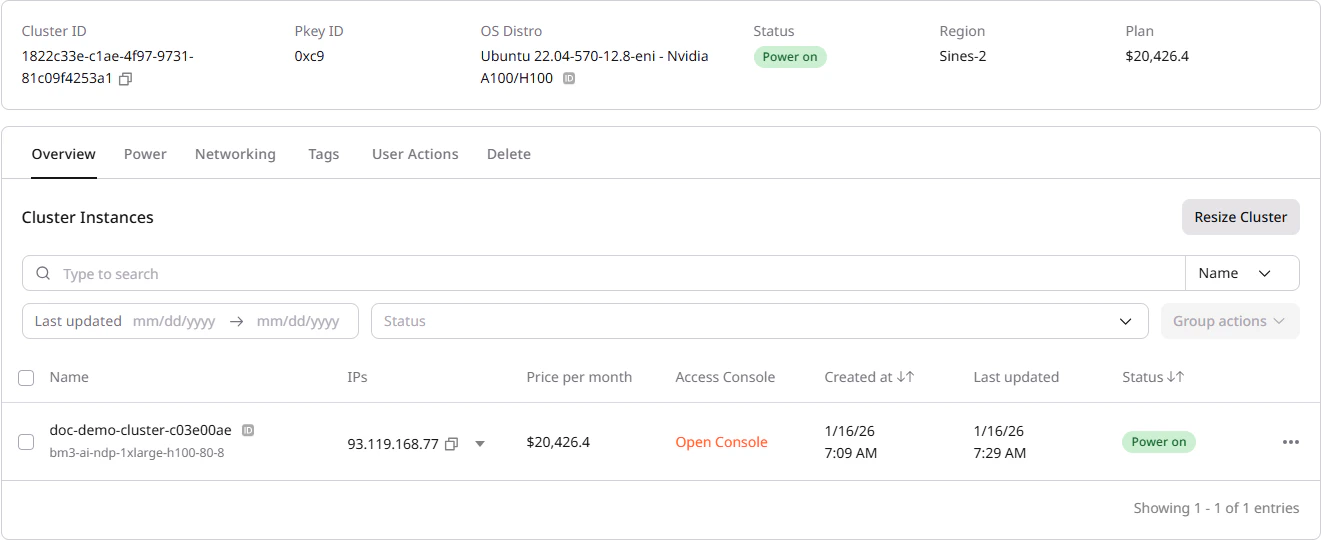
The **Overview** tab lists all nodes (servers) in the cluster. Each node entry shows the node name, flavor, assigned IP addresses, status, timestamps, cost, and other metadata. The table supports filtering by name, date range, and status.
## View cluster nodes
The **Overview** tab lists all nodes (servers) in the cluster. Each node entry shows the node name, flavor, assigned IP addresses, status, timestamps, cost, and other metadata. The table supports filtering by name, date range, and status.
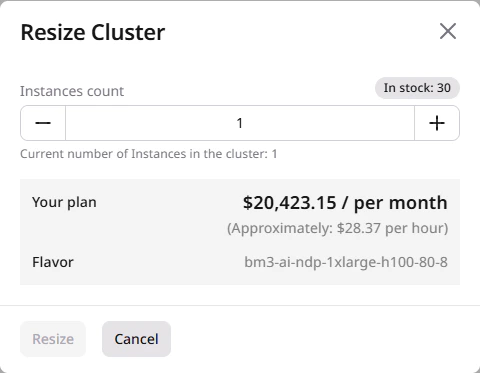 New nodes inherit the cluster's original configuration defined at creation time. The maximum number of nodes is limited by the current stock availability in the selected region.
 ### Bulk actions
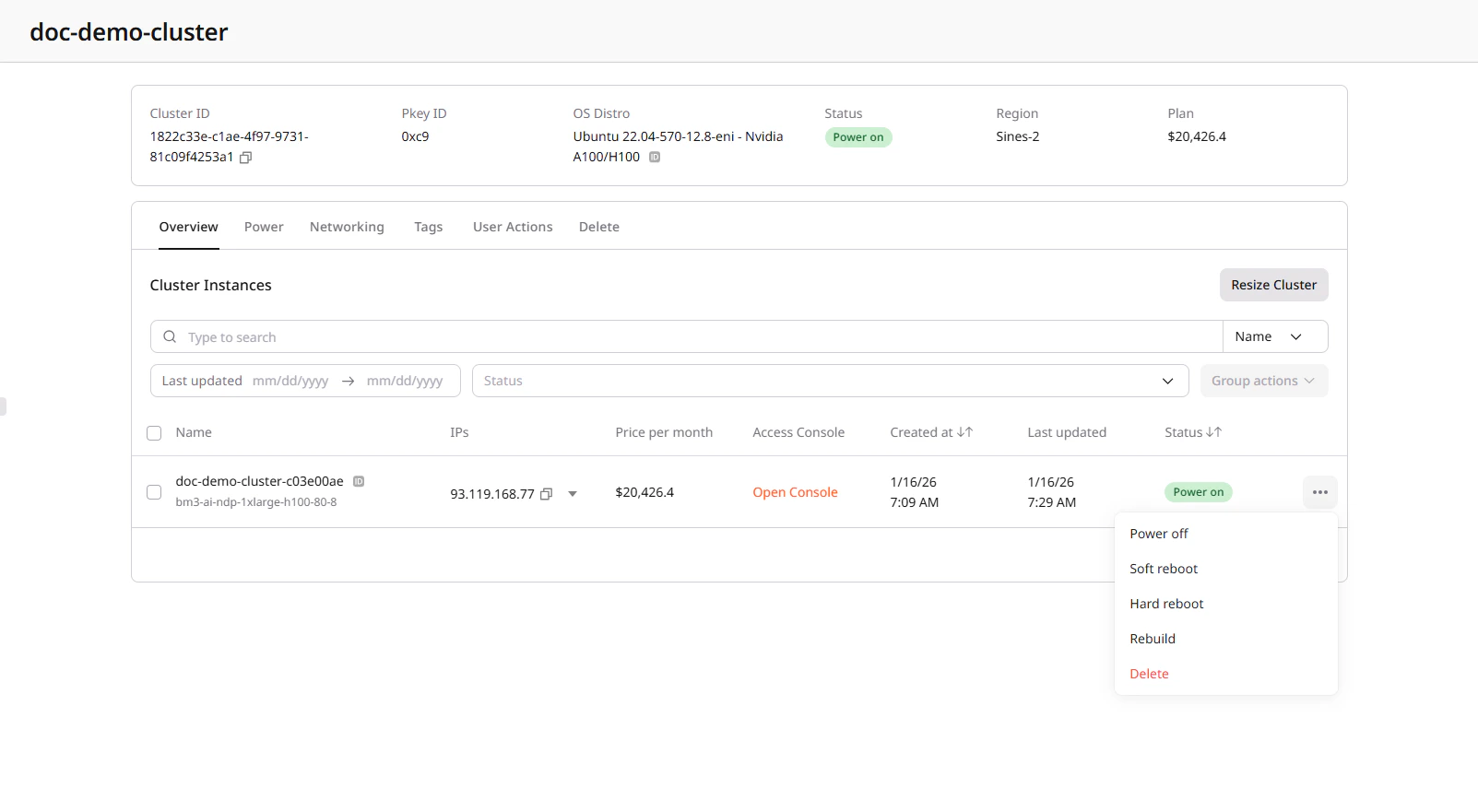
To apply actions to multiple nodes simultaneously:
1. Select nodes using the checkboxes in the nodes table.
2. Click **Group actions** in the toolbar.
3. Select the action to apply to all selected nodes.
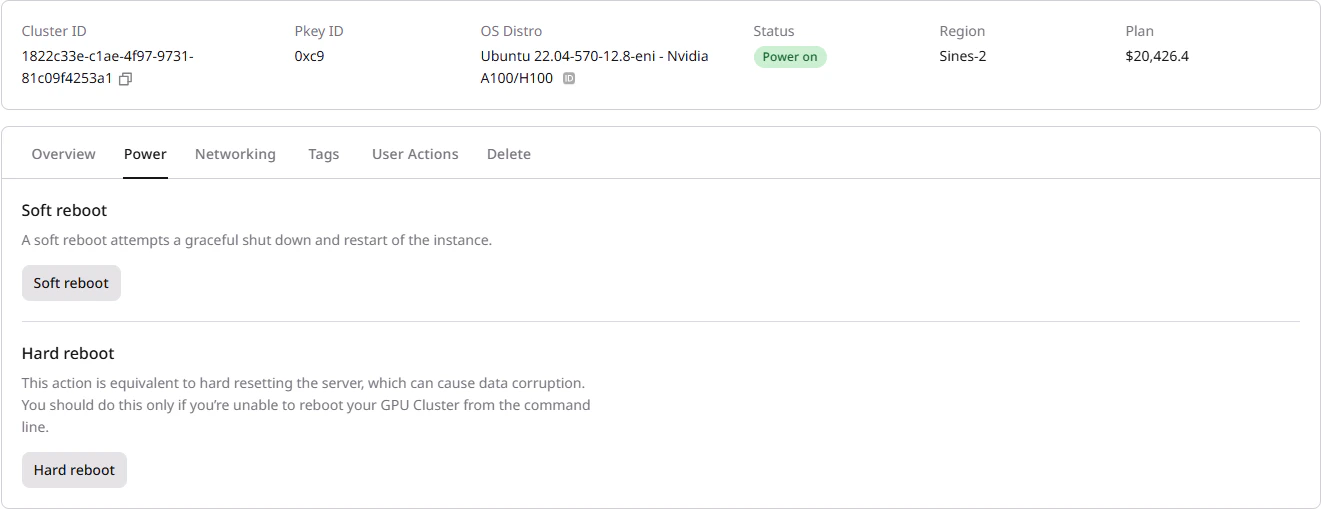
Alternatively, use the **Power** tab to perform soft or hard reboot on all cluster nodes at once.
### Bulk actions
To apply actions to multiple nodes simultaneously:
1. Select nodes using the checkboxes in the nodes table.
2. Click **Group actions** in the toolbar.
3. Select the action to apply to all selected nodes.
Alternatively, use the **Power** tab to perform soft or hard reboot on all cluster nodes at once.
 ## Network interfaces
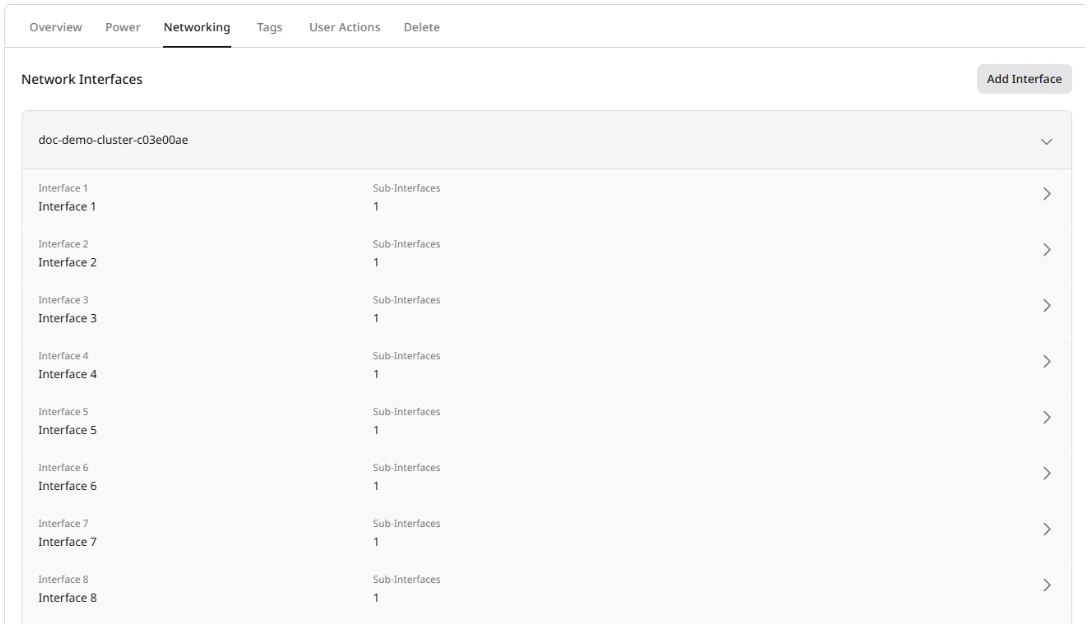
The **Networking** tab displays network interfaces for each node.
Click on a node name to expand its interface details.
Interface types include:
| Type | Description |
| ---------- | ----------------------------------------------------------------------- |
| Public | External IP address for internet access |
| Private | Internal network for communication with other cloud resources |
| InfiniBand | High-speed, low-latency inter-node network for GPU-to-GPU communication |
## Network interfaces
The **Networking** tab displays network interfaces for each node.
Click on a node name to expand its interface details.
Interface types include:
| Type | Description |
| ---------- | ----------------------------------------------------------------------- |
| Public | External IP address for internet access |
| Private | Internal network for communication with other cloud resources |
| InfiniBand | High-speed, low-latency inter-node network for GPU-to-GPU communication |
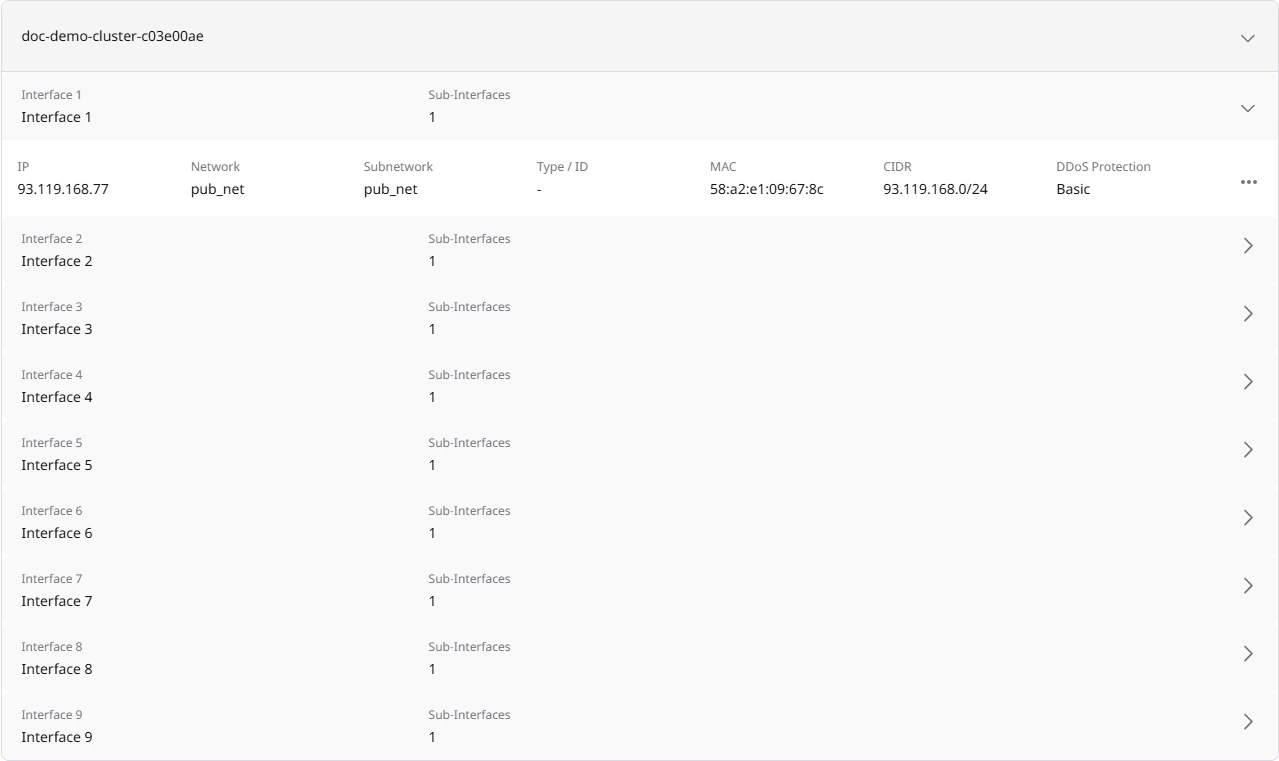
 For flavors with InfiniBand, multiple InfiniBand interfaces are created automatically (by default, 8 for H100 configurations). These appear as "GPU-cluster ib-subnet" entries in the interface list.
Click on an interface to expand its details, including IP address, network configuration, and other network information.
For flavors with InfiniBand, multiple InfiniBand interfaces are created automatically (by default, 8 for H100 configurations). These appear as "GPU-cluster ib-subnet" entries in the interface list.
Click on an interface to expand its details, including IP address, network configuration, and other network information.
 ### Modify network interfaces
To add network interfaces on a specific node:
1. Navigate to the **Networking** tab.
2. Click on a node to expand its details.
3. Click **Add Interface** or **Add Sub-Interface**.
4. Configure the interface type (public or private) and IP allocation settings as supported by the service.
### Modify network interfaces
To add network interfaces on a specific node:
1. Navigate to the **Networking** tab.
2. Click on a node to expand its details.
3. Click **Add Interface** or **Add Sub-Interface**.
4. Configure the interface type (public or private) and IP allocation settings as supported by the service.
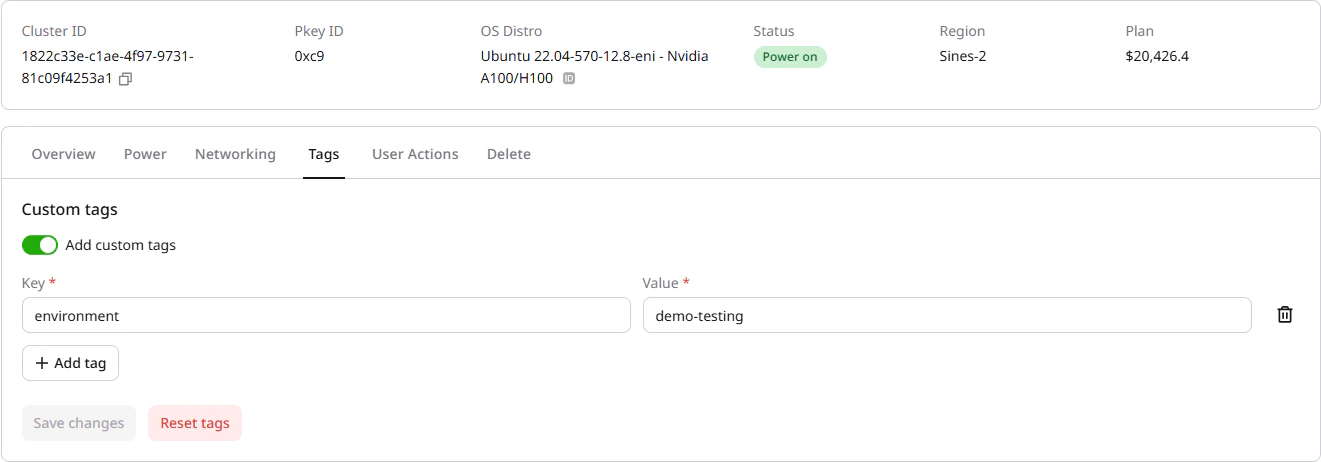 Use tags for billing allocation, environment identification, or organizational purposes.
 ## Console access
For troubleshooting or when SSH access is unavailable, use the browser-based console.
1. In the **Overview** tab, locate the target node.
2. Click **Open Console** in the node row.
3. The console opens in a new browser tab using noVNC.
4. Log in with the same credentials used for SSH access.
## Console access
For troubleshooting or when SSH access is unavailable, use the browser-based console.
1. In the **Overview** tab, locate the target node.
2. Click **Open Console** in the node row.
3. The console opens in a new browser tab using noVNC.
4. Log in with the same credentials used for SSH access.
 The console provides direct terminal access to the node, useful when network connectivity issues prevent SSH access.
## Delete a cluster
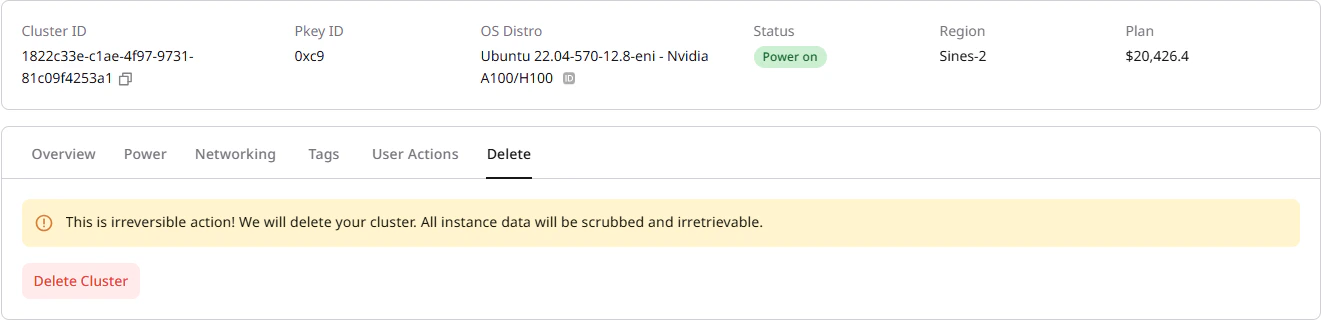
When a cluster is deleted, local NVMe storage is permanently erased; file shares and object storage remain intact.
To delete a cluster:
1. Navigate to the **Delete** tab on the cluster details page.
2. Click **Delete Cluster**.
3. Confirm the deletion.
The console provides direct terminal access to the node, useful when network connectivity issues prevent SSH access.
## Delete a cluster
When a cluster is deleted, local NVMe storage is permanently erased; file shares and object storage remain intact.
To delete a cluster:
1. Navigate to the **Delete** tab on the cluster details page.
2. Click **Delete Cluster**.
3. Confirm the deletion.