> ## Documentation Index
> Fetch the complete documentation index at: https://gcore.com/docs/llms.txt
> Use this file to discover all available pages before exploring further.
# Overview
Gcore Everywhere Inference deploys trained AI models on edge inference nodes across 180+ locations worldwide. It brings models closer to users for low response times, with no infrastructure to manage — suited for latency-sensitive workloads in fintech, healthcare, gaming, media, and industrial applications.
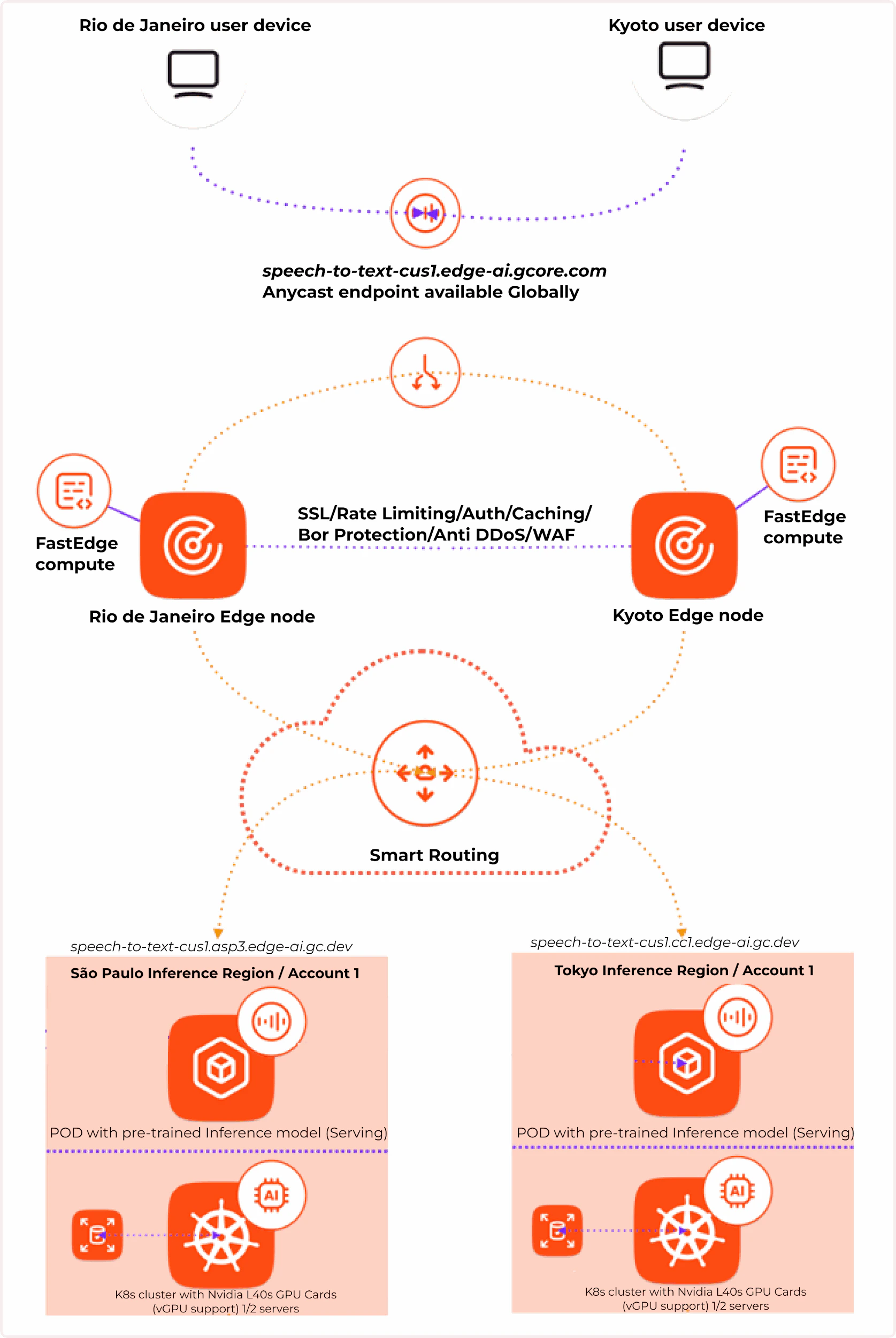
Gcore routes end-user queries to the nearest running model using [anycast endpoints](https://gcore.com/learning/what-is-anycast). Smart Routing selects the closest inference region through a single endpoint—no scaling, routing, or node monitoring required.
## How Everywhere Inference works
It combines two technologies:
1. **Edge network** — provides low latency via anycast balancing, smart routing, and built-in DDoS and bot protection.
2. **Serverless flexible GPU infrastructure** — enables deployment of [Application Catalog](/edge-ai/everywhere-inference/application-catalog) models or [custom models](/edge-ai/everywhere-inference/ai-models/prepare-a-custom-ai-model-for-deployment) on purpose-built NVIDIA GPUs.
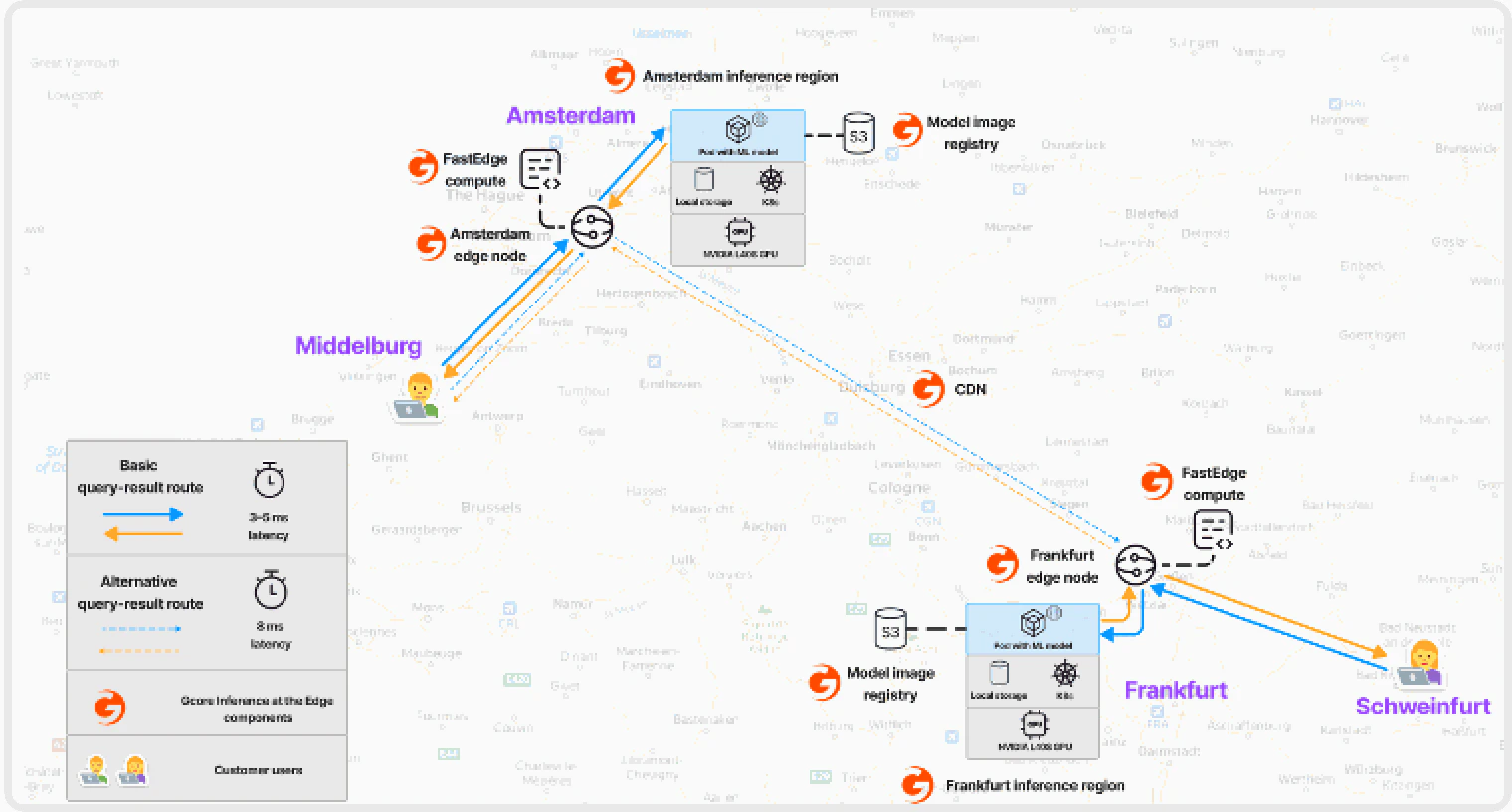
 Gcore uses [Healthchecks](/dns/dns-failover/configure-and-use-dns-failover) to monitor pod availability. If a pod in one region goes down, requests are automatically routed to the next-closest inference region.
 ## Supported VM flavors
The hardware options available to you depend on your account limits and region. To unlock GPU access or add more deployments, [submit a quota request](/edge-ai/everywhere-inference/quotas/request-quota-increase).
| **vGPUs** | **vCPUs** | **Memory (GiB)** |
| --------- | --------- | ---------------- |
| — | 4 | 16 |
| — | 8 | 32 |
| 1xL40S | 16 | 232 |
| 2xL40S | 32 | 464 |
| 1xH100 | 16 | 232 |
| 2xH100 | 32 | 464 |
| 4xH100 | 64 | 928 |
| 1xA100 | 16 | 232 |
| 2xA100 | 32 | 464 |
| 4xA100 | 64 | 928 |
## Supported VM flavors
The hardware options available to you depend on your account limits and region. To unlock GPU access or add more deployments, [submit a quota request](/edge-ai/everywhere-inference/quotas/request-quota-increase).
| **vGPUs** | **vCPUs** | **Memory (GiB)** |
| --------- | --------- | ---------------- |
| — | 4 | 16 |
| — | 8 | 32 |
| 1xL40S | 16 | 232 |
| 2xL40S | 32 | 464 |
| 1xH100 | 16 | 232 |
| 2xH100 | 32 | 464 |
| 4xH100 | 64 | 928 |
| 1xA100 | 16 | 232 |
| 2xA100 | 32 | 464 |
| 4xA100 | 64 | 928 |