> ## Documentation Index
> Fetch the complete documentation index at: https://gcore.com/docs/llms.txt
> Use this file to discover all available pages before exploring further.

# WebRTC to HLS/DASH

export const MethodSection = ({children}) => children ?? null;

export const MethodSwitch = ({children}) => {
  const tabs = React.Children.toArray(children).map(c => {
    if (!c || !c.props) return null;
    if (c.props.id) return c;
    const inner = c.props.children;
    if (inner && inner.props && inner.props.id) return inner;
    return null;
  }).filter(Boolean);
  const firstId = tabs.length > 0 ? tabs[0].props.id : "";
  const [active, setActive] = React.useState(firstId);
  React.useEffect(() => {
    try {
      const saved = localStorage.getItem("gcore_docs_method");
      if (saved && tabs.find(t => t.props.id === saved)) {
        setActive(saved);
      }
    } catch (_) {}
  }, []);
  React.useEffect(() => {
    try {
      document.querySelectorAll("h2[id], h3[id]").forEach(heading => {
        const visible = heading.offsetParent !== null;
        document.querySelectorAll(`a[href="#${heading.id}"]`).forEach(link => {
          if (link.closest("h1,h2,h3,h4,h5,h6")) return;
          const li = link.closest("li");
          if (li) li.style.display = visible ? "" : "none";
        });
      });
    } catch (_) {}
    window.dispatchEvent(new Event("scroll"));
  }, [active]);
  const handleClick = id => {
    setActive(id);
    try {
      localStorage.setItem("gcore_docs_method", id);
    } catch (_) {}
  };
  return <div>
      <div className="not-prose flex gap-0 border-b border-zinc-200 dark:border-zinc-800 mb-8 mt-2" role="tablist">
        {tabs.map(tab => {
    const isActive = active === tab.props.id;
    return <button key={tab.props.id} role="tab" aria-selected={isActive} onClick={() => handleClick(tab.props.id)} className={["px-4 py-2 text-sm font-medium border-b-2 -mb-px transition-colors cursor-pointer", isActive ? "border-primary text-primary" : "border-transparent text-zinc-500 hover:text-zinc-800 dark:hover:text-zinc-200"].join(" ")}>
              {tab.props.label}
            </button>;
  })}
      </div>

      {tabs.map(tab => <div key={tab.props.id} style={{
    display: active === tab.props.id ? "" : "none"
  }}>
          {tab.props.children}
        </div>)}
    </div>;
};

<MethodSwitch>
  <MethodSection id="portal" label="Customer Portal">
    <p>WebRTC lets a browser send camera and microphone media directly to Gcore, where the stream is converted to HLS and MPEG-DASH for playback. This is useful when a presenter needs to start a live stream without OBS, encoder software, or manual codec settings.</p>

    <p>Use the browser flow for quick webcam broadcasts, interviews, and remote presenters.</p>

    ## Start a browser stream

    <p>Use the browser publisher to start WebRTC ingest from a webcam and publish the resulting HLS/DASH stream.</p>

    1. Log in to the [Gcore Customer Portal](https://portal.gcore.com) and navigate to **Streaming** > **Live Streaming**.

    2. Open the live stream to publish to. If no stream exists, create a stream first.

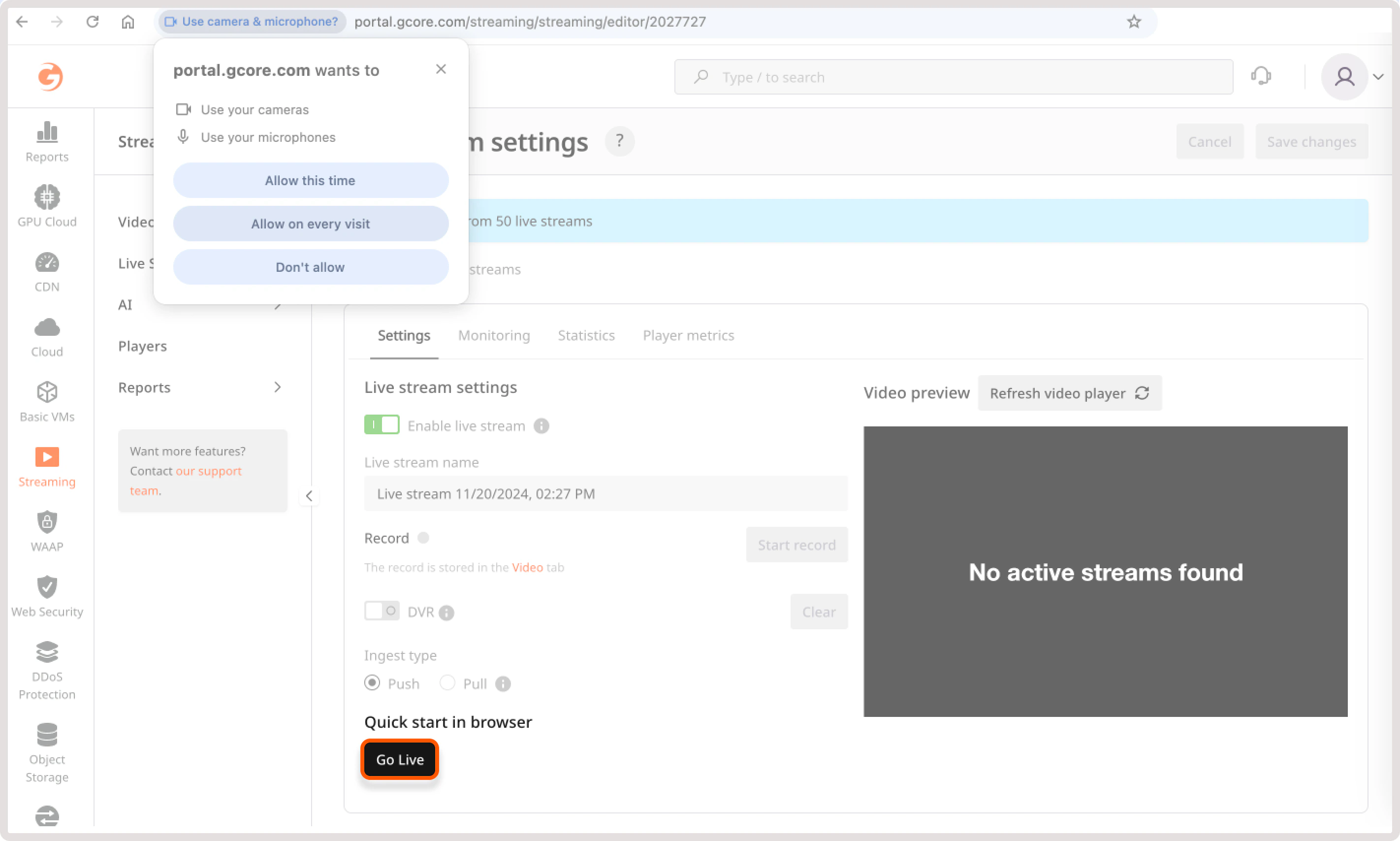
    3. In **Go live from your browser (beta)**, click **Start WebRTC + webcam**. The section description is "Here you can quickly start a WebRTC live stream using your webcam."
    <Frame>
      <img src="https://mintcdn.com/gcore/w7-RPSLfPIE-GGXz/images/docs/streaming-platform/live-streaming/protocols/webrtc/go-live-button.png?fit=max&auto=format&n=w7-RPSLfPIE-GGXz&q=85&s=63f28dc1c32fb8a229c458760250b7d9" alt="WebRTC browser publishing section in live stream settings" width="2844" height="1708" data-path="images/docs/streaming-platform/live-streaming/protocols/webrtc/go-live-button.png" />
    </Frame>

    4. Allow Gcore to access the camera and microphone.

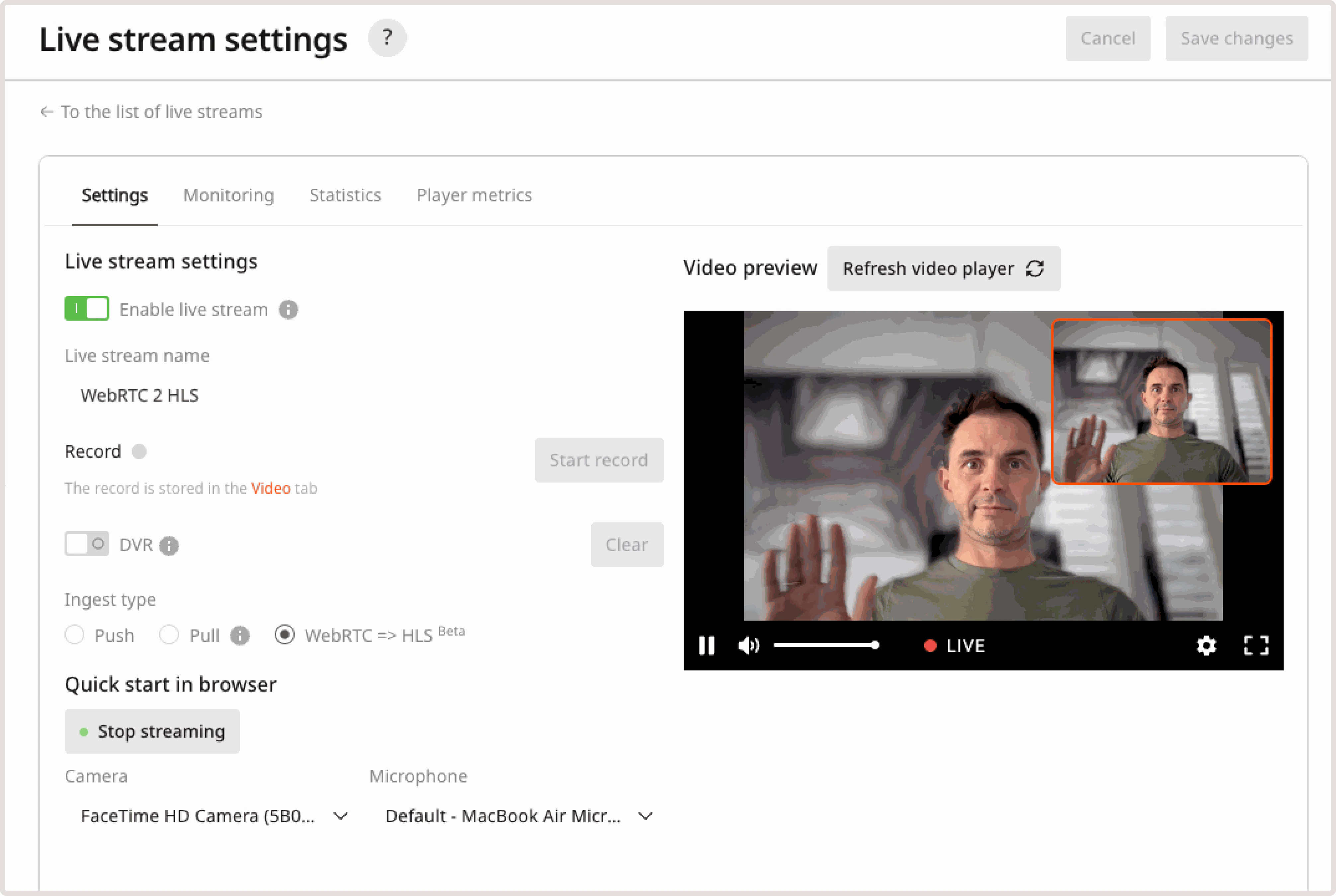
    <p>The **Video preview** section shows the transcoded HLS/DASH stream. The small window in the corner shows the local webcam feed that is being sent from the browser.</p>

    <Frame>
      <img src="https://mintcdn.com/gcore/w7-RPSLfPIE-GGXz/images/docs/streaming-platform/live-streaming/protocols/webrtc/started-live-stream.png?fit=max&auto=format&n=w7-RPSLfPIE-GGXz&q=85&s=2f210cd6da13fc4e7670edeb647e4170" alt="Live stream preview after WebRTC browser publishing starts" width="4024" height="2700" data-path="images/docs/streaming-platform/live-streaming/protocols/webrtc/started-live-stream.png" />
    </Frame>

    ## Share the stream

    <p>After the preview starts, use the export links from the live stream settings to publish the stream in an app, website, or custom player.</p>

    * Copy the **Iframe embed code** to embed the Gcore player.
    * Copy the **Player URL** to open the hosted player page.
    * Copy the HLS or MPEG-DASH manifest URL to use a custom player.

    ## Technical details

    <p>For API workflows, SDK examples, WHIP response codes, and codec requirements, use the detailed [protocol guide](/streaming/live-streaming/protocols/webrtc).</p>
  </MethodSection>
</MethodSwitch>