> ## Documentation Index
> Fetch the complete documentation index at: https://gcore.com/docs/llms.txt
> Use this file to discover all available pages before exploring further.

# Manage domains protected with WAAP

export const MethodSection = ({children}) => children ?? null;

export const MethodSwitch = ({children}) => {
  const tabs = React.Children.toArray(children).map(c => {
    if (!c || !c.props) return null;
    if (c.props.id) return c;
    const inner = c.props.children;
    if (inner && inner.props && inner.props.id) return inner;
    return null;
  }).filter(Boolean);
  const firstId = tabs.length > 0 ? tabs[0].props.id : "";
  const [active, setActive] = React.useState(firstId);
  React.useEffect(() => {
    try {
      const saved = localStorage.getItem("gcore_docs_method");
      if (saved && tabs.find(t => t.props.id === saved)) {
        setActive(saved);
      }
    } catch (_) {}
  }, []);
  React.useEffect(() => {
    try {
      document.querySelectorAll("h2[id], h3[id]").forEach(heading => {
        const visible = heading.offsetParent !== null;
        document.querySelectorAll(`a[href="#${heading.id}"]`).forEach(link => {
          if (link.closest("h1,h2,h3,h4,h5,h6")) return;
          const li = link.closest("li");
          if (li) li.style.display = visible ? "" : "none";
        });
      });
    } catch (_) {}
    window.dispatchEvent(new Event("scroll"));
  }, [active]);
  const handleClick = id => {
    setActive(id);
    try {
      localStorage.setItem("gcore_docs_method", id);
    } catch (_) {}
  };
  return <div>
      <div className="not-prose flex gap-0 border-b border-zinc-200 dark:border-zinc-800 mb-8 mt-2" role="tablist">
        {tabs.map(tab => {
    const isActive = active === tab.props.id;
    return <button key={tab.props.id} role="tab" aria-selected={isActive} onClick={() => handleClick(tab.props.id)} className={["px-4 py-2 text-sm font-medium border-b-2 -mb-px transition-colors cursor-pointer", isActive ? "border-primary text-primary" : "border-transparent text-zinc-500 hover:text-zinc-800 dark:hover:text-zinc-200"].join(" ")}>
              {tab.props.label}
            </button>;
  })}
      </div>

      {tabs.map(tab => <div key={tab.props.id} style={{
    display: active === tab.props.id ? "" : "none"
  }}>
          {tab.props.children}
        </div>)}
    </div>;
};

<MethodSwitch>
  <MethodSection id="portal" label="Customer Portal">
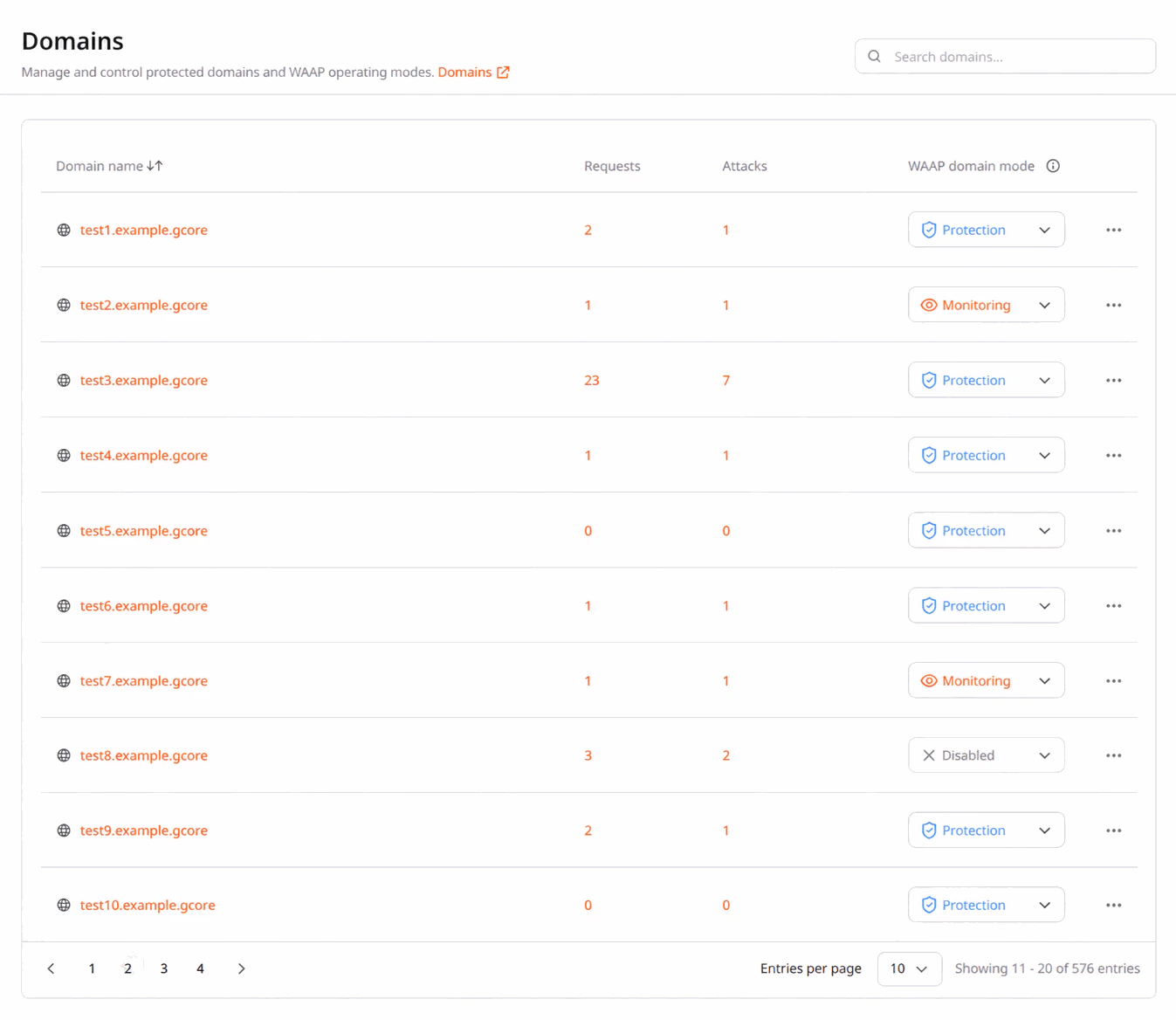
    <p>After [activating WAAP for a domain in CDN](/waap/getting-started/configure-waap-for-a-domain#step-2-enable-waap-in-cdn-resource-settings), it appears on the **Domains** page in the [Gcore Customer Portal](https://portal.gcore.com/). This page displays all domains and their statuses, provides access to CDN settings, and allows deletion of inactive domains.</p>

    <Frame>
      <img src="https://mintcdn.com/gcore/miQBBIP7_MJoxV5F/images/docs/waap/getting-started/configure-waap-for-a-domain/waap-domains.png?fit=max&auto=format&n=miQBBIP7_MJoxV5F&q=85&s=fd87f71792fc0ac312fa5aa1e6870466" alt="Domains page in the Customer Portal" width="1347" height="1168" data-path="images/docs/waap/getting-started/configure-waap-for-a-domain/waap-domains.png" />
    </Frame>

    <p>A domain in WAAP can have the following statuses: </p>

    * **Monitoring**: WAAP monitors all traffic to the domain but doesn't enforce any actions on requests.

    * **Protection**: WAAP enforces all configured security settings for the domain.

    * **Disabled**: The domain isn't protected because WAAP is disabled. You can always [enable WAAP](/waap/getting-started/configure-waap-for-a-domain#step-2-enable-waap-in-cdn-resource-settings) for inactive domains in the CDN resource settings. Note that inactive domains are still billable.

    ## Disable WAAP protection for a domain

    <Info>
      **Info**

      Inactive domains still incur charges as we retain all configured settings and data. If you want to discontinue billing for WAAP protection, delete a domain.
    </Info>

    <p>To disable WAAP protection for a domain:</p>

    1. In the [Gcore Customer Portal](https://portal.gcore.com/), navigate to **CDN** > **CDN resources**.
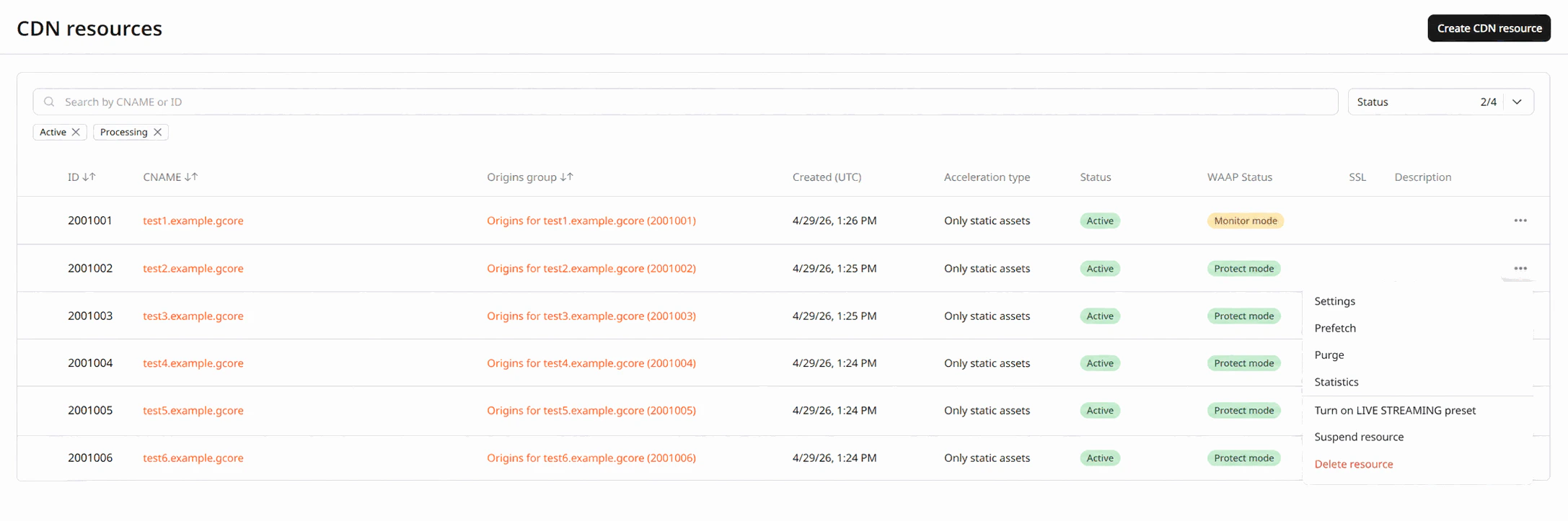
    2. Next to the resource for which you want to disable WAAP, click the three-dot icon and select **Settings**.
    <Frame>
      <img src="https://mintcdn.com/gcore/miQBBIP7_MJoxV5F/images/docs/waap/getting-started/configure-waap-for-a-domain/cdn-resources-settings.png?fit=max&auto=format&n=miQBBIP7_MJoxV5F&q=85&s=13d6caba1271fb710253471ed691d93e" alt="CDN resource settings page in the Customer Portal" width="2174" height="723" data-path="images/docs/waap/getting-started/configure-waap-for-a-domain/cdn-resources-settings.png" />
    </Frame>

    3. Navigate to the relevant section:

    * If you enabled WAAP in the resource settings, scroll down to the **Security** section and disable the **WAAP** toggle.

    * If you enabled WAAP for a particular rule, open the **Rules** tab, find the relevant rule, and disable the **WAAP** toggle in the **Options** section.

    4. Save the changes. Note that deactivating a domain can take up to 20 minutes as this step ensures that all changes are correctly and consistently applied across our system.

    <p>After you deactivate WAAP protection for your domain, all traffic from the CDN will go directly to the origin with no security checks. The domain status on the Domains page in WAAP will change to **inactive**. All WAAP settings and configured rules will remain intact and can be modified. However, it'll take no effect while WAAP is disabled.</p>

    <p>To activate WAAP protection again, [enable the WAAP toggle](/waap/getting-started/configure-waap-for-a-domain#step-2-enable-waap-in-cdn-resource-settings) in the CDN settings.</p>

    <Warning>
      **Warning**

      If you disable WAAP protection for a CDN resource and later re-enable it, WAAP mode will be set to **Monitoring**. If you had **Protection** mode before deactivating a domain, you need to enable it again.
    </Warning>

    ## Delete a domain from WAAP

    <p>You can't delete a domain that has enabled WAAP protection. To delete the domain, disable WAAP in CDN resource settings first. The **WAAP domain mode** should change to **Disabled**.</p>

    <p>To delete an inactive domain:</p>

    1. In the [Gcore Customer Portal](https://portal.gcore.com/), navigate to **WAAP** > **Domains**.
    2. Click the three-dot icon next to the domain that you want to remove.
    3. Select **Delete**.
    4. Confirm your action by clicking **Delete**.

    <p>You've successfully removed your domain from WAAP.</p>

    ## Suspend a CDN resource with WAAP protection

    <p>If you suspend a CDN resource with enabled WAAP, the status of your WAAP-protected domain will change to **Disabled**. All web requests will go directly to the origin, bypassing both CDN and WAAP.</p>

    <Info>
      **Info**

      Inactive domains still incur charges as we retain all configured settings and data. If you want to discontinue billing for WAAP protection, delete a domain.
    </Info>

    <p>A [suspended resource](/cdn/cdn-resource-options/general/suspend-a-cdn-resource-automatically-or-manually) is automatically deleted after 90 days. During this period, WAAP settings remain intact, and you can reactivate both CDN and WAAP.</p>

    ## Delete a CDN resource with WAAP protection

    <p>If you delete a CDN resource that has enabled WAAP protection, your domain and all relevant settings will be automatically removed from WAAP.</p>

    <p>For instructions on how to delete a CDN resource, check our [dedicated guide](/cdn/about-cdn-resources-interface-how-it-is-arranged#delete-a-resource).</p>
  </MethodSection>

  <MethodSection id="api" label="REST API">
    <p>The [Domains](/api-reference/waap#domains) endpoints cover checking a domain's protection status and deleting an inactive domain. Switching between Monitoring and Protection modes is covered in the [domain setup guide](/waap/getting-started/configure-waap-for-a-domain). Response examples include only the fields used in each step.</p>

    <Info>
      An [API token](/account-settings/api-tokens) is required. Use <code>GET /waap/v1/domains</code> to retrieve the domain ID.
    </Info>

    ```bash theme={null}
    export GCORE_API_KEY="{YOUR_API_KEY}"
    export WAAP_DOMAIN_ID="{YOUR_DOMAIN_ID}"
    ```

    ## Domain status

    <p>Retrieve the current protection status and basic details of a specific domain. The API uses different names for statuses than the Customer Portal:</p>

    | Customer Portal | API value |
    | --------------- | --------- |
    | Protection      | `active`  |
    | Monitoring      | `monitor` |
    | Disabled        | `bypass`  |

    <Tabs>
      <Tab title="Python SDK">
        ```python theme={null}
        import gcore
        import os

        client = gcore.Gcore(api_key=os.environ["GCORE_API_KEY"])
        domain_id = int(os.environ["WAAP_DOMAIN_ID"])

        domain = client.waap.domains.get(domain_id)
        print(f"id={domain.id}  name={domain.name}  status={domain.status}")
        ```
      </Tab>

      <Tab title="Go SDK">
        ```go theme={null}
        package main

        import (
            "context"
            "fmt"
            "os"
            "strconv"

            gcore "github.com/G-Core/gcore-go"
            "github.com/G-Core/gcore-go/option"
        )

        func main() {
            client := gcore.NewClient(option.WithAPIKey(os.Getenv("GCORE_API_KEY")))
            domainID, _ := strconv.ParseInt(os.Getenv("WAAP_DOMAIN_ID"), 10, 64)

            domain, err := client.Waap.Domains.Get(context.Background(), domainID)
            if err != nil {
                panic(err)
            }
            fmt.Printf("id=%d  name=%s  status=%s\n", domain.ID, domain.Name, domain.Status)
        }
        ```
      </Tab>

      <Tab title="curl">
        ```bash theme={null}
        curl -X GET "https://api.gcore.com/waap/v1/domains/${WAAP_DOMAIN_ID}" \
          -H "Authorization: APIKey ${GCORE_API_KEY}"
        ```

        Response:

        ```json theme={null}
        {
          "id": 12345,
          "name": "example.com",
          "status": "monitor"
          // ...
        }
        ```
      </Tab>
    </Tabs>

    <p>The `status` field returns the API value from the table above. The `bypass` state can only be set through CDN resource settings — the WAAP API only supports switching between `active` and `monitor`.</p>

    ## Delete a domain

    <p>Remove a domain from WAAP permanently, including all configured rules, firewall rules, and custom settings. This action cannot be undone.</p>

    <Warning>
      The domain must have Disabled status before deletion. To disable a domain, turn off the WAAP toggle in CDN resource settings — the WAAP API only supports switching between `active` and `monitor`, not setting Disabled status.
    </Warning>

    <Tabs>
      <Tab title="Python SDK">
        ```python theme={null}
        import gcore
        import os

        client = gcore.Gcore(api_key=os.environ["GCORE_API_KEY"])
        domain_id = int(os.environ["WAAP_DOMAIN_ID"])

        client.waap.domains.delete(domain_id)
        print("Domain deleted")
        ```
      </Tab>

      <Tab title="Go SDK">
        ```go theme={null}
        package main

        import (
            "context"
            "fmt"
            "os"
            "strconv"

            gcore "github.com/G-Core/gcore-go"
            "github.com/G-Core/gcore-go/option"
        )

        func main() {
            client := gcore.NewClient(option.WithAPIKey(os.Getenv("GCORE_API_KEY")))
            domainID, _ := strconv.ParseInt(os.Getenv("WAAP_DOMAIN_ID"), 10, 64)

            err := client.Waap.Domains.Delete(context.Background(), domainID)
            if err != nil {
                panic(err)
            }
            fmt.Println("Domain deleted")
        }
        ```
      </Tab>

      <Tab title="curl">
        ```bash theme={null}
        curl -X DELETE "https://api.gcore.com/waap/v1/domains/${WAAP_DOMAIN_ID}" \
          -H "Authorization: APIKey ${GCORE_API_KEY}"
        ```
      </Tab>
    </Tabs>

    <p>The API returns 204 with an empty body on success. Attempting to delete a domain that is not in Disabled status returns 422.</p>
  </MethodSection>
</MethodSwitch>