



How to Install MySQL Workbench on Ubuntu
- August 9, 2023
- 2 min read

MySQL Workbench is a visual tool for MySQL databases used by database professionals to design, model, and manage MySQL databases. It offers a unified visual platform that streamlines various database tasks. In this article, we’ll provide a guide on installing MySQL Workbench on your Ubuntu system. Before we proceed, let’s discuss MySQL Workbench in more detail in the next section.
What is MySQL Workbench?
MySQL Workbench is a is a graphical MySQL database management tool. It helps users design, visualize, and manage their databases. With it, you can create and edit database structures, run SQL queries, manage servers, and even migrate data from different database systems. It’s useful for both designing new databases and managing existing ones, making it a go-to tool for many database professionals. Now, let’s proceed to the instructions on how to install it on Ubuntu.
Installing MySQL Workbench on Ubuntu
Here’s a step-by-step guide to installing MySQL Workbench on Ubuntu.
1. Open a Terminal Window. You can do this by pressing Ctrl + Alt + T or by searching for “Terminal” in your applications menu.
2. Update the Package Database. Run the following command to make sure you have the latest information about available packages.
sudo apt update3. Install MySQL Workbench. Run the following command to install MySQL Workbench.
sudo apt install mysql-workbench4. Launch MySQL Workbench. After the installation is complete, you can find MySQL Workbench in your applications menu or run it from the terminal by entering.
mysql-workbench5. Configure MySQL Workbench. When you first run MySQL Workbench, you may need to set up a connection to your MySQL server. You’ll need the hostname, username, and password for your MySQL server.
Using MySQL APT Repository
If you want to have more control over the version you’re installing or ensure you’re getting the latest version, you may want to use the MySQL APT repository.
1. Download MySQL APT Repository. Go to the MySQL Downloads page and download the APT repository package. Click the “No thanks, just start my download” to get started.
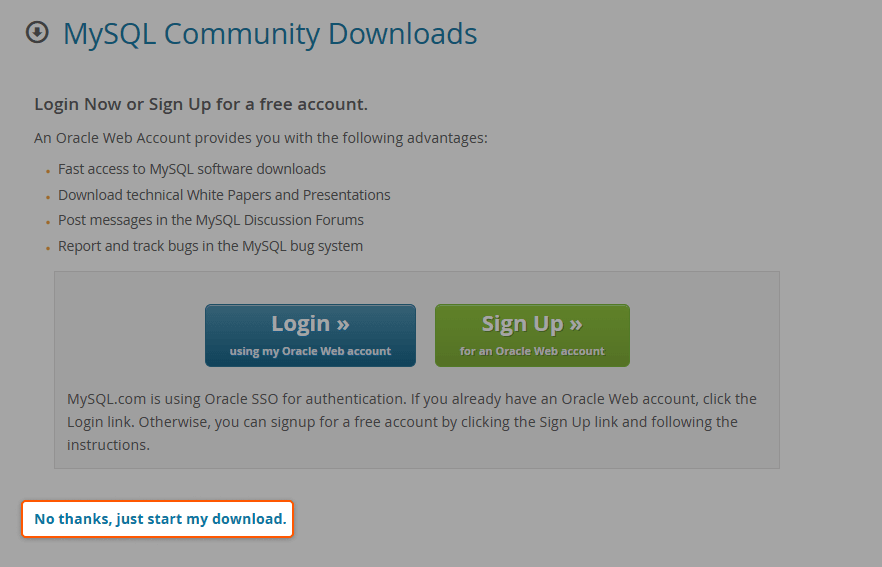
2. Install the Repository Package. Open a terminal and navigate to the folder where you downloaded the package. Then run.
sudo dpkg -i /path/to/the/downloaded/package.deb3. Update Package Information. Run the following command.
sudo apt update4. Install MySQL Workbench. Install MySQL Workbench by using this command.
sudo apt install mysql-workbenchThat’s it! Congratulations, you’ve successfully installed MySQL Workbench. Now you can start managing, designing, or engaging in any work that requires the best interaction with MySQL databases.
Conclusion
Searching for a managed database solution? Choose Gcore Managed Database for PostgreSQL so you can focus on your core business while we manage your database.
- 99.9% SLA for uninterrupted service with high-availability architecture
- Adjustable database resources for changing demands
- Currently in free public beta

Related articles





Imagine discovering that migrating your company's data to a new cloud provider will cost hundreds of thousands of dollars in egress fees alone, before you've even touched the re-engineering work. Or worse, picture being in Synapse Financial

Subscribe to our newsletter
Get the latest industry trends, exclusive insights, and Gcore updates delivered straight to your inbox.