



Updated plugin to connect CDN to a website powered by WordPress
- August 9, 2021
- 3 min read

It is very easy to connect Gcore CDN to a website powered by WordPress with our plugin. We wrote on how to work with it in detail back in 2019 in our article titled “How to integrate a WordPress website with CDN”.
But it has been over a year since then and we always seek to improve our solutions. We updated and made our plugin even more user-friendly. Here is what has been changed and how to work with the updated plugin.
Installation and general settings
No changes here. Once the plugin is installed, go to CDN settings, tick Enable CDN and complete the Personal domain field.

For an instruction on how to install the plugin and configure general settings, check our previous article or knowledge base.
Working with the plugin
We wanted to make settings as user-friendly as possible. It was important for us to make sure that setting necessary parameters could take just a couple of clicks and simple functionality should in no way limit the plugin capabilities.
To that end, we divided settings into two modes: basic (simple) and advanced. Basic settings include all the most popular parameters and the only thing you have to do is to choose which ones you need. Such a simple setup will take no more than a couple of minutes.
And if this is not enough for you, all necessary parameters can be configured in the advanced mode.
Let’s figure it out how to work with both modes.
File types
First, you need to specify which files will be distributed via CDN.
In the basic mode, you just need to choose extensions from the available list.

If the file type you are looking for is not on the list, use the advanced mode:
- Activate Advanced settings.
- In the new field, enter necessary extensions. Enter them one by one and click Add. Newly added extensions will appear on the tab.

Folders
If you want only files from specific folders to be distributed via CDN, you need to specify the paths to these folders in the settings.
In the basic mode, as in the case of the file types, you only need to choose necessary folders from the available list.
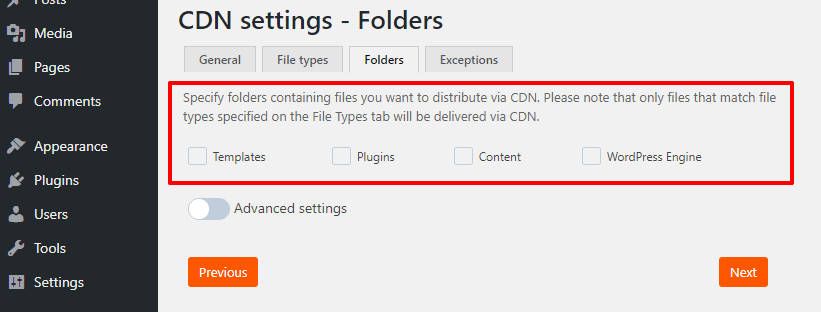
If this is not enough for you, use the advanced mode:
- Activate Advanced settings.
- In the new field, enter paths to folders one by one and click Add.
- The folders will appear on the same tab.

Please note that if you do not specify anything on the Folders tab, all files that match file types specified on the File types tab will be delivered via CDN.
Exceptions
There are no basic and advanced modes on this tab. Everything is the same here. If you want certain files not to be distributed via CDN, specify their URLs in the Exceptions tab field.
Enter them one by one and click Add. The files will appear on the same tab.

How the plugin works
The operation logic also remains unchanged.

For more on the plugin logic, check our previous article or knowledge base.
Conclusions
- It is easy to connect a website powered by WordPress to Gcore CDN with our plugin.
- We have updated the plugin to make it easier and faster to work with—we developed two setup modes: basic and advanced.
- The basic mode allows you to set up CDN in just a couple of minutes. We made some lists of the most popular parameters. In order to specify folders and types of files, which will be delivered via CDN, just choose the necessary extensions from the list.
- If there are too few options in the basic mode, you can activate advanced settings and specify the necessary parameters on your own.
Connect CDN to your WordPress websites and speed them up in a few clicks. Try Gcore CDN for free or get a free consultation.

Related articles




For many startups, infrastructure decisions are mostly about performance, pricing, and developer experience. For Melious AI, they are also about trust.Melious AI is a German startup building a European AI platform around privacy, transparen


At Gcore, delivering exceptional streaming experiences to users across our global network is at the heart of what we do. We're excited to share how we're taking our CDN performance monitoring to new heights through our partnership with AVEQ
Subscribe to our newsletter
Get the latest industry trends, exclusive insights, and Gcore updates delivered straight to your inbox.