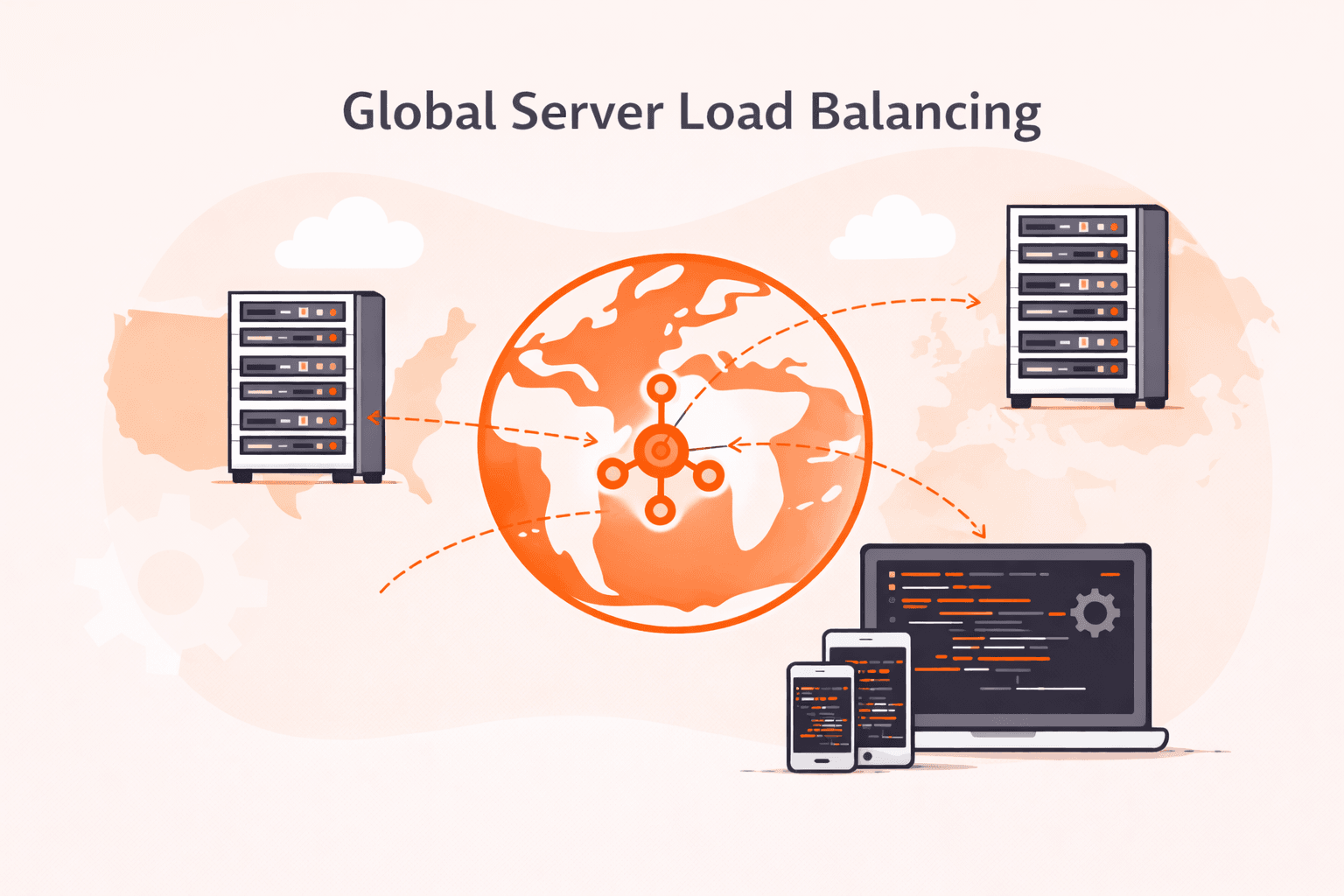
Global server load balancing is a traffic management system that distributes user requests across servers in multiple geographic locations to improve performance and reliability. This approach can reduce latency by 40-60% compared to single-location hosting.
The system works through a combination of DNS routing and health monitoring. When a user makes a request, DNS servers direct traffic to the best available data center based on factors like geographic proximity, server health, and current load. Most implementations check server status every 5-30 seconds to ensure requests reach only healthy endpoints.
The primary benefits focus on three areas: performance, availability, and disaster recovery. Users connect to the nearest server, which typically cuts response time by 50-200ms per request. If one data center fails, traffic automatically shifts to working locations within 30-60 seconds, helping maintain service uptime above 99.9% when combined with redundant infrastructure.
Different routing methods serve specific needs. Geographic routing sends users to the closest server based on location. Performance-based routing measures actual response times and directs traffic to the fastest option. Weighted routing splits traffic by percentage, useful when testing new infrastructure or during gradual migrations. Round-robin methods distribute requests evenly across all available servers.
Organizations running global applications need this technology to meet user expectations. A 100ms delay in page load time can reduce conversion rates by 1%, making fast, reliable content delivery a business requirement.
What is global server load balancing?
Global server load balancing is a DNS-based traffic management technique that distributes user requests across multiple data centers in different geographic locations to improve performance, availability, and reliability. The system routes each user to the optimal server based on factors like geographic proximity, server health, current load, and network conditions.
When a user makes a request, the GSLB system evaluates these criteria in real-time and directs traffic to the data center that can deliver the best experience (typically reducing latency by 40-60% compared to single-location hosting). This approach protects against regional outages by automatically redirecting traffic to healthy locations if one data center fails.
How does global server load balancing work?
Global server load balancing distributes user requests across multiple data centers in different geographic locations to ensure optimal performance and availability. The system monitors the health and capacity of servers worldwide, then routes each request to the best available location based on factors like server load, geographic proximity, network conditions, and response times.
Here's how it works: When a user makes a request, the load balancer performs a DNS lookup that returns the IP address of the most appropriate data center. Reliable DNS hosting makes this selection happen in milliseconds while considering real-time metrics. If a server becomes overloaded or fails, the load balancer automatically redirects traffic to healthy servers.
If a server becomes overloaded or fails, the load balancer automatically redirects traffic to healthy servers. There's no service interruption.
The system tracks server performance through continuous health check monitoring typically every 5-30 seconds. These checks measure CPU usage, memory availability, network latency, and application response times.
Modern GSLB systems respond to DNS queries in under 50ms while local load balancers at each data center handle millions of requests per second.
You'll see three common routing methods: round-robin distributes requests evenly, weighted distribution sends more traffic to higher-capacity servers, and geographic routing directs users to the nearest available data center. These load balancing algorithms each serve different operational needs.
Geographic routing sends users to their nearest data center. This reduces latency by 40-60% compared to random distribution. The result? Faster response times, better reliability, and the ability to handle traffic spikes without degrading user experience.
What are the key benefits of global server load balancing?
Global server load balancing distributes traffic across geographically dispersed servers to improve performance and reliability. Here are the key benefits organizations gain.
- Improved performance: Global server load balancing routes users to the nearest or fastest-responding server, reducing latency by 40-60%. Geographic proximity cuts response times from hundreds of milliseconds to under 50ms in most cases.
- High availability: If one server or data center fails, traffic automatically redirects to healthy servers without service interruption. This failover capability helps maintain uptime above 99.9% when properly configured with redundant infrastructure, even during regional outages.
- Geographic redundancy: Multiple server locations protect against regional disasters, network failures, and localized attacks. Combined with DDoS protection services, you can maintain service continuity when entire regions go offline or come under attack.
- Reduced bandwidth costs: Directing users to nearby servers minimizes long-distance data transfer across expensive international links. Local routing can cut bandwidth expenses by 30-50% for global applications.
- Better user experience: Faster response times and consistent availability keep users engaged and reduce bounce rates. Every 100ms delay in load time decreases conversion rates by 7%.
- Traffic distribution control: You can route traffic based on server capacity, health status, or business rules like data sovereignty requirements. This control prevents server overload and maintains consistent performance.
- Disaster recovery: Automated failover to backup locations provides instant recovery when primary sites fail. Recovery time objectives drop from hours to seconds with proper configured global load balancing.
What are the main methods of global server load balancing?
Global server load balancing uses several techniques to distribute traffic across servers in different geographic regions. Here are the main methods.
- DNS-based load balancing: This method returns different IP addresses based on user location and server health. When users request a domain, the DNS server responds with the IP of the closest or best-performing data center.
- Anycast routing: A network-layer technique where multiple servers share the same IP address across different locations. BGP routing automatically directs users to the nearest server. While not strictly GSLB, anycast often complements DNS-based load balancing and provides automatic failover at the network level.
- GeoDNS: This approach routes users to servers based on their geographic location by mapping IP addresses to physical regions. It connects users to the nearest available server, typically cutting response times by 40-60%.
- Round-robin DNS: The DNS server rotates through a list of IP addresses, distributing requests evenly across multiple servers. It's simple to set up, but it doesn't account for server load or geographic proximity.
- Health check-based routing: Systems monitor server performance and availability in real-time, removing unhealthy servers from the rotation. Traffic automatically redirects to working servers when issues occur, maintaining service availability.
- Weighted load balancing: Administrators assign different traffic percentages to servers based on capacity or performance capabilities. This allows gradual traffic shifts during updates or testing, with typical weight distributions ranging from 10% to 90%.
- Latency-based routing: The system measures response times from different servers and directs users to the fastest-responding location. This adapts to changing network conditions and can improve user experience by 30-50% compared to simple geographic routing.
What is the difference between global server load balancing and local load balancing?
Global server load balancing differs from local load balancing in three key ways: geographic scope, traffic routing methodology, and failure recovery mechanisms. Local load balancing distributes traffic among servers within a single data center or geographic location. Global server load balancing routes requests across multiple data centers spread across different regions or continents.
Local load balancing works at Layer 4 or Layer 7 of the network stack. It directs traffic to backend servers based on health checks, connection counts, or response times, typically making decisions in under 5ms. Global server load balancing functions at the DNS level or through anycast routing, selecting entire data centers based on geographic proximity, data center health, and real-time performance metrics, with decision times ranging from 20-50ms depending on DNS propagation.
The two approaches serve distinct operational needs.
You'll use local load balancing to distribute application load across web servers, database clusters, or microservices within your infrastructure. It handles thousands to millions of requests per second within a single location. Global server load balancing becomes essential when you need to direct users to the nearest available data center, maintain service during regional outages, or comply with data residency requirements across international operations.
Cost and complexity differ significantly between these methods. Local load balancing options range from cloud-native services with pay-as-you-go pricing (starting at $20-50/month) to dedicated hardware appliances costing $5,000-$50,000 for high-throughput requirements.
Global server load balancing demands DNS infrastructure, health monitoring across regions, and traffic management systems. This typically increases operational costs by 3-5x but reduces user latency by 40-70% and improves availability to 99.99% or higher through geographic redundancy.
What are the common use cases for global server load balancing?
Organizations deploy global server load balancing in several key scenarios.
- Disaster recovery: GSLB automatically redirects traffic to healthy data centers when primary locations fail. Failover happens in seconds. This keeps your applications running during outages or natural disasters.
- Multi-region applications: Organizations with users spread across continents route traffic to the nearest data center. A CDN provider like Gcore works similarly, using this geographic distribution to reduce latency by 40-60% compared to single-location hosting.
- Traffic management: GSLB distributes incoming requests based on server capacity, network conditions, and geographic location. This intelligent routing prevents any single data center from becoming overloaded during traffic spikes.
- Content localization: Websites serving region-specific content direct users to data centers hosting localized versions. This ensures users access content in their preferred language while meeting data residency requirements.
- Planned maintenance: IT teams redirect traffic away from data centers during scheduled updates or hardware maintenance. This enables zero-downtime deployments and reduces service interruptions.
- Cost management: GSLB routes traffic to data centers with lower operational costs during off-peak hours. You can also balance cloud and on-premises resources to control expenses while maintaining performance.
- Compliance requirements: Companies subject to data sovereignty laws direct traffic to data centers within specific jurisdictions. This geographic control ensures sensitive data stays within required borders.
How to implement global server load balancing best practices?
You implement global server load balancing best practices by distributing traffic across geographically dispersed servers with intelligent routing, health monitoring, and failover mechanisms.
- First, deploy load balancers in at least three geographic regions to ensure redundancy and reduce latency. Place them close to your user base. If 60% of traffic comes from Europe, position two balancers there and distribute others based on remaining traffic patterns.
- Next, configure health checks that run every 10-30 seconds to monitor server availability and response times. Set specific thresholds like 500ms response time or three consecutive failures to trigger automatic traffic rerouting before users experience downtime.
- Then, set up DNS-based load balancing to direct users to the nearest available server cluster. This reduces latency by 40-60% compared to single-region routing. It also provides automatic geographic failover if a region goes offline.
- After that, establish traffic distribution rules based on real-time metrics like server CPU usage, memory consumption, and active connections. Weight your distribution so servers operating above 70% capacity receive proportionally less traffic until resources free up.
- Configure session persistence for applications that require it, but limit sticky sessions to 15-20% of traffic when possible. This prevents uneven load distribution while maintaining user experience for stateful applications.
- Set up automated failover with a maximum detection time of 30 seconds and switchover completion within 60 seconds. Test your failover process monthly to verify it works under actual traffic conditions, not just in theory.
- Finally, create monitoring dashboards that track key metrics across all regions: request latency, error rates, traffic distribution percentages, and server health status. Set alerts for anomalies like sudden traffic spikes over 200% or error rates exceeding 1%.
Test your entire load balancing setup under simulated failure conditions quarterly. Include scenarios where entire regions go offline or experience network partitions.
What challenges does global server load balancing address?
Global server load balancing (GSLB) solves a critical challenge: how do you distribute traffic across geographically dispersed data centers while maintaining availability, performance, and resilience?
Here's the problem. A single data center can become overloaded, experience downtime, or serve distant users inefficiently. GSLB fixes this by routing requests to the best-performing location based on real-time conditions like server health, latency, and capacity.
The benefits are clear. You prevent service disruptions during regional failures. You improve response times by directing users to the nearest available server. This becomes critical when your applications must maintain 99.99% uptime across continents.
Frequently asked questions
What's the difference between GSLB and CDN?
GSLB routes users to the best-performing data center based on their location and server health. CDN caches and delivers static content from edge servers closest to users.
Here's how they differ: GSLB handles DNS-level traffic distribution across multiple origins, while CDN stores copies of your content at 200+ edge locations worldwide. This reduces latency by 50-70%.
How does GSLB improve disaster recovery capabilities?
Yes, GSLB improves disaster recovery by automatically rerouting traffic to healthy data centers when it detects server or site failures. It does this through continuous health monitoring. This eliminates manual DNS updates and maintains service availability during outages. Failover times typically range from 30 to 60 seconds depending on health check intervals and DNS TTL settings, so your users stay connected even when problems occur.
What are the DNS considerations for implementing GSLB?
GSLB requires you to configure DNS records with low TTL values (30-300 seconds) and set up health checks that update DNS responses based on server availability. You'll also need to manage authoritative nameservers that can quickly propagate routing changes across your global infrastructure.
Can GSLB work with cloud and on-premises infrastructure?
Yes, GSLB works with hybrid infrastructure. It routes traffic across cloud platforms, private data centers, and on-premises servers using DNS-based load balancing. This means you can distribute workloads seamlessly across your entire infrastructure, regardless of where your resources are located.
How does GSLB handle SSL/TLS certificates?
GSLB doesn't handle SSL/TLS certificates directly. Since DNS-based GSLB only returns IP addresses, certificates remain on your origin servers or load balancers. You'll need to manage certificates at each endpoint that GSLB routes traffic to, whether that's through automated tools like Let's Encrypt or centralized certificate management.
What metrics should be monitored in a GSLB setup?
Monitor health checks, response times (aim for <100ms), failover rates, geographic traffic distribution, and DNS query resolution times. You'll also want to track origin server availability percentages and error rates. This helps you catch issues before they impact users.
Is GSLB suitable for small businesses or only enterprises?
GSLB works for businesses of any size. That said, small businesses typically don't need it unless they run multiple data centers or serve global users who need geographic load distribution.
Related articles


Your server load suddenly spikes by 400%. Legitimate customers can't access your site. Competitors are methodically copying your product descriptions, pricing data, and proprietary content. Modern scraping bots are draining your resources a

Your web application just processed what looked like a normal login request, but it was actually an SQL injection attack that exposed your entire customer database. Cross-site scripting (XSS), SQL injection, and other application-layer atta
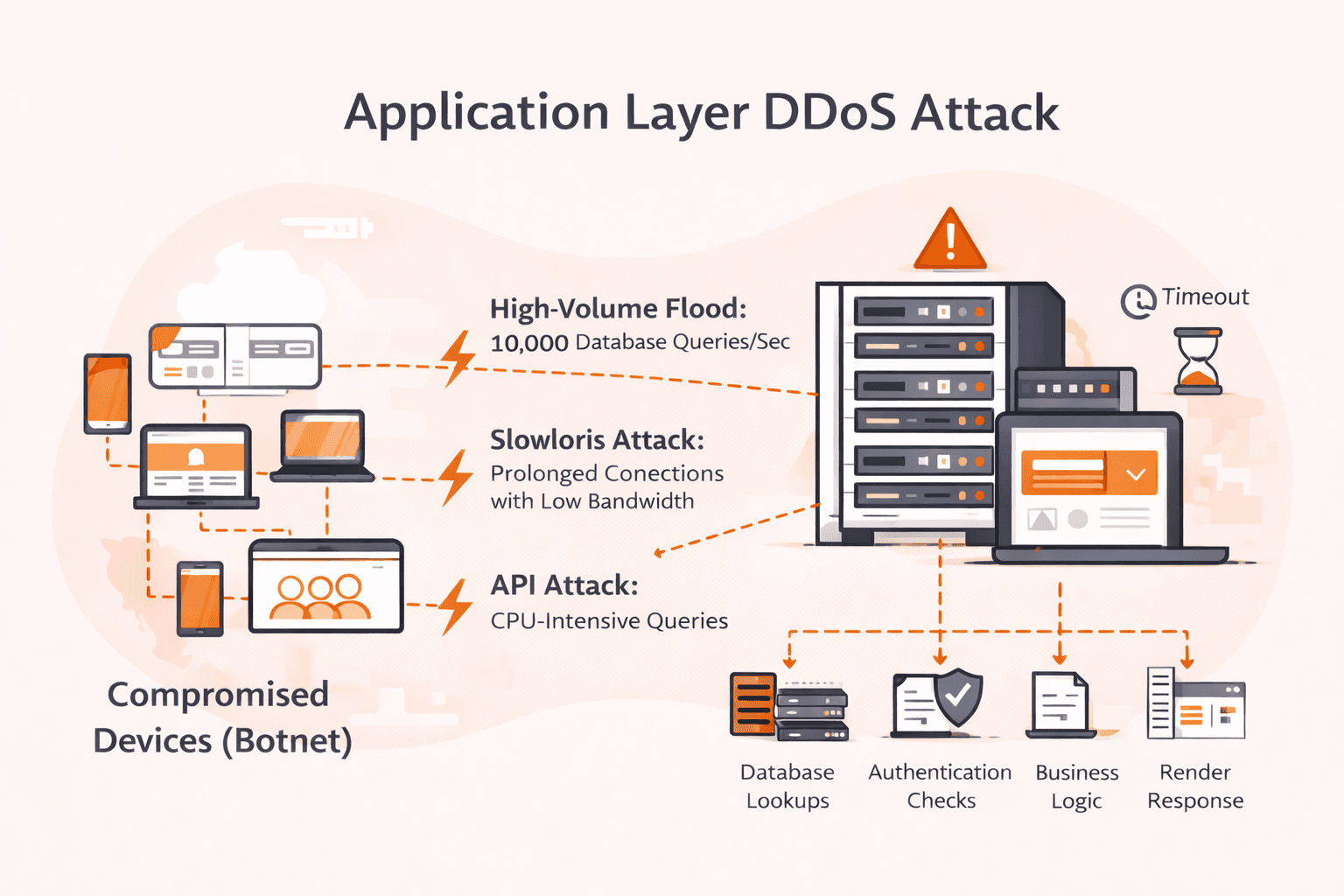
Your network dashboards show green. Bandwidth utilization is at 5%. Yet your application is dying, response times spike to 30 seconds, users get timeout errors, and your on-call engineer can't figure out why. Welcome to application layer DD

Subscribe to our newsletter
Get the latest industry trends, exclusive insights, and Gcore updates delivered straight to your inbox.