

Overview
FLV remains a critical protocol for live streaming and video-on-demand delivery, particularly in regions where low-latency, high-concurrency streaming is essential. Gcore CDN supports both FLV Live (real-time streaming) and FLV VOD (video-on-demand from static files) with distinct implementation paths and service models. This guide provides precise configuration, protocol behavior, authentication patterns, and operational guidance for production deployments.Service Models
| Feature | FLV VOD | FLV Live |
|---|---|---|
| Use Case | Pre-recorded video files | Real-time live streaming |
| Activation | Self-service | Requires support approval + sales agreement |
| Configuration | Generic CDN setup | Specialized streaming configuration |
| Cache Model | Standard static file caching | Sliding window buffer (RAM-based) |
| Protocols | HTTP/1.1, HTTP/2, HTTP/3 (QUIC) | HTTP/1.1, HTTP/2, HTTP/3 (QUIC) |
FLV Live
Opportunity
HTTP-FLV Live enables ultra-low-latency streaming with high concurrency tolerance, making it ideal for:- Live broadcasting with 1-3 second latency
- High-concurrency events (100K+ simultaneous viewers per stream)
Service Activation
IMPORTANT: FLV Live is not available for self-service activation. It requires: Sales Agreement.Contact your account manager or sales@gcore.com. Please provide the following information:
- Domain and company name
- Content type (e.g., sports, news, entertainment)
- Expected concurrent viewers per stream
- Geographic distribution of viewers
- Sample stream URL for testing
- Broadcasting license or content compliance policy
Productization: HTTP-FLV Live Profile
FLV Live is delivered as a dedicated service profile with specialized CDN behavior. FLV delivery is achieved through a protocol HTTP-FLV. HTTP-FLV protocol ensures continuous delivery of frames within a single infinitely long response from the server. Inside the stream, frames are scaled across the network instantly when they are received from the origin. HTTP-FLV is a pull-based streaming method in which the player requests an FLV file over HTTP.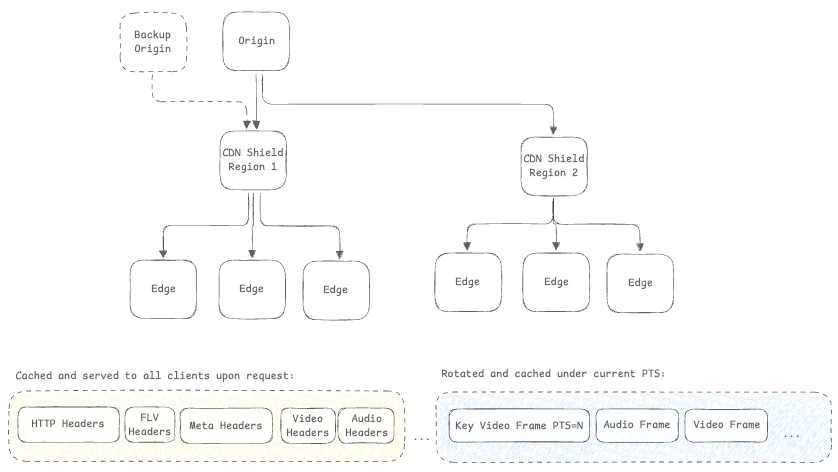
Configuration for FLV Live
Origin Requirements
Your origin must provide a valid FLV stream with the following characteristics: Stream Requirements:- Container: FLV (Flash Video).
- FLV Headers: Origin must prepare and return all necessary FLV headers, metadata, and data with PTS-aligned frames.
- Timestamps: Monotonic PTS/DTS.
- Codecs: Our CDN is codec-agnostic, providing transparent delivery of your media frames. You have the flexibility to utilize any standard or proprietary codec, including H.264 (AVC), H.265 (HEVC), and AAC.
- All statuses returned to end-user as is.
- 200 code is cached.
- 4xx codes are not cached.
- 5xx codes are not cached.
Formats and Query String Parameters
Base URL Format
Query String Parameters
FLV Live supports the following query parameters for playback control:| Parameter | Type | Description | Example |
|---|---|---|---|
only_audio | boolean | Play only audio track | ?only_audio=1 |
only_video | boolean | Play only video track | ?only_video=1 |
Authentication
FLV Live supports token-based authentication to prevent unauthorized access and hotlinking.-
Secure Token:
- Navigate to CDN Resource → Security → Secure Token
- More information in About Secure Token
- Referer-based Access Control
- User-Agent Filtering
- Geo Filtering
Origin Failover Configuration
FLV Live supports automatic failover to backup origins: Failover trigger examples:- Origin connection timeout
- Origin returns
5xxerror - Network unreachable to primary origin
Observability and Monitoring
Per-Stream KPIs
Metrics to Monitor:- Traffic: Traffic
- Requests: Requests
- Error rate: 4xx/5xx errors as % of total requests
- Gcore Customer Portal → CDN → Statistics
- Grafana dashboards (if enabled)
- Raw logs export (for custom analysis)
Player Compatibility
Player mpegts.js (flv.js)
Browser Support: Chrome, Firefox, Safari, Edge (via MSE) Implementation:SRS Player
Use Case: Embedded player with built-in controlsiOS/Android Native Implementation
iOS (AVPlayer):| Player | Chrome | Firefox | Safari | Edge | Mobile Safari | Android Chrome |
|---|---|---|---|---|---|---|
| mpegts.js | ✅ | ✅ | ✅ | ✅ | ✅ (iOS 17+) | ✅ |
| SRS Player | ✅ | ✅ | ✅ | ✅ | ✅ (iOS 17+) | ✅ |
| Native | ✅ | ✅ | ✅ | ✅ | ✅ | ✅ |
Scale and Performance Guidance
Bandwidth Calculation:- Origin Shielding: Reduces origin load by 80-95%
- Multi-Region Origins: Deploy origins in 2-3 regions for geographic redundancy
- Capacity Reservation: Pre-provision edge capacity 48 hours before event!
FLV Live response example
FLV VOD
Opportunity
FLV VOD enables delivery of pre-recorded video files with standard CDN caching benefits:- Cost-effective: Leverages CDN edge caching (reduces origin bandwidth by 80-95%)
- Self-service: No special activation required
- Global reach: 210+ edge locations worldwide
- Protocol flexibility: HTTP/1.1, HTTP/2, HTTP/3 (QUIC) support
- Security: Full suite of CDN security features (DDoS protection, WAF, secure token)
- Video-on-demand platforms
- Educational content delivery
- Archive/replay systems
- User-generated content hosting
Configuration for FLV VOD
1. Create CDN Resource
Standard CDN resource creation process: https://gcore.com/docs/cdn/about-cdn-resources-interface-how-it-is-arranged- Navigate to CDN Resources
- Click Create CDN Resource
- Configure origin:
- Origin Type: Your server or Storage
- Origin Address:
vod.example.comor S3/Storage bucket - Origin Protocol: HTTP or HTTPS
2. Enable Range Requests & Large File Optimization
FLV VOD delivery is optimized using HTTP range requests and Large File Delivery Optimization for files over 10 MB. This feature retrieves content in chunks, improves seeking performance, and reduces origin load.- Navigate to CDN Resource → Content → Large files delivery optimization.
- Toggle Enable Large files delivery optimization.
- Full instructions: Optimize large file delivery
3. Security for FLV VOD
Security settings for FLV VOD (Secure Token, Geo-restriction, RBAC, etc.) are identical to FLV Live. Refer to the Authentication section for implementation steps and token generation examples.4. Prefetch VOD
Use the Prefetch feature to load popular video files to the CDN cache before users request them. This ensures the first viewer gets a “HIT” status and experiences no origin-related latency.- Navigate to your CDN resource and select Prefetch.
- Enter the paths to the files you wish to cache.
- Click Prefetch.
URL Format and Access
Base URL:Usage Examples
Basic Video Delivery
HTML5 Video Player: Note: Most modern browsers do not support FLV natively. Use mpegts.js (flv.js):Range Request Example
Demo and Testing
FLV Player Demo
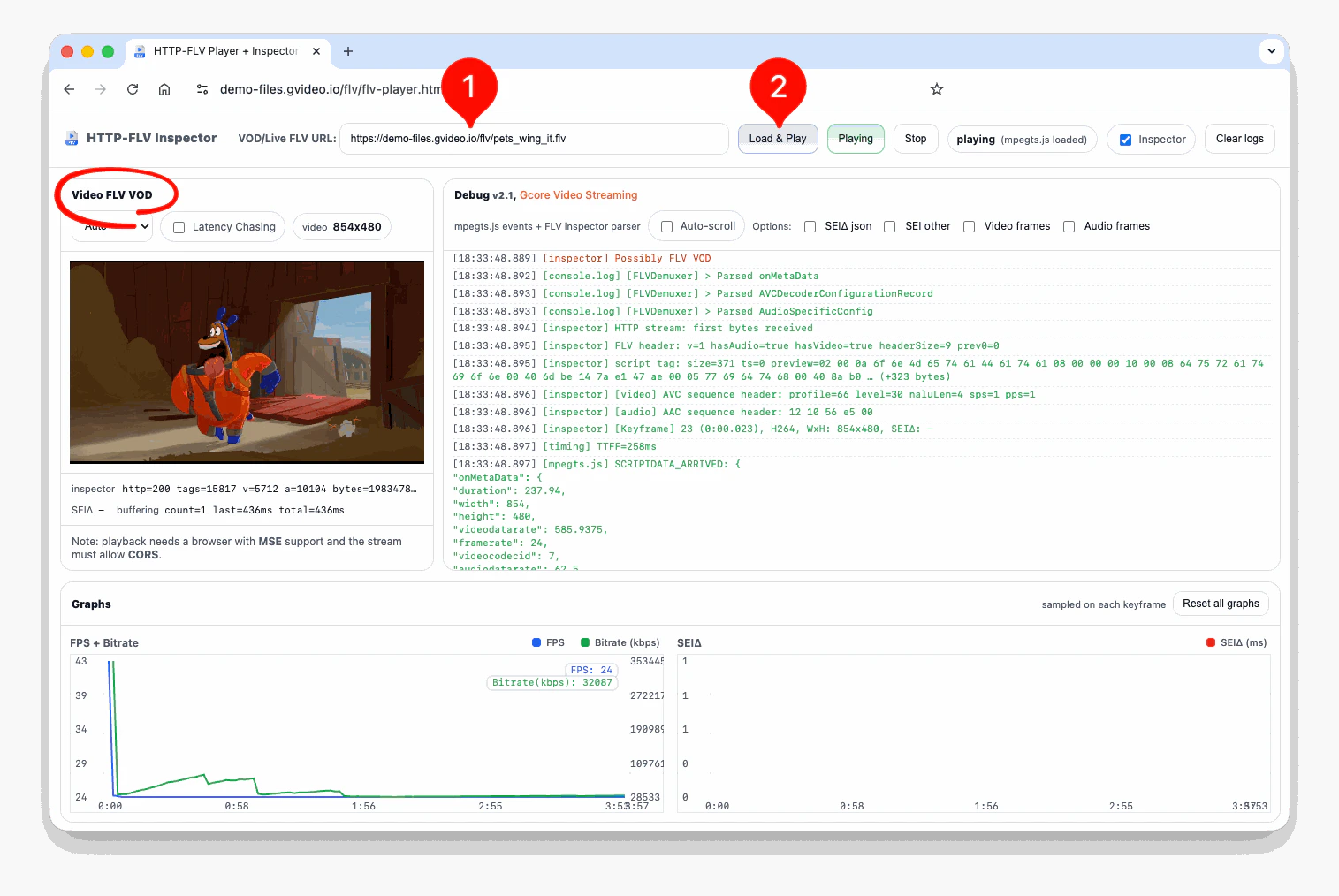
Test your FLV LIVE streams and VOD files using the Gcore FLV demo video player: Demo URL: https://demo-files.gvideo.io/flv/flv-player.html Features:- FLV Live: Real-time stream testing
- FLV VOD: Video file playback
- Latency Measurement: Shows end-to-end latency
- Diagnostics: Connection status, bitrate, dropped frames
- Enter your FLV URL:
- Live:
https://play.yourdomain.com/flv/channel1.flv - VOD:
https://cdn.yourdomain.com/videos/sample.flv - or use our demo FLV VOD
- Live:
- Click Load & Play to start playback
- Monitor diagnostics panel for performance metrics
Configuration Checklist
Pre-Production Validation (FLV Live)
- FLV Live service activated by Gcore support
- Origin encoder configured (H.264/AAC, 1-2s keyframes)
- CDN resource created with custom domain
- FLV Live preset enabled (RAM buffering)
- Secure token configured (optional)
- Backup origin configured for failover
- Test stream playback in demo player
- Monitoring alerts configured (error rate, latency)
- Capacity planning completed for expected concurrency
Pre-Production Validation (FLV VOD)
- CDN resource created with origin configured
- Range requests enabled and tested
- Secure token configured (optional)
- Test file playback in demo player
- Cache hit rate >80% after warmup
- Geo-restriction or IP access control configured (optional)
Additional Resources
- CDN Resource Configuration: General CDN setup guide
- Secure Token Configuration: Detailed authentication setup
- Origin Shielding: Reduce origin load for high-traffic streams
- HLS and LL-HLS: HLS live streaming setup
- CDN Statistics: Monitor performance and usage