

Main principles
Secure Reliable Transport (SRT) is an open-source streaming protocol that solves some of the limitations of RTMP delivery. In contrast to RTMP/RTMPS, SRT is a UDP-based protocol that provides low-latency streaming over unpredictable networks. SRT is also required if you want to use the H265/HVEC codec. Used as:- Used for sending/receiving an origin stream from your encoder, not for playback
- Default port: SRT 5001 (UDP)
- Must be configured on your encoder:
- Video codec and bitrate: look at Input Parameters and Codecs
- SRT URL latency:
&latency=2500 - Keyframe interval:
1sec - CPU usage preset:
veryfast - Profile:
baseline - Tune:
zerolatency - x264/x265 options:
rc-lookahead=0:bframes=0:scenecut=0
SRT does offer more capabilities than the other de-facto standard protocol RTMP. However, SRT also requires a precise understanding of how to configure it to suit your needs.If you encounter problems with its use, use an alternative RTMP. For more details, see the comparison of RTMP vs SRT.
When the SRT encoder connects, live transcoding reads the source FPS once from the incoming stream metadata at the beginning of the session. That FPS value is not re-read later and is not changed dynamically during transcoding. Gcore does not upscale a 10-12 fps source to 50 or 60 fps. If the source FPS was already degraded when the SRT session started, the customer must reconnect the stream from the encoder side after fixing the source settings.
SRT PUSH
Use SRT PUSH when the encoder itself can establish an outbound connection to our Streaming Platform. This is the best choice in situations like:- Use software encoders like OBS, ffmpeg, etc,
- use hardware encoders like Elemental, Haivision, etc,
- and when you control the encoder, want the simplest workflow, and don’t want to maintain your own always-on origin server.
srt://vp-push-ed1-srt.gvideo.co:5001?latency=2000&streamid=12345#aaabbbcccddd and contains:
- protocol
srt:// - name of a specific server located in a specific geographic location –
vp-push-ed1-srtis located in Europe - port
:5001 - latency window 2sec
- exact stream key
&streamid=12345#aaabbbcccddd
If the stream is experiencing transcoding or playback problems, then perhaps changing the ingest server to another location will solve the problem. Read more in the Geo Distributed Ingest Points section, and contact our support to change the ingest server location.
Obtain the server URLs
There are two ways to obtain the SRT server URLs: via the Gcore Customer Portal or via the API.Via UI
- In the Gcore Customer Portal, navigate to Streaming > Live Streaming.
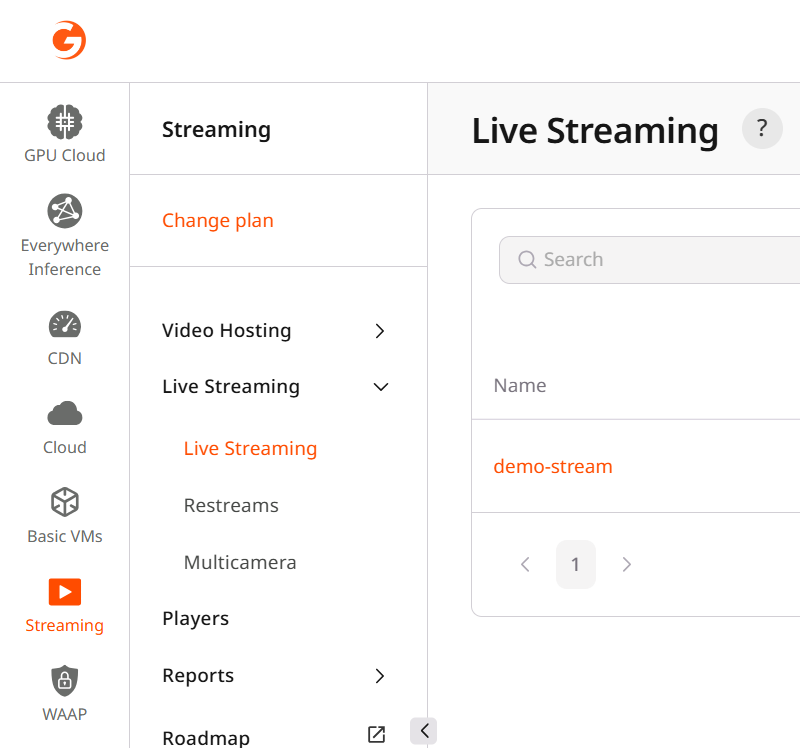
- Click on the stream you want to push to. This will open the Live Stream Settings.

- Ensure that the Ingest type is set to Push.
- Ensure that the protocol is set to SRT in the URLs for encoder section.
- Copy the server URL from the Push URL SRT field.
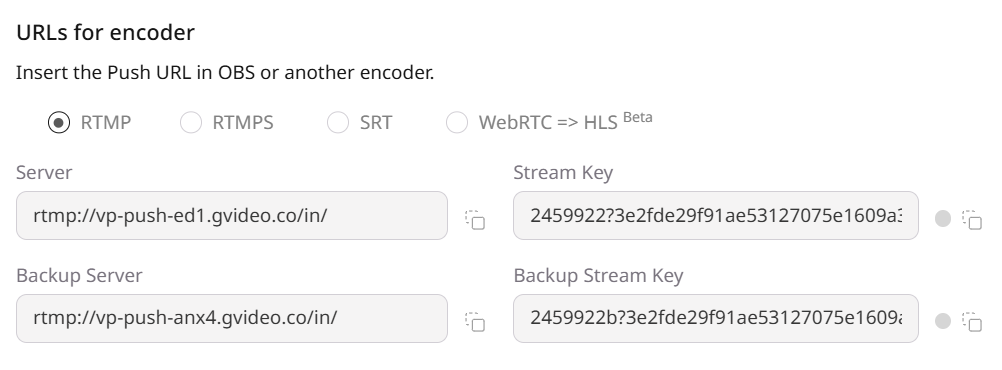
Via API
You can also obtain the URL and stream key via the Gcore API. The endpoint returns the complete URLs for the default and backup ingest points, as well as the stream key. Example of the API request:Protect SRT ingest with a passphrase
For SRT PUSH streams, you can require a passphrase on the ingest connection. Whensrt_passphrase is set for a live stream, your encoder must send the same passphrase while connecting to the SRT ingest URL. The incoming MPEG-TS stream is then AES-encrypted by SRT between the sender and the Gcore ingester.
This protects the ingest path from your encoder to Gcore. It does not encrypt playback URLs and does not replace viewer-side access protection.
Passphrase requirements:
- 10 to 80 characters
- ASCII letters, digits, and punctuation only
- No spaces or non-ASCII characters
srt_passphrase to null.
Then send the same passphrase from your encoder. In FFmpeg, pass it as a separate output option:
SRT PULL
Gcore Video Streaming can PULL video data from your origin. Main rules of pulling:- The URL of the stream to pull from must be publicly available and return data for all requests.
- If you need to set an allowlist for access to the stream, please contact support to get an up-to-date list of networks.
Setting up PULL stream
There are two ways to set up a pull stream: via the Gcore Customer Portal or via the API.Via UI
- In the Gcore Customer Portal, navigate to Streaming > Live Streaming.
- Click on the stream you want to pull from. This will open the Live Stream Settings.
- Ensure that the Ingest type is set to Pull.
- In the URL field, insert a link to the stream from your media server.
- Click the Save changes button on the top right.
Via API
You can also set up a pull stream via the Gcore API. The endpoint accepts the URL of the stream to pull from. Example of API request:Primary, backup, and global ingest points
In most cases, one primary ingest point with the default ingest region is enough for streaming. For those cases where more attention is needed, Streaming Platform also offers a special feature to use backup ingest point and specify another explicit ingest region. For example, if you are streaming from Asia and latency seems too big or unstable to you. For more information, see Ingest & BackupIngest limits
Only one ingest protocol type can be used for a live stream at a time.
Pushing SRT and another protocol (e.g., RTMP) to the same stream at once will cause transcoding to fail.
SRT latency
SRT latency parameter
The SRTlatency parameter defines how long the protocol buffers data to recover from packet loss and network jitter.
A shorter latency reduces end-to-end delay but exposes more network issues, while a longer latency increases stability by masking errors.
- Fast delivery => latency 100 ms, with minimal delay optimized for low-latency workflows, but it can’t handle network problems and may experience visual artifacts or buffering.
- Stable delivery for TV broadcasting => latency 2500 ms, with larger buffer to hide network issues and ensure smooth playback.
Encoder frame buffer and zerolatency
Along with latency, it is necessary to optimize the speed of sending frames from your encoder. In short, you need to make frame sending as fast and predictable as possible: disable the lookahead queue, disable dynamic framing, and disable B-frames. Now let’s explain what exactly and why. By default, both H.264 and H.265 encoders optimize compression efficiency using techniques such as B-frames, lookahead (rc-lookahead), scenecut analysis, and related predictive tools. You may already be familiar with this well-known diagram illustrating how modern video codecs structure a sequence of frames using different types of prediction to achieve compression efficiency: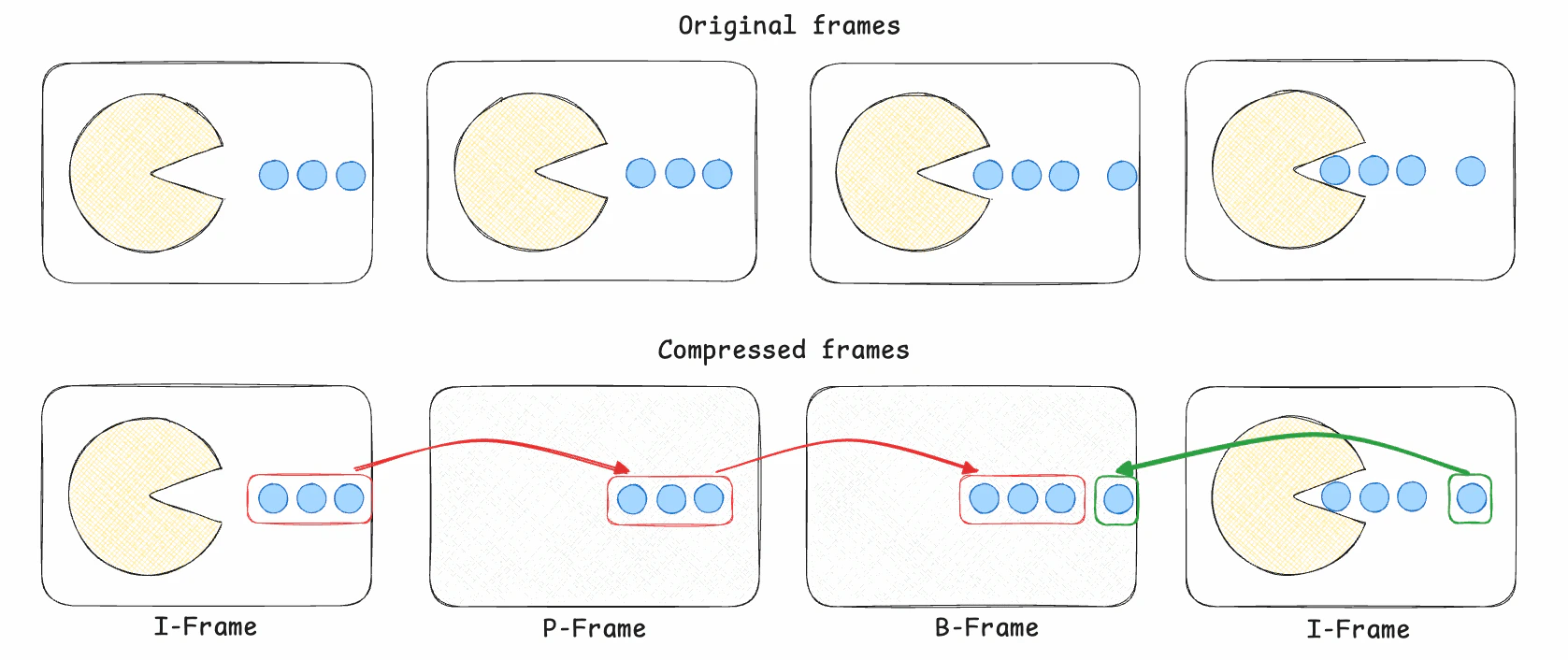
- I-frames contain a full image and act as decoding references,
- while P-frames encode only changes from a previous frame
- and B-frames use both past and future frames for prediction.
-tune zerolatency (or equivalent encoder parameters) for live scenarios.
Example scenario:
Without zerolatency tuning, typical H.264/H.265 defaults include:
rc-lookahead: Caches a future window of ~40 frames before deciding frame type and quantanization parameters. At 30 fps, this alone introduces roughly 1.3 seconds of encoder-side latency.scenecut: Enables lookahead-based scene detection, further increasing buffering and reordering.bframes: Uses B-frames, which inherently require reordering and delay in emission.
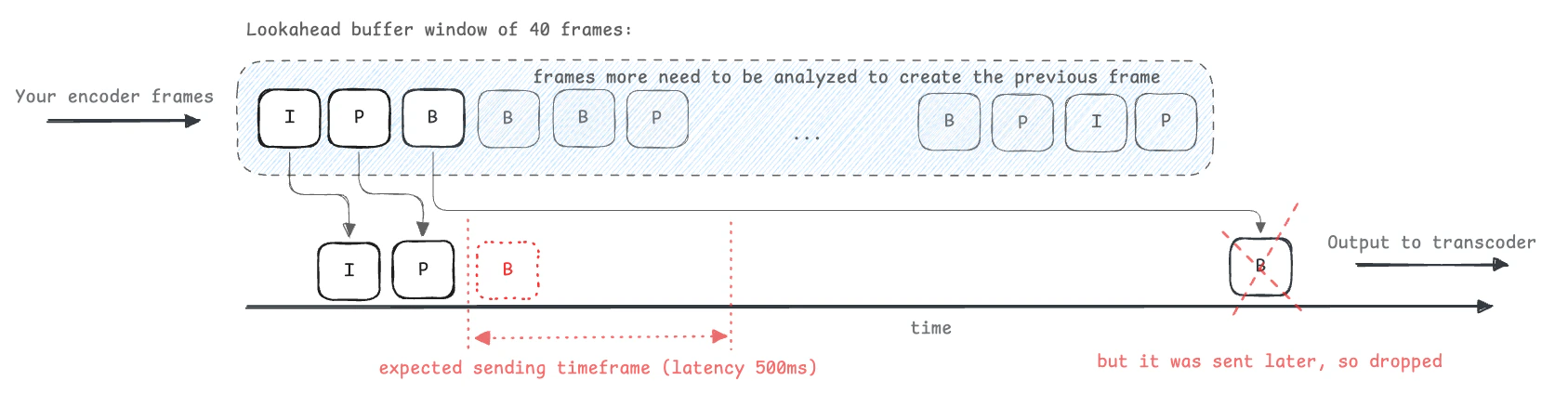
In other words: if your encoder introduces 1.5 seconds of delay but your SRT latency is 0.5 seconds, you are generating a stream that cannot possibly be delivered reliably. SRT will discard the majority of packets as late.Thus, your encoder is creating a deliberately unworkable stream.
-tune zerolatency (and explicitly disable lookahead, B-frames, and reordering parameters) when sending video over SRT. This ensures the encoder outputs frames immediately and keeps all timestamps within increased SRT’s latency window, enabling stable, predictable ingest.
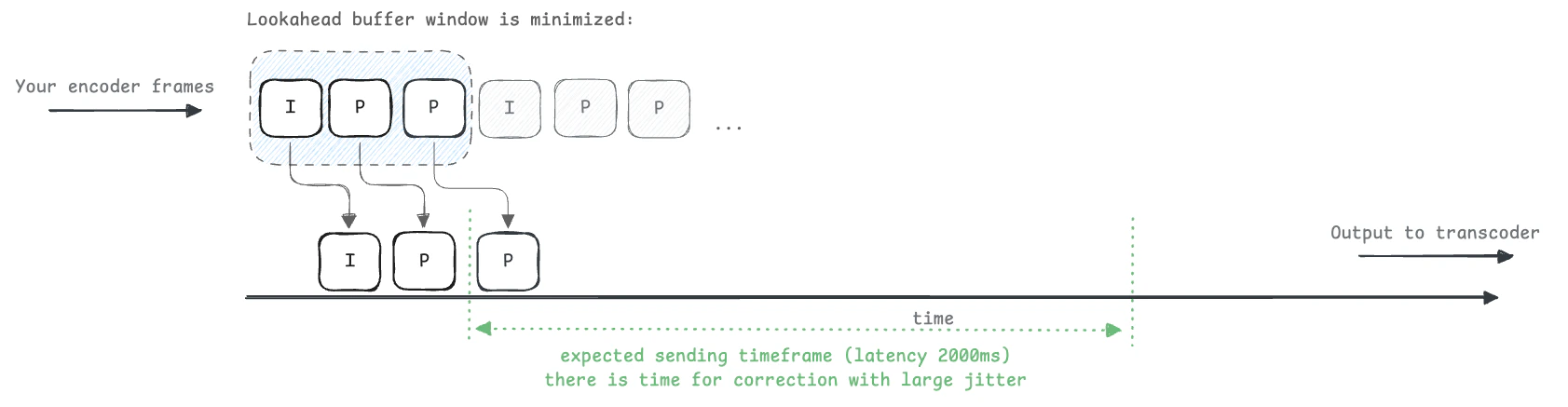
Public Internet latency
SRT is a latency transport protocol by design, but real-world networks are not always stable and the path from a venue to our ingest point may traverse long and unpredictable routes.Incorrect or low default value is one of the most common reasons for packet loss, frames loss, bad picture and bufferings in video players.
Best practices for configuring SRT latency
Recommended latency ranges for SRT ingest based on network conditions and “zerolatency” tuning of your encoder.| Network Conditions | Typical RTT (ms) | Jitter/Loss | Recommended Latency (ms) |
|---|---|---|---|
| Same datacenter | <20 | Very low | 150–400 |
| Same country, stable uplink | 20–100 | Low (<0.5% loss) | 600–1000 |
| Cross-region, higher variability | 100–300 | Moderate (<1%) | 1000–2000 |
| Other unstable (mobile) internet | >300 | High (>1% bursts) | 2000-2500 |
latency in SRT encoder close to or more than 3000ms. See about limits above. Your SRT encoder will collect and fill the buffer for 3 seconds before sending the data, but this will already be considered an inactive connection.
Practical setup notes for reliable streaming:
- Use
-tune zerolatencyoption in your encoder. - Use 2000-2500ms latency in SRT configuration.
- Check SRT statistics for retransmissions, buffer usage, and packet drops. If drops occur, increase latency more according to the table above.
- Read your encoder docs carefully to see what the
latencyattribute is and what units it uses: s, ms, µs. In most cases, it will be ms (milliseconds), but ffmpeg requiress a value in µs (microseconds) – ffmpeg.
- RTT and jitter: round-trip time, variability. Drives latency sizing.
- Loss and retransmissions:
pkt*Loss,pkt*Retrans,pkt*Drop. Rising values → increase latency or reduce bitrate. - Throughput/bandwidth: current/peak send rate.
- Buffer occupancy: send/receive buffer fill vs negotiated latency; approaching 0 under loss means too low latency.
- Flight/window size, MSS/packet size: detects fragmentation or congestion. Also check official SRT statistics documentation – github
SRT troubleshooting
There are 2 main cases:- Picture is falling apart. If the picture breaks into squares or just gray.
- Stream is frozen or buffered. If frames are dropped or player shows buffering.
How to send SRT
FFmpeg SRT
This FFmpeg command generates a live 1080p/30fps test video and sine-wave audio, encodes and packs into MPEG-TS stream. Stream is sent via SRT in caller mode with a 2-second latency window.-tune zerolatency– to disable lookahead and frames reordering-g 30 -keyint_min 30– to keeps GOP strictly predictable-pix_fmt yuv420p– to force common pixel format 8-bit YUV 4:2:0- ?mode=caller – PUSH mode from FFmpeg to ingest
- &latency=2500000 – 2.5 sec SRT buffering (µs, microseconds in ffmpeg)
- &streamid=id#key – stream id is taken from UI or API, contains id and key divided by ”#”
GStreamer SRT
This GStreamer pipeline generates a live 1080p/30fps test video with sine-wave audio, encodes and packs into MPEG-TS stream. Stream is sent via SRT in caller mode with a 2-second latency window.OBS SRT
- In Settings/Stream, choose Custom and enter the full SRT URL in Server:
- Use x264 with low-latency settings to prevent encoder buffering that can exceed SRT’s latency window.
- Recommended H.264 parameters must be set via Advanced Encoder Options in OBS:
- Keyframe interval: 1s
- CPU Usage Preset: preset veryfast
- Profile: baseline
- Tune: zerolatency
- x264 Options: rc-lookahead=0
vMix SRT
- Open Settings Outputs/NDI/SRT/SRT and create an Output with:
- Destination: srt://HOST:PORT
- Mode: Caller
- Latency: 2000 ms (or appropriate value)
- Stream ID: set if your ingest server requires it (123#abc719 format).
- Enable Low Latency / No B-frames in vMix by applying equivalent x264 settings:
- Encoder Preset: veryfast
- Tune: zero latency
- Custom x264 Params: rc-lookahead=0