



New features of the CDN control panel
- October 29, 2019
- 2 min read

We always consider the functional needs of our customers and regularly add new content delivery functions.
We want to tell you about the newest features in the CDN control panel that were added recently.
Origin request headers on the CDN side
This option enables customization of origin request headers on the CDN side. It can be enabled in the Options menu and in the Rules menu in the Security section. Click the Options button corresponding to one of the active origins, find HTTP headers in the menu, and click Add option.

HTTP headers are most frequently used for customizing policy access to the origin. You can add a secret header (which will be used only by Gcore servers when they make a request to the origin) and restrict requests with other headers.
What are the advantages of the new function?
Now you don’t have to ask technical support every time you need to define rules for every resource. You can quickly set them in the control panel. If you need to change headers frequently to protect your content, you can make this process automated by using API.
Redirect HTTP to HTTPS
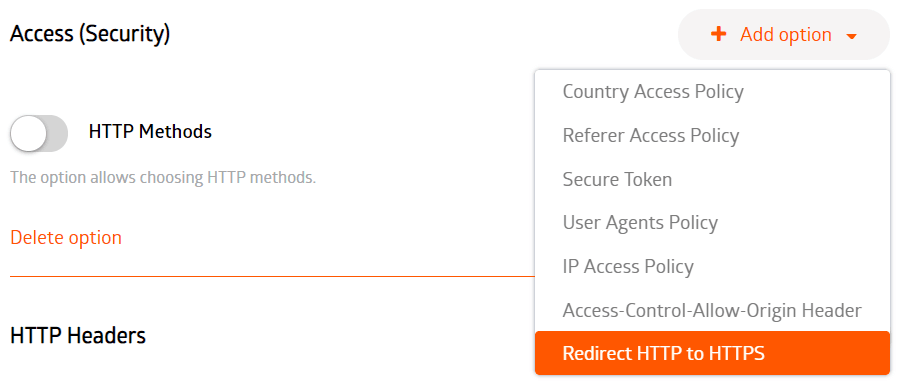
We added the Redirect HTTP to HTTPS option to the CDN resource settings and to the Access (Security) section.
Now you don’t have to ask technical support to set redirect from HTTP to HTTPS without setting redirect on the origin. You can also configure this option yourself using the control panel every time you need it.
To activate this option, go to the CDN resource settings, find the Access (Security) section, click Add option > Redirect HTTP to HTTPS.
What are the advantages of the new function?
Previously, if you used CNAME in the gcdn.co zone or couldn’t set redirect on the origin, you would have to ask technical support. Now you can set redirect from HTTP to HTTPS in the control panel or by using API.
Ignore query string when caching
This option defines how to cache the same file with different query strings: as the same file or as two different files. Previously, there was a possibility to ignore all query strings or not. Now you can specify which query strings are to be ignored and which strings must be cached.
This option is activated in the Settings menu of the active CDN resource or in the menu: Rules > Cache settings.
In order to adjust ignoring of any query string when caching, open the CDN resource settings, then go to the Cache section, click Add option > Ignore Query String, and specify which query strings are to be ignored.

What are the advantages of the new function?
Now you have more flexibility in adjusting the cache for different files. This feature can be useful for improving network efficiency.
Choose the most suitable plan, register a personal account, and deliver any heavy content around the world with minimal delay.

Related articles




For many startups, infrastructure decisions are mostly about performance, pricing, and developer experience. For Melious AI, they are also about trust.Melious AI is a German startup building a European AI platform around privacy, transparen


At Gcore, delivering exceptional streaming experiences to users across our global network is at the heart of what we do. We're excited to share how we're taking our CDN performance monitoring to new heights through our partnership with AVEQ
Subscribe to our newsletter
Get the latest industry trends, exclusive insights, and Gcore updates delivered straight to your inbox.