

Overview
HLS (HTTP Live Streaming) is an HTTP-based adaptive streaming protocol that can be delivered through standard CDN infrastructure. If your live streams or videos are in HLS format, Gcore CDN can proxy them to end users worldwide, significantly improving loading times and scalability. HLS works seamlessly with CDN because it’s based on HTTP—the same protocol used for regular static files. This means HLS content can be cached and distributed via CDN edge servers just like images or CSS files.When to use HLS via CDN
Use Video CDN for HLS if:- You already have HLS streams (
.m3u8playlists and.tssegments) - You handle transcoding on your side
- You need global delivery at scale
- You want CDN features like geo-blocking, secure tokens, or origin shielding
- You have raw video input (RTMP, SRT, MP4) that needs transcoding → Use Video Streaming instead
- You need automatic ABR (Adaptive Bitrate) ladder generation → Use Video Streaming instead
Requirements
To use HLS streaming via CDN, you must meet these conditions:- HLS format: Your content must be in HLS format (
.m3u8playlists and.tsor.m4ssegments) - Paid CDN plan: Any paid subscription
- Legal approval: Streaming activation from Gcore support (see below)
Need transcoding? If your stream is in another format (RTMP, SRT, MP4) or you need automatic quality ladder generation, use the Video Streaming platform instead of Video CDN.
Quick setup
For detailed step-by-step instructions on setting up HLS streaming via CDN, follow our comprehensive guide: Create a CDN Resource for Video Streaming This guide covers:- Requesting streaming activation from support
- Creating and configuring your CDN resource
- Setting up cache rules for optimal HLS delivery
- Enabling the LIVE STREAMING preset
- Testing your stream
Low-Latency HLS (LL-HLS) Support
Gcore CDN fully supports LL-HLS (Low-Latency HLS) delivery for ultra-low latency streaming (2-4 seconds glass-to-glass latency).What is LL-HLS?
LL-HLS is an extension to the HLS protocol that enables sub-second latency by:- Using smaller segment chunks (partial segments)
- Implementing HTTP/2 push and blocking playlist requests
- Delivering segments as they’re being produced
Supported file formats
| File Type | Extension | Description |
|---|---|---|
| Playlists | .m3u8 | Master and media playlists with LL-HLS directives |
| Video segments | .m4s, .m4v | Fragmented MP4 (fMP4) CMAF segments |
| Audio segments | .m4a, .m4s | Audio-only CMAF segments |
| Initialization | .mp4 | Initialization segments for fMP4 streams |
Configuration requirements
To enable LL-HLS on your CDN resource:- Enable query parameter whitelisting in your CDN resource cache settings
-
Add these required LL-HLS query parameters:
_HLS_msn- Media Sequence Number for blocking playlist requests_HLS_part- Partial segment number_HLS_skip- Skip older segments in playlist response
-
Set appropriate cache times:
- Playlists (.m3u8): 1-2 seconds
- Segments (.m4s, .m4v): 60 seconds or match your target latency
Technical deep dive
For video engineers and CTOs interested in how Gcore achieves 3-second latency: Engineering blog post: Optimizing HLS and DASH for 3-second latency This article covers HTTP Chunked Transfer Encoding, HTTP/2 framing optimizations, and the technical implementation behind our low-latency streaming.Advanced cache configuration
Understanding HLS cache behavior
HLS streaming works through two types of files that need different cache strategies: Playlists (.m3u8):
- Contain metadata and the ordered list of video segments
- Browsers request playlists first
- Should be cached for 1-2 seconds to ensure viewers get the latest segment list
- If cached too long, viewers receive outdated playlists pointing to non-existent segments
.ts or .m4s):
- Contain actual video/audio data in small chunks
- Browsers request segments in the order listed in the playlist
- Should be cached for 60 seconds (longer than segment duration)
- Longer cache protects slow-connection users from 404 errors when segments rotate
Cache configuration methods
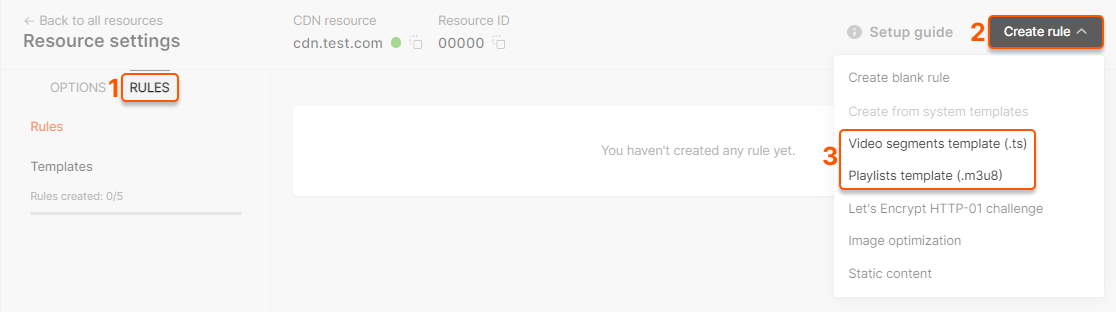
You can set cache TTLs in two ways:- On your origin server: Use
Cache-ControlHTTP headers - In Gcore Customer Portal: Create cache rules (see Getting Started Guide)
Additional recommendations
Origin shielding
If you expect more than 1K concurrent viewers, enable Origin Shielding to:- Reduce origin requests by 80-95%
- Protect your origin from traffic spikes
- Improve cache hit ratios
Custom domains
Use custom domains for branded streaming URLs:- Before:
http://123456.gcdn.co/playlist.m3u8 - After:
http://video.yourdomain.com/playlist.m3u8
Testing your stream
Test HLS playback using:- VLC Media Player: Download VLC
- Online players: HLS.js demo, JW Player demo
- Mobile: Safari (iOS), Chrome (Android)
Next steps
Getting Started Guide
Complete setup instructions for HLS streaming
Low-Latency MPEG-DASH
Alternative: LL-DASH for low-latency streaming
Video CDN Overview
All Video CDN features and capabilities
Engineering Blog
Technical deep dive: 3-second latency optimization