

Endpoint URL
The endpoint URL is available on the Overview tab of the deployment detail page under Everywhere Inference > Deployments.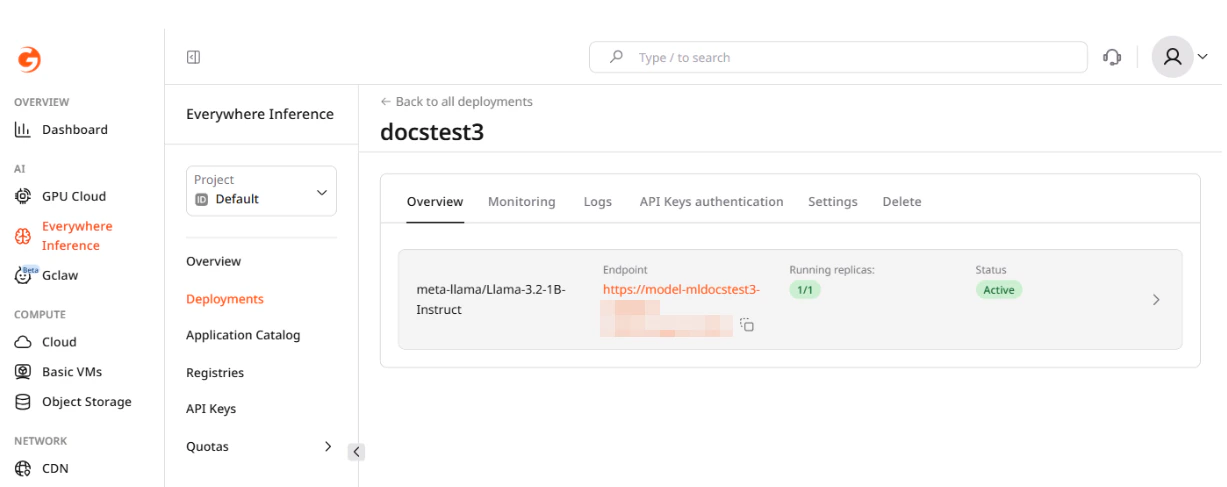
Chat completions
The endpoint implements the OpenAI Chat Completions API at/v1/chat/completions. The model field must match the identifier returned by /v1/models — use the exact string, including the organization prefix (e.g., meta-llama/Llama-3.2-1B-Instruct).
By default, API key authentication is disabled and the api_key / apiKey field is not validated — pass any non-empty string. When authentication is enabled on the deployment, include the key in the X-API-Key header on every request. See Inference deployment with API key authentication for details.
Multi-turn conversation
Each request is stateless — the model has no memory of previous calls. To maintain context, pass the full conversation history in themessages array on every request.
The system role sets the model’s overall behavior and is placed first in the array. It is optional but recommended for chat applications.
As the conversation grows, the combined token count of all messages plus the generated reply must stay within the model’s context window. If the responses degrade or the request fails with a context length error, trim the oldest user/assistant exchanges from the history while keeping the system message.
Streaming responses
Withstream: true, the server returns the response as server-sent events (SSE). Each event is formatted as data: {...} followed by a blank line; the sequence ends with data: [DONE].
The generated text arrives in choices[0].delta.content — this field is null on the first and last chunks. Streaming reduces time-to-first-token latency and suits interactive chat UIs.
Available models
The/v1/models endpoint returns the model identifiers accepted by the deployment:
id field in the response is the value to pass as model in chat completion requests.
Key parameters
| Parameter | Type | Description |
|---|---|---|
model | string | Model identifier. Use the id value from the /v1/models response. |
messages | array | Conversation history. Each item has role (system, user, or assistant) and content. |
max_tokens | integer | Maximum number of tokens to generate. |
temperature | float | Randomness of output. Range 0–2. Lower values are more deterministic. Default: 1. |
top_p | float | Nucleus sampling threshold. Range 0–1. Default: 1. |
stream | boolean | If true, responses are sent token by token as server-sent events. Default: false. |
stop | string or array | One or more sequences where generation stops. |